Smart Binders That Keep Your Notes in Sync
For most people, the Rocketbook Fusion is the best smart binder. It combines reusable pages with a powerful app that digitizes and routes your notes. Its main advantage is the flexibility of multiple page layouts. The main limitation is that you must use Pilot Frixion pens, and you need to microwave the pages to erase them.
Smart binders combine the tactile feel of paper with the convenience of digital storage. They let you write notes by hand, then scan and sync them to cloud services like Google Drive, Dropbox, or Evernote. This makes them great for students, professionals, and anyone who prefers handwriting but needs digital backups.
In this roundup, we compare the top smart binders on the market. We focus on page quality, app functionality, durability, and value. Whether you want a reusable notebook or a binder that works with regular paper, there is a smart binder for you.
What to look for
The best picks, ranked
Rocketbook Fusion
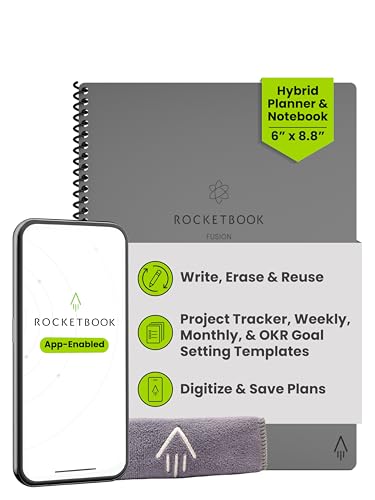
The Rocketbook Fusion is a versatile smart binder that combines dotted grid, lined, and planner pages in one notebook. It uses reusable pages that you can wipe clean with a damp cloth after scanning. The app captures your notes clearly and can send them to multiple destinations using smart tags.
Pros
- Multiple page layouts in one binder
- Excellent OCR accuracy in the app
- Smart tags for easy routing
Cons
- Requires Pilot Frixion pens only
- Pages must be microwaved to erase if not wiped

Elfinbook Smart Notebook
The Elfinbook Smart Notebook offers a low-cost entry into smart binders. It has reusable pages that can be erased with water or a hair dryer. The companion app provides decent OCR and supports multiple cloud services, though the scanning quality is not as sharp as the Rocketbook.
Pros
- Very affordable
- Comes with a microfiber cloth and pen
- Works with many cloud services
Cons
- OCR accuracy is lower
- Build quality is less durable

Moleskine Smart Writing Set
The Moleskine Smart Writing Set includes a smart pen and a paper notebook. The pen records your strokes using a camera, and the app transcribes and syncs your notes. It feels like writing on premium paper, but the pen requires a special notebook and is pricey.
Pros
- High-quality paper and pen feel
- Accurate digital capture and transcription
- Audio recording syncs with notes
Cons
- Very expensive
- Paper is not reusable
Rocketbook Core
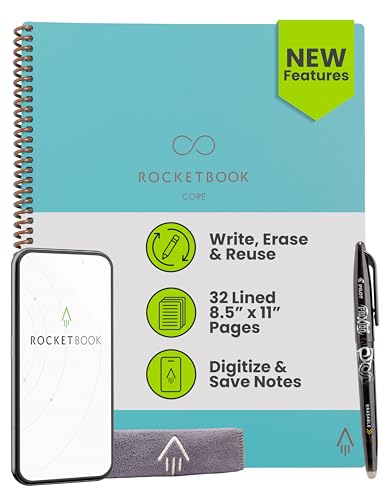
The Rocketbook Core is a simpler version of the Fusion, with only dot grid pages. It offers the same app integration and reusability. It is lighter and more straightforward for those who prefer a classic notebook feel.
Pros
- Clean, dot grid design
- Lightweight and portable
- Same great app features
Cons
- Only one page format
- Limited page count

Wacom Bamboo Slate
The Wacom Bamboo Slate is not a binder, but a smart notepad that captures your handwriting on any paper. You place paper on the slate and write with the included pen. The app converts your notes to digital text and images. It works well for those who want to use their own paper.
Pros
- Use any standard paper
- Pressure-sensitive pen for natural writing
- Syncs to multiple cloud services
Cons
- Requires battery charging
- Pen needs replacement

iSYKO Smart Notebook
The iSYKO Smart Notebook features 80 reusable pages that you can erase by heating with a hair dryer or wiping with a damp cloth. The app scans pages and supports cloud sync. It has a soft cover and is lightweight, making it easy to carry.
Pros
- Large page count for the price
- Easy to erase with water or heat
- Comes with a pen and cloth
Cons
- App is less polished
- Some users report page staining
Rocketbook Everlast
The Rocketbook Everlast is a reusable notebook with lined or grid pages. It offers the same reliable scanning and app integration as other Rocketbook products. It is a solid choice for those who want a no-frills smart notebook.
Pros
- Classic lined or grid options
- Consistent high-quality scanning
- Built-in smart tags
Cons
- Requires Frixion pens
- Pages need to be microwaved for full erase
Compared at a glance
| # | Model | Page count | Best for | Score | Price |
|---|---|---|---|---|---|
| 1 | Rocketbook Fusion | 42 pages (7 layouts) | Best Overall | 9.4 | Check price |
| 2 | Elfinbook Smart Notebook | 40 pages | Budget Choice | 8.9 | Check price |
| 3 | Moleskine Smart Writing Set | 176 pages (not reusable) | Premium Pen Integration | 8.8 | Check price |
| 4 | Rocketbook Core | 32 pages | Simple Reusable Notebook | 9.1 | Check price |
| 5 | Wacom Bamboo Slate | Unlimited with paper | Digital Capture on Regular Paper | 8.5 | Check price |
| 6 | iSYKO Smart Notebook | 80 pages | Eco-Friendly Reusable Pages | 8.2 | Check price |
| 7 | Rocketbook Everlast | 36 pages | Standard Reusable Notebook | 9.0 | Check price |
Questions worth asking
How does a smart binder work?
A smart binder uses special paper or a smart pen to capture your handwriting digitally. With reusable pages, you write on the page, scan it with the app, and then wipe it clean. With smart pens, the pen tracks strokes and sends them to the app.
Can I use any pen with a smart binder?
For reusable notebooks like Rocketbook, you must use Pilot Frixion pens, which have erasable ink. For smart pen systems like Moleskine, you must use the included pen. For slates like Wacom, you can use any pen, but the smart pen is required for digital capture.
Are smart binders worth it?
Smart binders are worth it if you frequently digitize handwritten notes. They save paper and make it easy to organize and search your notes. However, they require an upfront investment and a learning curve.
How do you erase reusable pages?
Most reusable pages can be erased with a damp cloth or by microwaving the pages for a few seconds. Some notebooks, like the Elfinbook, can also be erased with a hair dryer. Always follow the manufacturer’s instructions.
What is OCR and why is it important?
OCR stands for Optical Character Recognition. It converts images of text into editable, searchable text. In smart binders, OCR allows you to search your handwritten notes and copy text into other applications. Accuracy varies by app and handwriting quality.
Can I share my digital notes?
Yes, most smart binder apps allow you to share notes as PDF or image files. You can also send them to cloud storage or email. Some apps offer direct sharing to social media or collaboration tools.
Do smart binders require batteries?
Reusable notebook systems like Rocketbook do not require batteries; they rely on scanning with your phone. Smart pen systems do require charging. Slates like Wacom also need to be charged periodically.
Which smart binder has the best app?
Rocketbook’s app is widely considered the best due to its intuitive interface, robust OCR, and integration with many services. Other apps have improved, but Rocketbook remains a leader in performance.
Final word
For most users, the Rocketbook Fusion is the best smart binder because it offers versatile page layouts, excellent app support, and reusable pages that save money and paper. If you prefer a more traditional writing experience and are willing to spend more, the Moleskine Smart Writing Set is a premium option with unmatched pen quality. For budget-conscious users, the Elfinbook Smart Notebook provides a decent experience at a lower price, though with some compromises in app quality.