Book Scanners Compared: Overhead, Flatbed, and Handheld Wands
CZUR ET24 Pro leads for anyone digitizing bound books, since its overhead camera never presses the spine flat. Plustek OpticBook 4800 fits flatbed fans who want sharp single-page scans without full spine protection. Fujitsu ScanSnap iX1600 wins for loose or debound pages, scanning both sides at 40 pages per minute.
CZUR ET24 Pro tops this list because its overhead camera photographs an open book without pressing the spine flat. A 24 megapixel sensor and foot pedal let one person scan continuously. Curved pages still need software correction before OCR runs cleanly, a step flatbed owners skip.
Choosing between overhead, flatbed, and wand designs gets confusing fast, since each protects pages differently. Overhead rigs cost more but spare spines; flatbeds flatten pages sharply but stress tight bindings; wands sacrifice resolution for portability. Rankings below weigh published resolution, page-handling method, scanning speed, and recurring points raised in owner feedback.
Before you buy
What to Look for in a Book Scanner Three designs dominate this category: overhead rigs, flatbeds, and handheld wands. Overhead models such as CZUR’s lineup photograph an open book from above, leaving the spine untouched. Flatbeds press pages against glass for sharp single-page detail but strain tight bindings. Resolution matters less than page-handling method for a stack of books, since a steady 1200 dpi flatbed scan can still beat a shot taken from an unstable curled page. Confirm that OCR software ships in the box rather than costing extra, since that turns any scan into a searchable file.
Overhead vs Flatbed for Tightly Bound Books Pressing a hardcover flat against a flatbed’s glass can crack the spine or leave a permanent crease. Overhead scanners avoid that risk by photographing the page from above while the book rests at a natural angle. Software then digitally flattens the curved text near the gutter. Plustek narrows this gap with an edge-mounted lens that shortens how far a book must open. Even so, an overhead rig such as the CZUR ET24 Pro still asks less of the binding overall.
Best Setup for High-Volume or Archival Scanning Libraries and serious collectors digitizing hundreds of pages need speed and resolution working together. A higher-resolution overhead scanner such as the CZUR Shine Ultra captures more detail per page, useful for archival masters or old maps bound into a volume. Pairing it with a foot pedal lets one person turn pages continuously without touching a mouse. Batch OCR software then processes an entire folder overnight instead of one file at a time.
Loose Pages and Debound Books Need a Different Tool Once pages are already separate, whether from a debound book or a stack of loose documents, an automatic feeder like the Fujitsu ScanSnap iX1600 outpaces every book scanner here. It scans both sides of 50 sheets unattended at 40 pages per minute. That speed only applies after a book has been broken down, making it the wrong choice for anything meant to stay on a shelf intact.
The top picks, ranked

CZUR ET24 Pro Book & Document Scanner
An overhead camera captures the open book from above, so the spine never presses against glass. A foot pedal frees both hands for continuous page turning, and bundled software flattens curved text before OCR. Owners note it folds flat between sessions, saving desk space.
Pros
- Keeps bound spines flat and undamaged
- Foot pedal speeds up one-person scanning
- Bundled software flattens curved text for cleaner OCR
Cons
- Curve correction adds an extra processing step
- A3 arm needs significant desk clearance

CZUR Shine Ultra Book Scanner
Shine Ultra pushes resolution higher than the ET24 Pro, aimed at libraries digitizing fragile originals. Laser-assisted curve mapping reads page shape before capture, sharpening text near the gutter. Foot pedal control and batch OCR keep large projects moving without constant supervision.
Pros
- Laser mapping sharpens text near the spine
- Higher resolution suits archival-quality scans
- Handles large A3 originals and maps
Cons
- Larger footprint than the ET24 Pro
- Higher-resolution files take longer to process
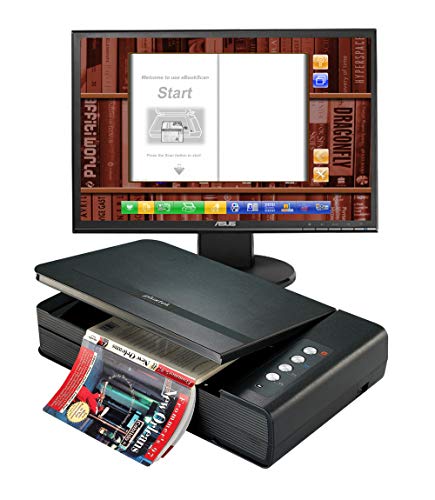
Plustek OpticBook 4800
OpticBook 4800 mounts its scanning lens at the very edge of the glass, capturing text near the inner margin with only a slight press. Bundled ABBYY FineReader converts scans into searchable PDFs. Readers who want flatbed sharpness without opening a book fully flat tend to prefer this model.
Pros
- Edge-mounted lens cuts gutter shadow versus standard flatbeds
- 1200 dpi optical resolution sharpens text and images
- ABBYY OCR included at no extra cost
Cons
- Book still needs a partial press to lie flat
- Single-page scanning trails an automatic feeder for speed

IRIScan Book 5 Wifi
This battery-powered wand drags across a page like a highlighter, saving images to microSD or sending them over wifi. No computer or outlet is required, useful at a library table or in the field. Final sharpness depends on a steady hand rather than a fixed camera mount.
Pros
- Works anywhere without a laptop or outlet
- Wifi transfer sends scans straight to a phone
- Compact enough to carry in a bag
Cons
- Scan straightness depends on hand steadiness
- Scanning a full book page by page takes a while

Fujitsu ScanSnap iX1600
iX1600 is a duplex document scanner, not a book scanner, so pages must come out of the binding first. Its automatic feeder scans both sides at 40 pages per minute, faster than any book scanner here. A touchscreen lets users choose scan-to-cloud or scan-to-folder profiles.
Pros
- Fastest throughput of any option on this list
- Automatic duplex scanning skips manual page flipping
- Touchscreen profiles simplify repeat scanning jobs
Cons
- Cannot scan a book that is still bound
- Debinding a book first cannot be undone
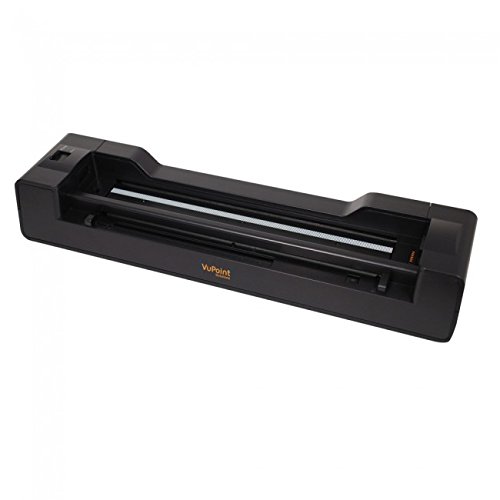
VuPoint Magic Wand PDSWF-ST47
VuPoint’s wand costs less than the IRIScan model while covering the same basic task, dragging across a page to capture it. Built-in wifi sends images to a companion phone app. Light use, like scanning receipts or a handful of pages, suits this model best.
Pros
- Lower cost than most portable scanners
- Wifi app transfer skips cables entirely
- Light enough for one-handed use
Cons
- Maximum resolution trails the IRIScan Book 5
- Not built for scanning a full book quickly

CZUR Aura Book Scanner
Aura brings CZUR’s overhead, spine-friendly design to a lower price by swapping the foot pedal for a manual capture button. It still folds flat for storage and ships with OCR software for searchable exports. Occasional bound-book digitizing is where this model earns its keep.
Pros
- Protects spines like pricier CZUR models
- Folds flat for easy storage between uses
- Lower cost entry into overhead scanning
Cons
- No foot pedal slows one-person scanning
- Fewer software features than the ET24 Pro
How they compare
| # | Model | Scan method | Best for | Score | Price |
|---|---|---|---|---|---|
| 1 | CZUR ET24 Pro Book & Document Scanner | Overhead camera, no glass press | Best overall | 9.4 | Check price |
| 2 | CZUR Shine Ultra Book Scanner | Overhead camera with laser curve mapping | Best for archiving and high-resolution scans | 9.1 | Check price |
| 3 | Plustek OpticBook 4800 | Flatbed, edge-mounted lens design | Best flatbed for minimizing spine stress | 8.9 | Check price |
| 4 | IRIScan Book 5 Wifi | Handheld wand, drag-to-scan | Best portable handheld | 8.6 | Check price |
| 5 | Fujitsu ScanSnap iX1600 | Duplex automatic document feeder | Best for loose pages and high-volume debound scanning | 8.4 | Check price |
| 6 | VuPoint Magic Wand PDSWF-ST47 | Handheld wand, drag-to-scan | Best budget portable | 8.2 | Check price |
| 7 | CZUR Aura Book Scanner | Overhead camera, no glass press | Best budget overhead scanner | 8.0 | Check price |
Common questions
Does scanning damage a book’s spine?
Flatbed scanners can stress a tight spine, since pages must press against glass to lie flat. Overhead scanners like the CZUR ET24 Pro sidestep this by photographing the book from above at its natural open angle, so the spine never gets forced flat.
What resolution is enough to digitize a book?
For readable text, 300 dpi generally suffices, and most dedicated book scanners exceed that mark. Preserving fine detail in illustrations or old maps calls for a higher-resolution model such as the CZUR Shine Ultra.
Can a book scanner create a searchable PDF?
Every scanner on this list ships with OCR software. CZUR models include their own OCR tool, Plustek bundles ABBYY FineReader, and the ScanSnap iX1600 has OCR built into its capture app.
Which is better for a bound book, flatbed or overhead?
Overhead wins for anything with a tight or old binding, since the book never has to lie fully flat. A flatbed like the Plustek OpticBook 4800 still handles paperbacks or books that already open flat easily.
How much faster is a document scanner than a book scanner?
The Fujitsu ScanSnap iX1600 scans 40 pages per minute automatically, far outpacing any overhead or flatbed model that needs a manual page turn between captures. That speed only applies to loose, unbound pages fed through its tray.
Can a smartphone replace a dedicated book scanner?
A phone camera can photograph pages in a pinch, but it lacks a foot pedal, page-flattening software, and a fixed camera angle, so results vary page to page. A dedicated overhead scanner keeps framing and lighting consistent across an entire book.
What is the difference between a book scanner and a document scanner?
A book scanner, overhead or flatbed, captures pages while a book stays bound. A document scanner such as the ScanSnap iX1600 relies on an automatic feeder and only accepts loose, single sheets.
Are handheld wand scanners good for scanning an entire book?
They can work, but slowly. Wands like the IRIScan Book 5 Wifi or VuPoint Magic Wand capture one page at a time by hand, which suits a few pages or a receipt more than a full cover-to-cover scan.
Final word
CZUR ET24 Pro is the pick for most people digitizing books still on the shelf, since its overhead design protects the spine while the foot pedal keeps a solo session moving. Anyone working mainly with loose sheets or already-debound pages should skip every book scanner here and choose the Fujitsu ScanSnap iX1600 instead, since its automatic feeder scans far faster than any page-by-page method. Budget-focused buyers who still want spine protection can start with the CZUR Aura and upgrade later.


