Top Boom Arms for Every Setup
If you need a dependable boom arm, the RODE PSA1+ is our top pick for its sturdy build and 180 degree range, though it is pricey. For budget buyers, the InnoGear Microphone Boom Arm offers solid performance at a low cost, but it lacks some premium features.
A good boom arm keeps your microphone positioned perfectly while clearing desk space. But with so many models, choosing one can be tough.
We compared seven popular boom arms, looking at specs and owner feedback. The best choice depends on your mic weight, desk setup, and budget.
The best picks, ranked

RODE PSA1+
The RODE PSA1+ is a premium boom arm with an internal spring mechanism that supports heavy microphones with ease. It offers a wide range of motion and includes a desk clamp and integrated cable management.
Pros
- Sturdy build that holds position
- Smooth articulation with 180 degree range
- Integrated cable routing keeps desk tidy
Cons
- More expensive than many alternatives
- Clamp may not fit very thick desks

Blue Compass
The Blue Compass is a sleek boom arm designed with streamers in mind. It features a unique internal routing system for cables and a spring-loaded arm that supports a range of microphones.
Pros
- Easy to adjust and holds well
- Aesthetic design with clean cable path
- Compatible with most standard mic mounts
Cons
- Some users report slight wobble at full extension
- Price is on the higher side
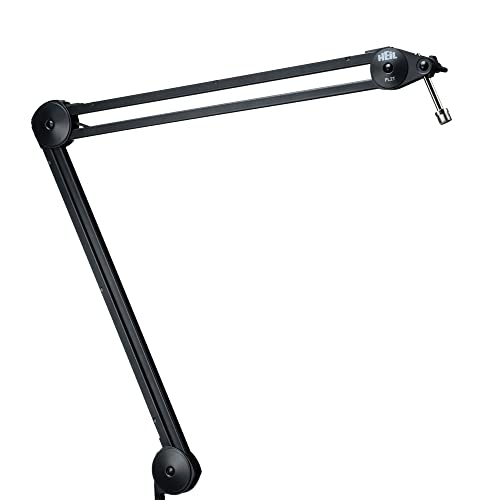
Heil Sound PL2T Overhead Broadcast Boom
The Heil PL2T is a heavy-duty broadcast boom that offers exceptional stability and a long reach. It is built to last with all metal construction and a wide clamp.
Pros
- Massive weight capacity
- Very stable even with heavy mics
- Long reach for overhead placement
Cons
- Large and heavy footprint
- Requires a sturdy desk

Samson MBA38
The Samson MBA38 is an affordable boom arm with a solid metal build and adjustable tension. It offers decent reach and comes with both a clamp and a thread adapter for mounting.
Pros
- Great price for the quality
- Includes both clamp and base mounts
- Durable metal construction
Cons
- Cable management is minimal
- Spring tension may need adjusting

InnoGear Microphone Boom Arm
The InnoGear boom arm is a low cost, lightweight option perfect for small condenser mics. It features an adjustable gooseneck and a simple desk clamp.
Pros
- Very affordable
- Easy to set up
- Compact for small spaces
Cons
- Not suitable for heavy microphones
- Limited reach

Gator Frameworks GFWBOOM-1
The Gator Frameworks boom arm is designed to be used in both vertical and horizontal positions. It includes a counterweight system for optimal mic placement and a clamp mount.
Pros
- Can be positioned overhead effectively
- Smooth adjustments
- Sturdy construction
Cons
- Counterweight adds bulk
- Cable management not integrated

Elgato Wave Mic Arm LP
The Elgato Wave Mic Arm LP is a low profile boom arm that mounts horizontally. It is ideal for keeping microphones out of the camera frame and features a clean design.
Pros
- Low profile design is great for streaming
- Easy to adjust with one hand
- Cables hidden inside
Cons
- Requires a specific mounting orientation
- Not as versatile for overhead use
What matters most
How they stack up
| # | Model | Max Load | Best for | Score | Price |
|---|---|---|---|---|---|
| 1 | RODE PSA1+ | 2.2 lbs | Best overall for heavy mics | 9.4 | Check price |
| 2 | Blue Compass | 2.2 lbs | Best for streamers and gamers | 9.0 | Check price |
| 3 | Heil Sound PL2T Overhead Broadcast Boom | 7 lbs | Best for studio use | 9.1 | Check price |
| 4 | Samson MBA38 | 1.5 lbs | Best budget option | 8.5 | Check price |
| 5 | InnoGear Microphone Boom Arm | 1.1 lbs | Best for lightweight mics | 8.0 | Check price |
| 6 | Gator Frameworks GFWBOOM-1 | 2.2 lbs | Best for over-head positioning | 8.7 | Check price |
| 7 | Elgato Wave Mic Arm LP | 2.2 lbs | Best for low profile setups | 8.8 | Check price |
Questions worth asking
What is the weight capacity I need for my microphone?
Most condenser mics weigh less than 1 pound. If you use a heavy broadcast mic, choose an arm with at least 2 pounds capacity. Always check your mic’s weight.
Can I use a boom arm with any microphone?
Most boom arms use a standard 5/8 inch thread. Some mics come with a shock mount that connects to the arm. Check compatibility before buying.
How do I route cables through a boom arm?
Look for arms with internal channels. Open the covers, run the cable through, and close them. For external cable management, use zip ties to keep wires tidy.
Will a boom arm damage my desk?
Quality clamps have padded grips to protect surfaces. However, very thick or fragile desks might be damaged. Use a protective pad if needed.
What is the difference between a scissor arm and a suspension arm?
Scissor arms use a spring and pivot, offering vertical movement. Suspension arms use a different mechanism for horizontal reach. Most boom arms are scissor type.
How much desk space does a boom arm need?
A typical arm needs about 4 to 6 inches of clamp space. The arm can be positioned to free up desk area. Consider the reach when planning.
Can I mount a boom arm to a glass desk?
It is risky because clamps can break glass. Use a weight-based mount or a wall mount instead. Always test carefully.
What is the ideal positioning for a microphone on a boom arm?
Place the mic about 6 to 10 inches from your mouth, slightly off to the side to avoid plosives. Adjust the arm so the mic is at mouth level.
How do I clean and maintain my boom arm?
Dust the arm regularly with a dry cloth. Tighten screws periodically. Lubricate moving parts with a silicone spray if they become stiff.
The bottom line
For most users, the RODE PSA1+ is the best overall boom arm because it combines durability with a wide range of motion. If you are on a budget, the Samson MBA38 offers great value without sacrificing much quality. For streamers who want a low profile look, the Elgato Wave Mic Arm LP is a solid choice.



