Which Business Scanner Matches Your Office Paper Volume
Most small offices do well with the Fujitsu ScanSnap iX1600, a 50-sheet duplex feeder rated at 40 pages per minute. The Xerox D70n suits departments scanning hundreds of pages daily, thanks to its 100-sheet ADF and 70ppm rating. Field staff who scan occasionally get more use from the cordless, Wi-Fi-only Doxie Q.
Small and mid-size offices get the most balanced fit from the Fujitsu ScanSnap iX1600, which pairs a 50-sheet duplex ADF with 40ppm scanning and touchscreen profiles, though it skips Ethernet for shared network setups.
Feeder capacity, rated speed, and connectivity pull against each other once daily page counts climb, so we lined up ADF sheet counts, ppm ratings, and network options against owner feedback on jams and driver stability.
The shortlist, ranked

Fujitsu ScanSnap iX1600
This duplex sheet-fed scanner packs a 50-sheet ADF rated at 40 pages per minute, or 80 images per minute in color duplex mode. A 4.3-inch touchscreen stores one-touch profiles that route files to cloud folders or accounting software. USB 3.2 and Wi-Fi cover both wired desktop use and wireless scanning from anywhere in the office.
Pros
- Touchscreen profiles cut setup time on repeat scan jobs
- Duplex feeding stays reliable across mixed paper weights
- ScanSnap Home software runs on both Mac and Windows
Cons
- Lacks an Ethernet port for shared network scanning
- 50-sheet ADF trails higher-volume departmental scanners

Xerox D70n Duplex Document Scanner
Centralized scan stations rely on this model’s 100-sheet ADF and 70 pages per minute duplex rating, or 140 images per minute. Built-in Ethernet lets several workstations queue jobs to one shared scanner over the network. Xerox rates the duty cycle for several thousand pages a day, matching departmental archiving and invoice workloads.
Pros
- Ethernet networking serves multiple users from a single unit
- 100-sheet feeder cuts down on reloading during long batches
- Mixed document sizes feed through without frequent misfeeds
Cons
- Footprint runs larger than compact desktop scanners
- Daily volume under a few hundred pages does not justify the cost

Brother ADS-4300N
An 80-sheet ADF and 40ppm duplex scanning come paired with built-in Ethernet, Wi-Fi, and USB on this network-ready model. One-touch panel buttons send scans to cloud storage, email, or a network folder without opening a computer first. Ultrasonic double-feed detection catches stapled or stuck pages before they jam the feeder.
Pros
- Ethernet and Wi-Fi both come standard at this price
- One-touch scan-to-cloud buttons skip the computer setup step
- Ultrasonic sensor flags double-feeds before they cause jams
Cons
- Touch panel is smaller than on premium ScanSnap models
- OCR workflow setup takes longer to learn than rivals
Epson DS-770 II
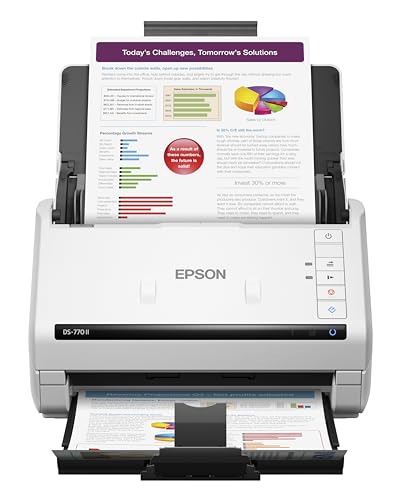
Back-office teams running long invoice or form batches get 45ppm duplex scanning (90ipm) from this scanner’s 100-sheet ADF. USB 3.0 ties it to a single workstation rather than a shared network. TWAIN and ISIS driver support makes it compatible with most existing document management platforms.
Pros
- High page throughput suits long single-user batch jobs
- Large ADF means fewer manual reloads per batch
- TWAIN and ISIS drivers cover most third-party scanning software
Cons
- No wireless or network scanning option is available
- Desk footprint runs larger than compact ADF units

Epson WorkForce ES-580W
Wi-Fi, Ethernet, and USB connectivity all live on this 50-sheet duplex ADF scanner, rated at 35ppm (70ipm duplex). A dedicated card slot scans plastic IDs and receipts separately, keeping wear off the main feeder. Scan-to-cloud and scan-to-email presets run straight from the control panel without extra software.
Pros
- Three connection options fit both shared and single-user desks
- Dedicated ID card slot handles receipts without ADF wear
- Compact enough to share a small desk area
Cons
- Rated speed trails higher-volume duplex competitors
- 50-sheet ADF capacity limits daily batch size

Canon imageFORMULA R40
This entry-level duplex scanner runs a 60-sheet ADF at 40ppm (80ipm duplex) over a standard USB 2.0 connection. CaptureOnTouch software covers basic scan-to-PDF and searchable-text conversion. Small offices replacing an aging flatbed, rather than departments with heavy volume, get the most use from it.
Pros
- Entry cost undercuts network-ready duplex models
- Rated speed keeps pace with pricier duplex scanners
- Setup stays simple for basic PDF and OCR tasks
Cons
- USB 2.0 only rules out wireless or network scanning
- Software skips the automation profiles found on higher-tier models

Doxie Q
No ADF sits on this single-sheet-fed scanner, which weighs about 1.4 pounds and runs on a rechargeable battery for cordless use. Wi-Fi sends scanned pages straight to a phone, tablet, or cloud folder without a nearby computer. Feeding one page at a time suits receipts and single documents rather than large batches.
Pros
- Battery power removes the need for a nearby outlet
- Wi-Fi delivers files directly to phones and tablets
- Small enough to fit a laptop bag or desk drawer
Cons
- Manual feeding is required since there is no ADF
- Daily high-volume office batches are not what it is built for
What to look for
ADF Capacity Sets the Real Starting Point Feeder size determines how many pages run unattended before a scanner needs reloading. Compact 50-sheet feeders, like the one on the Fujitsu ScanSnap iX1600, suit offices scanning a stack at a time. Departmental units such as the Xerox D70n load 100 sheets, useful for archiving projects or long invoice runs. Single-sheet designs like the Doxie Q skip the ADF entirely and trade capacity for portability.
Rated Speed Matters More at Higher Volume Pages per minute range from 35ppm on compact models to 70ppm on the Xerox D70n. Offices scanning under 100 pages daily rarely notice the difference, since filing and setup time dominate either way. Departments running invoice batches or archiving projects feel the gap directly, where a faster duplex rating shortens total processing time. Matching ADF size to typical batch volume first, then comparing speed, narrows the field faster than speed alone.
Shared Scanning Needs Ethernet or Wi-Fi Multiple workstations sending jobs to one shared device require Ethernet or Wi-Fi, found on the Brother ADS-4300N and Epson WorkForce ES-580W. This setup pays off in offices with several employees but no budget for a scanner at every desk. Single-user setups tied to one dedicated computer, like the Epson DS-770 II, get more value from raw scan speed than from network features. Field or mobile use favors the battery-powered, Wi-Fi-only Doxie Q over any wired option.
Software and Driver Support Affect Daily Friction TWAIN and ISIS driver compatibility, present on the Epson DS-770 II, determines whether a scanner plugs into existing document management or accounting software. Bundled apps such as ScanSnap Home or CaptureOnTouch handle basic searchable-PDF conversion without a separate purchase. Confirming driver support against a specific software platform avoids more daily friction than a slightly slower ADF ever would. Offices without a fixed platform can rely on bundled software alone for typical PDF and OCR needs.
How they stack up
| # | Model | ADF capacity | Best for | Score | Price |
|---|---|---|---|---|---|
| 1 | Fujitsu ScanSnap iX1600 | 50 sheets | Best overall | 9.4 | Check price |
| 2 | Xerox D70n Duplex Document Scanner | 100 sheets | Best for high-volume document processing | 9.2 | Check price |
| 3 | Brother ADS-4300N | 80 sheets | Best value | 8.9 | Check price |
| 4 | Epson DS-770 II | 100 sheets | Best for high-speed batch scanning | 8.7 | Check price |
| 5 | Epson WorkForce ES-580W | 50 sheets | Best for wireless network scanning | 8.4 | Check price |
| 6 | Canon imageFORMULA R40 | 60 sheets | Best budget | 8.2 | Check price |
| 7 | Doxie Q | None, single-sheet feed | Best for mobile professionals | 8.0 | Check price |
Questions worth asking
Which scanner works best for a small business office?
The Fujitsu ScanSnap iX1600 fits most small offices, pairing a 50-sheet duplex ADF with 40ppm scanning and touchscreen profiles without requiring a network setup.
How many pages per day can a departmental scanner handle?
The Xerox D70n is rated for several thousand pages daily, backed by a 100-sheet ADF and 70ppm duplex speed built for centralized scan stations.
Can a document scanner send files straight to cloud storage?
Yes, the Brother ADS-4300N and Epson WorkForce ES-580W both include one-touch scan-to-cloud and scan-to-email buttons on their control panels.
Is a network scanner better than USB-only for multiple employees?
A network model like the Brother ADS-4300N lets several workstations share one scanner over Ethernet or Wi-Fi, which suits multi-employee offices better than a USB-only unit tied to a single computer.
What is duplex scanning and do I need it?
Duplex scanning captures both sides of a page in one pass. Offices handling double-sided contracts or forms save time with duplex models such as the Epson DS-770 II compared to single-sided scanners.
Does any scanner work without a nearby computer?
The Doxie Q scans over Wi-Fi directly to a phone or tablet and runs on a rechargeable battery, so no wired computer connection is needed.
Fujitsu ScanSnap iX1600 vs Xerox D70n, which fits my office?
Pick the ScanSnap iX1600 for typical small-office volume with occasional wireless scanning. Choose the Xerox D70n once daily volume regularly tops a few hundred pages and needs network sharing.
Is a budget scanner like the Canon imageFORMULA R40 good enough for daily use?
It handles daily duplex scanning at 40ppm with a 60-sheet ADF, workable for small offices, though it lacks the wireless and network options found on pricier models.
What is the best scanner for mobile or field use?
The Doxie Q suits mobile professionals best, since its battery power and Wi-Fi scanning skip both a wall outlet and a nearby computer.
How much ADF capacity does a busy office actually need?
Offices scanning under 100 pages a day do fine with a 50-sheet ADF, while batches running into the hundreds benefit from a 100-sheet feeder like the one on the Xerox D70n or Epson DS-770 II.
The verdict
The Fujitsu ScanSnap iX1600 covers the widest range of small-office needs, with its 50-sheet duplex ADF, 40ppm speed, and touchscreen profiles handling most daily paperwork. Departments processing several hundred pages a day should choose the Xerox D70n instead, since its 100-sheet feeder and 70ppm rating are built for that load. Field staff who scan only occasionally get more practical value from the cordless, Wi-Fi-only Doxie Q than from any desktop model here.