Top Cable Modems for Fast, Reliable Internet
The Motorola MB7621 is our top pick for most households, offering solid DOCSIS 3.0 performance at a budget-friendly price. It supports plans up to 600 Mbps and works with major providers like Comcast and Spectrum. However, it lacks DOCSIS 3.1, so if you have gigabit speeds, consider the Netgear CM1000.
Buying your own cable modem can save you monthly rental fees and often improves performance. But with many models on the market, choosing the right one can be confusing.
We compared top sellers from Motorola, Netgear, ARRIS, and others. Our focus is on real-world speed support, reliability, and ease of setup. Read on to find your best match.
What to look for
What to Look for in a Cable Modem First, check your internet plan’s speed tier. For plans under 300 Mbps, a DOCSIS 3.0 modem like the Netgear CM500 is enough. For gigabit plans, you need a DOCSIS 3.1 modem. Also, verify that your ISP supports the modem model. Most major providers have an approved list.
DOCSIS 3.0 vs. 3.1 DOCSIS 3.1 is the newer standard, offering faster speeds and better efficiency. It is backward compatible, so you can use a 3.1 modem even on 3.0 networks. However, 3.1 modems cost more. If you don’t plan to upgrade your internet speed soon, a 3.0 modem can save money.
Channel Bonding Explained Channel bonding refers to how many upstream and downstream channels a modem can use. More channels mean higher potential speeds. For example, a 32×8 modem can handle gigabit speeds, while a 16×4 is limited to around 300 Mbps. Check your ISP’s requirements.
Compatibility and ISP Approval Before buying, confirm your internet provider supports the modem. Cable ISPs like Xfinity, Spectrum, and Cox have approved modem lists. Using an unapproved modem may not work or may get reduced speeds. Also, note that some ISPs do not allow separate modems for voice service.
The shortlist, ranked
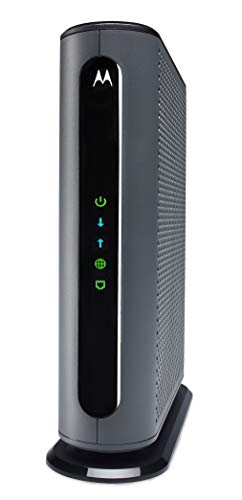
Motorola MB7621
A reliable DOCSIS 3.0 modem with 24×8 channel bonding. It is compatible with major U.S. cable providers and offers stable performance for streaming and gaming. Owners report easy setup and consistent speeds.
Pros
- Affordable price point
- Broad ISP compatibility
- Compact design
Cons
- No DOCSIS 3.1 support
- Not for gigabit plans

Netgear CM1000
A DOCSIS 3.1 modem ready for future speed upgrades. It supports gigabit speeds and is backward compatible with DOCSIS 3.0 networks. Users appreciate its sturdy build and low latency for gaming.
Pros
- Future-proof 3.1 technology
- Handles high-speed plans easily
- Reliable performance
Cons
- Pricier than DOCSIS 3.0 models
- Large footprint

ARRIS Surfboard SB8200
This DOCSIS 3.1 modem supports multi-gigabit speeds and features two Gigabit Ethernet ports. It is a popular choice for its proven performance and compatibility with major ISPs. Users report excellent throughput.
Pros
- Two Ethernet ports for link aggregation
- Strong performance
- Widely compatible
Cons
- No phone jacks for voice service
- Higher price

Netgear CM500
An affordable DOCSIS 3.0 modem with 16×4 channel bonding. It is ideal for standard internet plans and small households. Users say it is simple to install and works well with major providers.
Pros
- Very affordable
- Easy setup
- Reliable for basic use
Cons
- Lower channel bonding
- Not suitable for high-speed plans
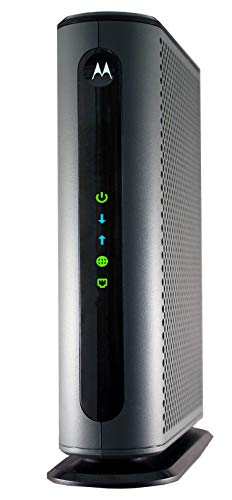
Motorola MB8600
A DOCSIS 3.1 modem designed for maximum speed and performance. It features a 32×8 channel configuration and a 2.5 Gbps Ethernet port. Enthusiasts praise its low latency and robust build.
Pros
- 2.5 GbE port for future speeds
- Excellent performance
- Compatible with major ISPs
Cons
- Premium price
- Overkill for most plans

ARRIS Surfboard SBG10
This 2-in-1 modem router saves space and simplifies setup. It supports DOCSIS 3.0 and includes built-in Wi-Fi, making it a good choice for apartments. Owners report adequate coverage for small homes.
Pros
- Combines modem and router
- Compact and cost-effective
- Simple to set up
Cons
- Limited Wi-Fi range
- Not for high-speed plans

NETGEAR CM1200
A DOCSIS 3.1 modem with four Gigabit Ethernet ports, supporting link aggregation for speeds up to 2 Gbps. It is ideal for users with compatible routers. Users find it stable and fast.
Pros
- Four Ethernet ports
- Link aggregation support
- Great for high-end setups
Cons
- Higher cost
- Requires compatible router for full speed
Compared at a glance
| # | Model | Technology | Best for | Score | Price |
|---|---|---|---|---|---|
| 1 | Motorola MB7621 | DOCSIS 3.0 | Most households with plans up to 600 Mbps | 9.4 | Check price |
| 2 | Netgear CM1000 | DOCSIS 3.1 | Gigabit internet plans | 9.2 | Check price |
| 3 | ARRIS Surfboard SB8200 | DOCSIS 3.1 | Heavy streamers and gamers | 9.0 | Check price |
| 4 | Netgear CM500 | DOCSIS 3.0 | Budget-friendly plans up to 300 Mbps | 8.8 | Check price |
| 5 | Motorola MB8600 | DOCSIS 3.1 | Power users with multi-gigabit plans | 9.1 | Check price |
| 6 | ARRIS Surfboard SBG10 | DOCSIS 3.0 | All-in-one modem and router for small spaces | 8.5 | Check price |
| 7 | NETGEAR CM1200 | DOCSIS 3.1 | Multi-gigabit connections with link aggregation | 8.7 | Check price |
Common questions
What is a cable modem?
A cable modem is a device that connects your home network to the internet via coaxial cable. It modulates and demodulates signals for data transmission.
Why should I buy my own modem instead of renting?
Renting a modem from your ISP costs monthly fees, often around current price to current price. Buying your own can pay for itself within a year. You also get better control over performance and features.
How do I know if a modem is compatible with my ISP?
Check your ISP’s approved modem list on their website. You can also contact customer support. Most manufacturers list compatible providers on the product page.
What is DOCSIS 3.1?
DOCSIS 3.1 is the latest cable modem standard, supporting faster download and upload speeds, lower latency, and better security. It is backward compatible with DOCSIS 3.0.
Can I use a DOCSIS 3.1 modem with a DOCSIS 3.0 network?
Yes, DOCSIS 3.1 modems are backward compatible. They will work on older networks, but you will only get speeds up to the network’s capability.
Do I need a separate router?
A cable modem alone does not provide Wi-Fi. You need a router to create a wireless network. Some modems have built-in routers, but many users prefer separate devices for better performance and flexibility.
What is channel bonding?
Channel bonding is the ability of a modem to use multiple channels for data transmission. More channels mean higher potential speeds. For example, a 32×8 modem can handle gigabit speeds.
How do I set up a cable modem?
Connect the modem to a coaxial cable outlet and plug in the power. Then connect the modem to your router or computer using an Ethernet cable. Contact your ISP to activate the modem by providing its MAC address.
Will buying a faster modem improve my internet speed?
Only if your internet plan supports higher speeds. If you have a 100 Mbps plan, a gigabit modem won’t make it faster. However, a better modem can provide more stable connections and better handling of multiple devices.
What if my ISP requires a specific modem?
Some ISPs, especially those offering voice services, may require a specific modem or a modem with telephone ports. Check their requirements before purchasing.
Final word
For most people, the Motorola MB7621 offers the best balance of price and performance. If you have gigabit internet, upgrade to the Netgear CM1000 or ARRIS SB8200. Budget shoppers can save with the Netgear CM500, while the ARRIS SBG10 is a practical all-in-one for small spaces.


