Which Capture Card Fits Your Streaming Setup?
The Elgato Game Capture HD60 X leads for its clean 1080p60 passthrough and low latency, making it our top overall pick. The Elgato Cam Link 4K is best for turning a mirrorless camera into a webcam, while the Mirabox USB HDMI card covers budget builds without draining performance.
Most console and PC streaming setups suit the Elgato Game Capture HD60 X, which handles smooth 1080p60 capture and 4K passthrough without much fuss. Cam Link 4K fits camera-to-computer workflows instead, and the Mirabox card gives budget builders an affordable entry point.
Specs overlap between capture cards even though the use cases do not, which is where the confusion sets in. A card built for a DSLR is not the same as one built for a PS5, and passthrough resolution rarely equals recording resolution. We compared each model on connection type, encoding, latency, and bundled software so the differences are easy to see.
The best picks, ranked

Elgato Game Capture HD60 X
Capture tops out at 1080p60, while passthrough sends 4K60 HDR to your display with minimal lag. It works with PC and console, and pairs with OBS or Elgato’s own software. Owners report a straightforward setup that fits most single-PC and dual-PC streams.
Pros
- Low-latency passthrough for responsive play
- Works across PC and console
- Flexible with third-party software
Cons
- Recording tops out at 1080p60
- Needs a USB 3.0 port for full speed

Elgato Cam Link 4K
A mirrorless or DSLR camera with clean HDMI out becomes a high-quality webcam or capture source through this stick. Based on specifications it accepts up to 4K30 or 1080p60 input. Owners report it as a compact way to lift video quality for streams and calls.
Pros
- Big jump in webcam quality from a real camera
- Tiny, travel-friendly design
- Plug-and-play with most software
Cons
- Needs a camera with clean HDMI output
- Not aimed at console gameplay

Elgato Game Capture 4K X
Recording reaches 4K60 here, and passthrough climbs to 4K144 with VRR support, aimed at creators who want native high-resolution footage. USB-C handles the bandwidth 4K demands. Owners report it as a future-proof option for high-refresh gaming setups.
Pros
- Native 4K60 recording
- High-refresh passthrough with VRR
- Handles HDR content
Cons
- Higher price bracket
- Large 4K files need fast storage

AVerMedia Live Gamer Portable 2 Plus
Recording to an SD card without a PC suits capture on the go here. It handles 1080p60 capture with 4K passthrough. Owners report the PC-free mode is handy for grabbing console footage away from a main rig.
Pros
- Records without a computer
- Portable and self-contained
- Simple one-touch capture
Cons
- USB 2.0 limits live-to-PC quality
- SD card not included

Razer Ripsaw HD
A dedicated 3.5mm mic input for mixing commentary joins 1080p60 capture and 4K60 passthrough here. USB 3.0 handles the connection, and it works with common streaming apps. Owners report clean audio handling as a standout for console-focused streams.
Pros
- Built-in audio mixing inputs
- Solid 4K passthrough
- Sturdy metal housing
Cons
- Software is more limited than rivals
- No standalone recording

AVerMedia Live Gamer 4K
This PCIe card installs inside a desktop for 4K60 HDR capture and high-refresh passthrough. Based on specifications it supports 1440p120 and 1080p240 modes. Owners report strong performance for single-PC creators with a spare slot.
Pros
- Internal card frees a USB port
- High refresh-rate capture modes
- HDR support
Cons
- Requires a desktop with a free PCIe slot
- Not usable with laptops
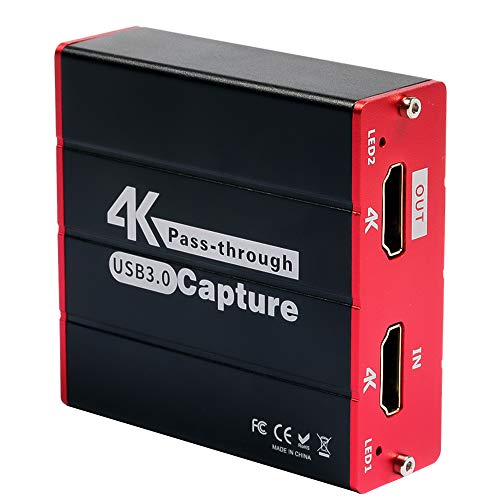
Mirabox USB 3.0 HDMI Capture Card
Bringing an HDMI source into OBS at 1080p60 with 4K passthrough costs little with this card. It is driver-free on most systems and pocket-sized. Owners report it as a reliable entry point for first-time streamers on a tight budget.
Pros
- Very affordable entry point
- No drivers needed on most systems
- Compact and light
Cons
- No dedicated software or extras
- Build feels less premium
Before you buy
What should decide your capture card: console, PC or camera? The single biggest decision is where your video comes from. Console and PC gameplay favor a card with strong passthrough so you can play on your main display without lag, while a camera setup calls for something like Cam Link 4K that accepts clean HDMI. Buying the wrong category is the most common mistake, so start here before comparing numbers.
Capture resolution versus passthrough: what is the real difference? These two specs are easy to mix up. Passthrough is what your monitor shows in real time, and it is often higher than what the card actually records. A card can pass 4K to your screen while capturing at 1080p60, fine for most streams. Confirm the recording resolution, not just the passthrough figure, if native 4K files matter to you.
Does connection type limit your capture card’s speed? USB 3.0 or USB-C is needed for smooth high-resolution capture, while USB 2.0 models are limited and better suited to standalone recording. Internal PCIe cards remove USB dependency entirely but only fit desktops with a free slot. Check your available ports before buying so the card can hit its rated speed.
How much does bundled software matter for beginners? Most cards work with OBS Studio, but bundled tools can simplify setup for beginners. Look for features like instant gameview, audio mixing inputs, or standalone SD recording depending on how you plan to work. A card that fits your existing software saves time and avoids compatibility headaches later.
The lineup, side by side
| # | Model | Max capture | Best for | Score | Price |
|---|---|---|---|---|---|
| 1 | Elgato Game Capture HD60 X | 1080p60 | Best overall | 9.4 | Check price |
| 2 | Elgato Cam Link 4K | 4K30 / 1080p60 | Best for cameras | 9.1 | Check price |
| 3 | Elgato Game Capture 4K X | 4K60 | Best for 4K | 9.0 | Check price |
| 4 | AVerMedia Live Gamer Portable 2 Plus | 1080p60 | Best for standalone recording | 8.7 | Check price |
| 5 | Razer Ripsaw HD | 1080p60 | Best for console streamers | 8.5 | Check price |
| 6 | AVerMedia Live Gamer 4K | 4K60 HDR | Best internal card | 8.3 | Check price |
| 7 | Mirabox USB 3.0 HDMI Capture Card | 1080p60 | Best budget | 8.0 | Check price |
Frequently asked questions
Do I need a capture card to stream from a PC?
Not always. A single powerful PC can stream directly through OBS. Capture cards shine for console footage or dual-PC setups where you offload encoding to a second machine.
What is passthrough and why does it matter?
Passthrough sends the video signal from your source to your monitor in real time so you can play without delay. It lets you game at high resolution while the card records at its own capture resolution.
Can these capture cards record in 4K?
Some can. Models like the Elgato Game Capture 4K X and AVerMedia Live Gamer 4K record native 4K60, while many popular cards capture 1080p60 and only pass 4K through to the display.
Will a capture card work with a Nintendo Switch, PS5, or Xbox?
Yes, most HDMI capture cards work across consoles. Note that some consoles apply HDCP protection to certain apps, which can block capture of protected video.
Is USB 3.0 required for a capture card?
For smooth 1080p60 or 4K capture, USB 3.0 or USB-C is strongly recommended. USB 2.0 cards exist but are limited and generally better for standalone or lower-resolution use.
Can I use a capture card as a webcam source?
Yes. Pairing a card like the Cam Link 4K with a camera that has clean HDMI output gives you a high-quality webcam feed for streaming or video calls.
Do capture cards add lag to my gameplay?
The passthrough feed on modern cards has very low latency, so you play on your main display in near real time. Any small delay appears on the recording, not on your screen.
What software should I use with a capture card?
OBS Studio is the most common free option and works with nearly every card. Some brands include their own utilities that add setup wizards, audio mixing, or instant replay features.
Internal PCIe card versus external USB capture card: which is better?
A PCIe card frees up USB ports and often supports higher refresh rates, but it only fits a desktop with a spare slot. External USB cards work with laptops too and swap between machines easily.
What is the best capture card for a beginner streamer on a budget?
The Mirabox USB 3.0 HDMI Capture Card covers the basics at the lowest cost, handling 1080p60 capture without drivers. Upgrading to a card like the HD60 X later adds better software and lower latency.
The verdict
For most streamers and recorders, the Elgato Game Capture HD60 X is the easiest card to recommend thanks to its low-latency 4K passthrough and broad compatibility. Camera-based creators should look at the Cam Link 4K, and budget builders can start with the Mirabox card and upgrade later.
You might also need
Keyboard Tray or Desk Level Setup: Which Fits You?
How to Choose a Gaming Headset for Your Setup
Filing Cabinets vs Digital Storage: Which Fits Your Office?
