Which Car GPS Navigator Still Beats Your Phone?
The Garmin DriveSmart 66 is our top car GPS for its bright six inch screen, voice control and free lifetime map updates. The Garmin DriveSmart 76 suits drivers who want a larger display, while the Garmin Drive 53 covers the essentials at a lower entry point.
The Garmin DriveSmart 66 is the car GPS navigator most drivers should buy, with the larger DriveSmart 76 for those who want a bigger screen and the Garmin Drive 53 as the straightforward budget option. Truck and RV drivers need the routing profiles in the dezl OTR700 or RV 795 instead.
Choosing is harder than it looks because a navigator competes directly with a phone that is already in the car, so the case rests on offline maps, a screen you can read in sunlight and routing profiles phones do not offer. We compared display sizes, map update terms, traffic sources, voice control, driver alerts and mount design, then ranked the seven units below on how well they justify a dedicated dashboard device.
The top picks, ranked

Garmin DriveSmart 66
The DriveSmart 66 hits the balance most drivers want, with a six inch edge to edge display that stays readable in daylight and voice control that handles destination entry without touching the screen. Maps are stored on the device, so routing continues where mobile signal does not. It also pairs with a phone for live traffic and hands free calls.
Pros
- Bright screen readable in direct sun
- Works with no mobile signal at all
- Voice destination entry is genuinely usable
Cons
- Live traffic needs a paired phone
- Suction mount can mark a hot windscreen

Garmin DriveSmart 76
The 76 is the same platform as the 66 with a seven inch screen, which makes junction views and lane guidance far easier to read at a glance. That size suits taller vehicles and drivers who prefer glancing rather than squinting. Owners report the larger display is the single upgrade they notice most.
Pros
- Large clear display for junction views
- Same reliable Garmin routing
- Easier to read from a high seating position
Cons
- Takes up more windscreen space
- Costs more than the six inch model for the same features

Garmin Drive 53
The Drive 53 strips out voice control and smart notifications but keeps the core of what a navigator is for, which is accurate offline routing on a clear five inch screen. Driver alerts for sharp curves and school zones are still included. It is the sensible pick for a second car or an occasional long trip device.
Pros
- Lowest cost route into a real navigator
- Offline maps with no subscription
- Simple interface with less to learn
Cons
- No voice control
- Smaller screen than the DriveSmart models

Garmin DriveCam 76
Combining a navigator and dash cam clears one device and one cable off the windscreen. The DriveCam 76 records continuously and saves footage automatically when it detects an incident, while running the same seven inch navigation as the DriveSmart 76. Owners report the shared mount is the main practical benefit.
Pros
- One mount instead of two
- Automatic incident recording
- Adds forward collision warnings
Cons
- Needs a memory card that is not always included
- Camera quality trails a dedicated dash cam
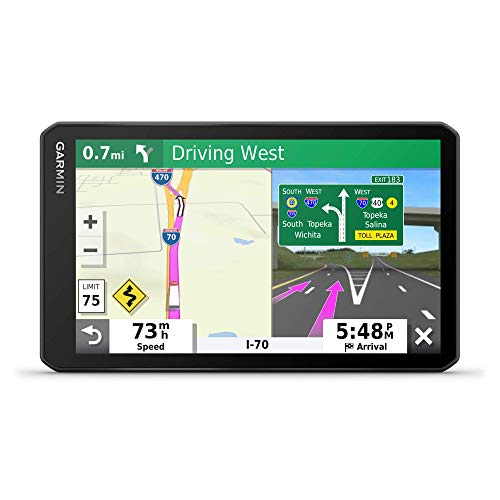
Garmin dezl OTR700
Truck drivers need routing that accounts for height, weight and hazardous cargo restrictions, which is precisely what consumer navigation ignores. The dezl OTR700 builds routes around a saved vehicle profile and adds truck parking, weigh station and service listings. The seven inch screen is designed for a high cab position.
Pros
- Routes around bridge and weight restrictions
- Truck specific points of interest
- Built in trip and hours logging
Cons
- Features are wasted on a normal car
- Higher price than consumer models

Garmin RV 795
Towing changes what a safe route looks like, and the RV 795 takes the rig dimensions into account to avoid low bridges and tight turns. It includes campground directories and a checklist tool for setting up and packing down. Based on specifications it also supports a wireless reversing camera.
Pros
- Routes suited to rig height and length
- Campground and service listings included
- Setup checklists reduce forgotten steps
Cons
- Overspecified for daily commuting
- Camera accessory sold separately
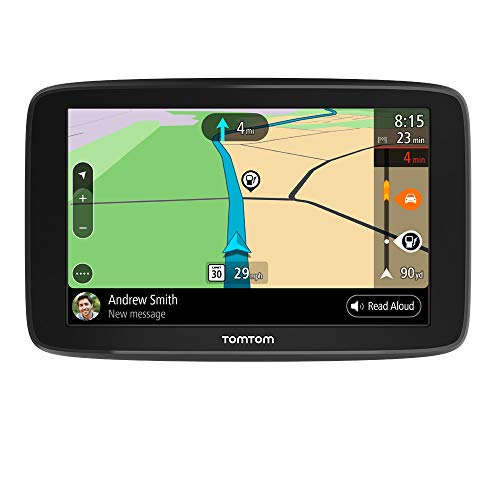
TomTom GO Comfort
TomTom’s strength has always been traffic prediction, and the GO Comfort leans on that with routing that adapts to congestion patterns. Maps are stored on the device and updated over WiFi without a computer. Owners report the interface is cleaner than rivals but the point of interest database is thinner.
Pros
- Strong traffic prediction and rerouting
- Updates over WiFi with no computer needed
- Clean, uncluttered interface
Cons
- Smaller points of interest database
- Some live services depend on a subscription
What to look for
Why a dedicated navigator still makes sense The strongest argument is offline reliability. Maps stored on the device keep routing through tunnels, mountain passes and rural stretches where a phone loses signal and the route collapses mid journey. A navigator also keeps the phone free for calls and music, does not drain its battery, and mounts at a fixed height where glancing at it is quicker and less distracting than reading a phone propped in a vent.
Screen size and readability Five inch screens are fine in a small car where the mount sits close. Six inches is the practical sweet spot for most drivers, and seven suits SUVs, vans and anyone who finds smaller text a strain. Brightness and anti glare treatment matter as much as size, since a dim screen at midday is unreadable regardless of how many inches it measures.
Map updates and traffic Check the update policy before buying, since a navigator with outdated maps sends you down roads that have changed. Most current Garmin units include free lifetime map updates delivered over WiFi. Live traffic works either through a paired phone or a built in service, and it is the feature that most affects arrival times in cities, so confirm which method a model uses.
Vehicle specific routing This is where dedicated devices beat phones outright. Truck models route around bridge heights, weight limits and restricted roads based on a saved profile, and RV models do the same for length and towing. If you drive anything larger than a car, this single feature usually justifies the device on its own, because a wrong turn under a low bridge is expensive in a way a detour never is.
The lineup, side by side
| # | Model | Screen | Best for | Score | Price |
|---|---|---|---|---|---|
| 1 | Garmin DriveSmart 66 | 6 inch touchscreen | Best overall | 9.4 | Check price |
| 2 | Garmin DriveSmart 76 | 7 inch touchscreen | Best large screen | 9.2 | Check price |
| 3 | Garmin Drive 53 | 5 inch touchscreen | Best value | 9.0 | Check price |
| 4 | Garmin DriveCam 76 | 7 inch touchscreen | Best with a built in dash cam | 8.8 | Check price |
| 5 | Garmin dezl OTR700 | 7 inch touchscreen | Best for trucks | 8.6 | Check price |
| 6 | Garmin RV 795 | 7 inch touchscreen | Best for RVs and towing | 8.3 | Check price |
| 7 | TomTom GO Comfort | 6 inch touchscreen | Best alternative to Garmin | 8.0 | Check price |
Frequently asked questions
Is a car GPS better than Google Maps?
For live traffic and searching businesses, a phone is usually ahead. For offline reliability, screen readability in sun and vehicle specific routing, a dedicated navigator wins. Many drivers use both, with the navigator as the one that never drops out.
Do car GPS units need a data connection?
Not for navigation. Maps are stored on the device. A connection, usually through a paired phone or WiFi, is only needed for live traffic and map updates.
Are map updates free?
On most current Garmin models, yes, with lifetime map updates delivered over WiFi. Always check the specific listing, since older or entry level units sometimes limit the number of updates.
Can I use a car GPS in a rental or a second vehicle?
Yes. These are self contained devices that move between vehicles with the suction mount and a power lead, which is one of their practical advantages over built in systems.
What is the best screen size?
Six inches suits most cars. Choose five inches in a compact car with a close mount, and seven inches for SUVs, trucks and RVs where the device sits further away.
Do they warn about speed cameras?
Some models include alerts where local law permits. Rules vary by country and region, so check what is legal where you drive before relying on the feature.
How long do they last on battery?
Internal batteries typically run for under an hour and are meant for setup rather than driving. Plan to keep the unit powered from the vehicle for any real journey.
Is a combined GPS and dash cam worth it?
It saves a mount and a cable, which is a real benefit on a cluttered windscreen. If footage quality is your main concern, a dedicated dash cam still records better, so the combo suits convenience over evidence quality.
The bottom line
The Garmin DriveSmart 66 is the navigator that makes the clearest case against simply using a phone, with offline maps, a screen that stays legible in sunlight and voice control that works while driving. Step up to the DriveSmart 76 if you want a larger display, or save with the Drive 53 if you only need reliable routing. Anyone driving a truck or towing should skip the consumer models entirely and choose the dezl OTR700 or RV 795.


