Charging Docks That Declutter and Power Up Fast
The Anker 3-in-1 Cube with MagSafe stands out as the best overall charging dock for Apple users. It folds into a compact cube for travel, yet unfolds to charge an iPhone, Apple Watch, and AirPods simultaneously. Its main limitation is that it only works with MagSafe-compatible iPhones, so Android users will need an alternative.
A charging dock can turn a tangle of cables into a single, organized hub. Whether you own an iPhone, an Android phone, or a mix of devices, the right dock saves counter space and keeps your gadgets powered overnight.
We compared popular docks from Anker, Belkin, Satechi, and others. We looked at charging speeds, build quality, and how well they handle multiple devices. Owners report that some docks are better suited for travel, while others excel as permanent desk fixtures.
How to pick the right one
The best picks, ranked

Anker 3-in-1 Cube with MagSafe
This foldable cube unfolds to charge an iPhone via MagSafe, an Apple Watch, and AirPods simultaneously. Its sturdy hinge and premium finish make it ideal for both home and travel.
Pros
- Compact foldable design saves space
- Delivers fast 15W MagSafe charging
- Stable base prevents tipping
Cons
- Only works with MagSafe iPhones (12 and newer)
- No USB-A port for additional devices

Belkin BoostCharge Pro 3-in-1 Wireless Charging Stand
This sleek stand holds an iPhone in landscape orientation for StandBy mode, an Apple Watch, and AirPods. Owners report it keeps all devices cool even during overnight charging.
Pros
- iPhone charges in landscape for StandBy
- Heavy base stays put on nightstands
- Cable management keeps desk tidy
Cons
- Not foldable, takes up more space
- Requires a 30W power adapter (not included)

Satechi 3-in-1 Foldable Wireless Charging Stand
This foldable stand is thinner than the Anker Cube and charges an iPhone, Apple Watch, and AirPods. Its leather-like finish adds a premium feel, and it folds flat for easy packing.
Pros
- Ultra-thin when folded
- Premium leather finish
- Easy to pack in a laptop bag
Cons
- Smaller AirPods pad may not fit larger cases
- Watch charger is not a fast charger

Anker PowerWave 2-in-1 Stand
This stand charges a phone (up to 15W for Samsung) and a pair of earbuds or a second phone. It is a no-frills option that gets the job done without breaking the bank.
Pros
- Affordable price point
- Compact footprint
- Compatible with both Android and iPhone
Cons
- No Apple Watch charging
- Phone must be centered precisely for fast charging
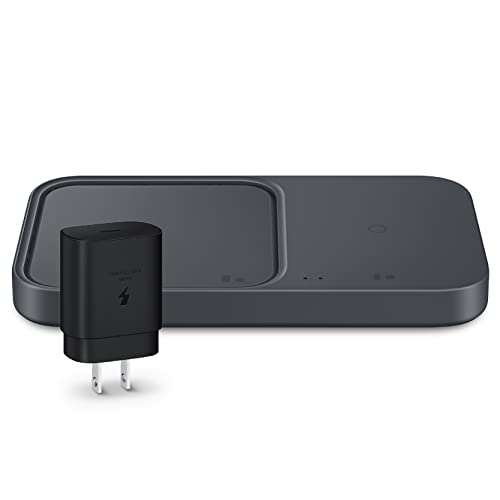
Samsung Super Fast Wireless Charger Duo
Samsung’s official duo charger provides up to 15W fast charging for Galaxy phones and 9W for Galaxy Watches. It also charges earbuds via the phone pad, though not simultaneously with a phone.
Pros
- Fast charging for Samsung devices
- Built-in cooling fan prevents overheating
- Official Samsung accessory ensures compatibility
Cons
- No support for Apple Watch
- Fan can be audible in a quiet room

Belkin 2-in-1 Wireless Charging Stand with MagSafe
This stand combines a MagSafe charger for iPhone with a second charging pad for AirPods or another phone. It is simple, sturdy, and designed to work with MagSafe cases.
Pros
- Strong magnetic alignment
- Stable base with anti-slip grip
- Apple-certified for compatibility
Cons
- No Apple Watch charger
- Only one device charges at full speed

Nomad Base One Max 3-in-1
This aluminum and glass dock charges an iPhone, Apple Watch, and AirPods with a weighted base that feels luxurious. It delivers fast charging for all devices and looks great on a desk.
Pros
- Heavy, high-quality build
- Fast charging for all three devices
- Cable management included
Cons
- Expensive compared to others
- Bulky footprint on nightstand
The lineup, side by side
| # | Model | Charging method | Best for | Score | Price |
|---|---|---|---|---|---|
| 1 | Anker 3-in-1 Cube with MagSafe | MagSafe for iPhone, puck for Watch, pad for AirPods | Apple users who want a compact, travel-ready dock | 9.4 | Check price |
| 2 | Belkin BoostCharge Pro 3-in-1 Wireless Charging Stand | MagSafe for iPhone, puck for Watch, pad for AirPods | Apple households with multiple devices and a permanent nightstand spot | 9.2 | Check price |
| 3 | Satechi 3-in-1 Foldable Wireless Charging Stand | MagSafe for iPhone, puck for Watch, pad for AirPods | Travelers who need a lightweight, compact dock | 9.0 | Check price |
| 4 | Anker PowerWave 2-in-1 Stand | Qi wireless for phone, Qi pad for earbuds | Budget-minded users who want a simple dual-device stand | 8.7 | Check price |
| 5 | Samsung Super Fast Wireless Charger Duo | Qi wireless for phone, Qi for Watch and earbuds | Android users who need fast charging for phones and watches | 8.9 | Check price |
| 6 | Belkin 2-in-1 Wireless Charging Stand with MagSafe | MagSafe for iPhone, Qi pad for earbuds/phone | iPhone owners who also need a spot for AirPods or a second phone | 8.8 | Check price |
| 7 | Nomad Base One Max 3-in-1 | MagSafe for iPhone, puck for Watch, pad for AirPods | Users who want a premium, heavy-duty desk dock | 9.1 | Check price |
Good to know
Can I charge my phone and watch at the same time on a charging dock?
Yes, most 3-in-1 docks are designed to charge a phone, watch, and earbuds simultaneously. However, the charging speed may be reduced when multiple devices are connected. Check the specifications for each port’s output.
Will a charging dock work with any phone?
Most docks use the Qi wireless standard, which works with iPhone and Android phones that support wireless charging. However, Apple Watch requires a dedicated magnetic puck, so not all docks include that. For iPhone users, MagSafe-compatible docks offer the fastest charging.
Do I need to remove my phone case before using a wireless charging dock?
It depends on the case thickness. Many cases under 3mm thick work fine. MagSafe cases are designed to work with MagSafe chargers. If your case is bulky or has metal parts, you may need to remove it.
How long does it take to charge a phone on a wireless dock?
With a 15W fast charger, an iPhone can go from 0 to 50% in about 30 minutes. However, slower 5W chargers take longer. Actual time depends on the phone model and battery capacity.
Can I use a charging dock to charge my earbuds?
Yes, if the dock has a dedicated earbud pad. Most 3-in-1 docks include a spot for AirPods or other Qi-compatible earbuds. Some 2-in-1 docks also have a secondary pad for earbuds or a second phone.
Are charging docks safe to leave plugged in overnight?
Yes, most modern docks have overcharge protection and automatically stop charging when the battery is full. They are safe to leave plugged in, but always use the included adapter or one with the correct wattage.
What is the difference between a charging pad and a charging dock?
A charging pad is a flat surface where you lay your device. A charging dock typically holds your device at an angle, making it easier to see notifications. Docks often have multiple charging spots for different devices.
Do charging docks work with fast charging phones like Samsung Galaxy?
Yes, many docks support Samsung’s Super Fast Charging up to 15W. Check for the ‘Super Fast Charging’ or ‘Fast Charge’ certification. The Samsung Super Fast Wireless Charger Duo is a good example.
The bottom line
For most Apple users, the Anker 3-in-1 Cube with MagSafe is the best choice because it combines portability, performance, and a reasonable price. If you prefer a permanent nightstand solution and want your iPhone in StandBy mode, opt for the Belkin BoostCharge Pro. Android users should get the Samsung Super Fast Wireless Charger Duo for reliable quick charging.


