How to Pick Coding Toys Kids Will Actually Use
Sphero BOLT wins overall because one app carries a child from drawn paths through block coding into real JavaScript. Learning Resources Botley 2.0 teaches loops and conditionals with no screen at all. Osmo Coding Starter Kit suits iPad households that want guided, tactile progression.
Sphero BOLT offers the clearest path from drag and drop blocks to genuine text based code, which keeps it interesting for years rather than weeks. Younger children do better with the screen free Learning Resources Botley 2.0. Osmo Coding Starter Kit is the natural fit when an iPad already lives in the house.
Coding toys are hard to judge because the ones that demo well often go quiet within a fortnight. A lasting toy lets the child invent new problems after the built in challenges run out, and an expensive novelty does not. We compared published specifications, stated age ranges and supported programming environments, then weighed owner reviews for two signals: how long children kept using each toy and how it survived everyday handling.
Before you buy
What age is right for a coding toy? Effective age bands run narrow, and buying ahead of a child’s current stage is the most common way to waste money. Three to five year olds need physical cause and effect with no screen. Five to eight year olds handle sequencing, loops and simple conditionals through tangible programmers or block apps. From around eight, blocks start feeling limiting for some children, and a route into text based code sustains interest. When in doubt, buy for the age your child is today.
Are screen free coding toys better? Screen free is a real advantage for younger children, keeping eyes on the physical world and removing the pull of other apps. Complexity is the ceiling, since a handful of buttons only expresses so much. App based toys unlock deeper programming at the cost of a tablet in every session. Many families own one of each across different ages, which is a sensible outcome rather than a planning failure.
How do you tell if a coding toy will last? Abandoned toys share one trait: nothing left to do once the included challenges finish. Check whether open ended projects are possible, whether the app still receives content, and whether a community publishes project ideas. An environment that grows with the child matters most. A robot supporting both blocks and a real language answers that test, while a single game app usually fails it.
What extra costs come with coding robots? Tablet compatibility lists run narrower than expected, especially for camera based kits, so verify your exact device before buying. Battery powered toys turn cells into a running cost, making rechargeables worth ordering alongside. Accessories and expansion packs are where spending really accumulates, so price the whole ecosystem before deciding which robot counts as the affordable one.
The shortlist, ranked

Sphero BOLT App-Enabled Robotic Ball
One app spans drawing paths, Scratch style blocks and real JavaScript, so the same ball a child unwraps at eight still teaches at eleven. A programmable 8 by 8 LED matrix, onboard sensors and infrared links between multiple BOLTs open genuinely open ended projects. Owners report the sealed polycarbonate shell survives repeated collisions with skirting boards.
Pros
- Grows from blocks into real text based code
- Sealed shell shrugs off rough play
- Sensors support open ended projects
Cons
- Needs a tablet or phone to program
- Among the pricier options here

Learning Resources Botley 2.0 the Coding Robot
A handheld remote programmer teaches sequencing, loops and if then logic without a tablet anywhere in the room. Tiles, cards and obstacles in the box create real activities rather than a bare robot. Owners report strong engagement from four to seven year olds, with the object detection feature the consistent favourite.
Pros
- Fully screen free operation
- Tiles and obstacles included for real activities
- Covers conditionals, not just sequences
Cons
- Runs through batteries steadily
- Children outgrow it around age nine

Osmo Coding Starter Kit for iPad
Children arrange magnetic coding blocks on the table while the iPad camera reads them, keeping the tactile element that pure app coding loses. Three bundled games cover sequencing, loops and creative composition, so progression is structured rather than a single activity. Owners note the reflector and base must sit correctly or block recognition turns frustrating.
Pros
- Physical blocks keep coding tactile
- Three games build structured progression
- Strong fit for younger primary ages
Cons
- Depends on a compatible tablet you already own
- Camera setup and lighting need care

Wonder Workshop Dash Robot
Schools adopted Dash for good reasons: it answers voice commands, dodges obstacles and pairs with apps scaling from simple sequences to Blockly programming. Expressive movement and sound give younger children a reason to care what their program does. Owners praise the build quality and say accessories like the launcher and xylophone add serious replay value.
Pros
- App ecosystem scales with the child
- Built to survive heavy handling
- Accessories extend the play meaningfully
Cons
- Accessories cost extra and add up
- Every session needs a tablet or phone

BBC micro:bit v2 Go Bundle
This is a genuine programmable microcontroller, not a toy, which is precisely its appeal for children who have outgrown robot pets. Programming runs through browser based MakeCode blocks or Python, and the onboard LED matrix, microphone, speaker and sensors power hundreds of free published projects. Owners report adult help matters at the start and pays off in far deeper learning.
Pros
- Skills transfer directly to real programming
- Huge free project library online
- Very low cost for the capability
Cons
- Needs adult support at the start
- Bare board ships without an enclosure
Fisher-Price Think & Learn Code-a-Pillar Twist
Physical dials on the body set a sequence of moves before the child presses go, bringing sequencing to ages too young for any app. Simplicity is the design, and the immediate cause and effect feedback holds a three year old’s attention. Owners report the sound is loud and wish for a volume switch.
Pros
- Works for genuinely preschool ages
- No screen or app involved
- Instant feedback keeps toddlers engaged
Cons
- Teaches only simple sequencing
- Loud output with no volume control
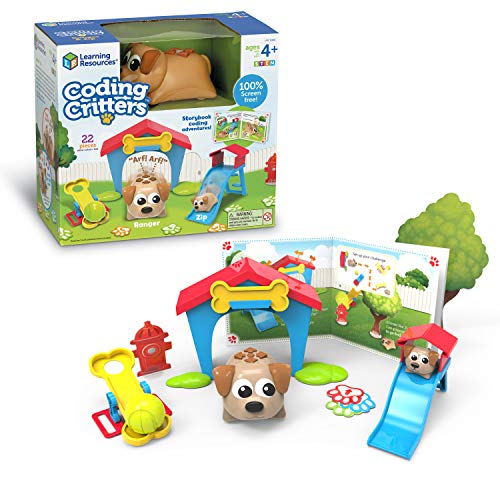
Learning Resources Coding Critters Ranger and Zip
A storybook guides children through programming the pet dog to fetch, hide and roam its play set, wrapping early coding in a pet care narrative. That framing wins over children drawn to imaginative play rather than robots. Owners call it the least expensive genuine coding toy here and credit the storybook with carrying the learning.
Pros
- Story framing suits imaginative players
- Complete play set in the box
- Lowest cost entry on this list
Cons
- Shallowest coding concepts of the group
- Play set pieces are lightweight plastic
Compared at a glance
| # | Model | Age range | Best for | Score | Price |
|---|---|---|---|---|---|
| 1 | Sphero BOLT App-Enabled Robotic Ball | Around 8 and up | Best overall | 9.4 | Check price |
| 2 | Learning Resources Botley 2.0 the Coding Robot | Around 5 to 9 | Best screen free | 9.2 | Check price |
| 3 | Osmo Coding Starter Kit for iPad | Around 5 to 10 | Best guided progression | 9.0 | Check price |
| 4 | Wonder Workshop Dash Robot | Around 6 and up | Best for project based learning | 8.8 | Check price |
| 5 | BBC micro:bit v2 Go Bundle | Around 10 and up | Best for older kids | 8.6 | Check price |
| 6 | Fisher-Price Think & Learn Code-a-Pillar Twist | Around 3 to 6 | Best for preschoolers | 8.3 | Check price |
| 7 | Learning Resources Coding Critters Ranger and Zip | Around 4 to 8 | Best budget | 8.0 | Check price |
Common questions
What age should kids start with coding toys?
Around three works for simple sequencing toys with physical buttons or dials, since ordering steps is graspable before reading is. Loops and conditionals suit five and up. Text based programming generally lands from about ten, depending on reading confidence.
Do coding toys actually teach programming?
They teach the thinking underneath it: sequencing, decomposition, loops, conditionals and debugging, all of which transfer. Syntax is the gap they leave, so a block coding veteran still faces a step up to a real language. Toys supporting both bridge that gap.
Are screen free coding toys better for young children?
For preschool and early primary ages, yes, because learning stays physical and no app can lure attention away. Depth is the limit. Older children need an app or a real programming environment to keep progressing.
How long do kids stay interested in a coding robot?
Owners typically describe a few weeks of intense use followed by occasional returns. Toys with open ended environments, active project communities or challenge adding accessories last longest. A ceiling the child hits quickly is the main cause of disappointment.
Do you need a tablet for coding toys?
Only for some. Tangible programmers and dial based toys run entirely on their own, while robots and camera based kits need a compatible phone or tablet. Check the exact compatibility list rather than assuming any modern device works.
Is Scratch enough or should kids learn text based code?
Block environments stay productive for years, and there is no rush. Moving to text makes sense once blocks feel tedious for the size of program the child wants to write, which often happens around ten to twelve.
Are coding toys worth it compared with free apps?
Free block environments teach the same core concepts, so the honest case for hardware is engagement. A robot crossing the floor holds attention in a way a screen often cannot, especially for younger children. Kids already happy coding on screen may need nothing more.
What comes after a child outgrows a coding toy?
A microcontroller board is the usual next step, shifting from prescribed activities to building things nobody designed in advance. Browser based Python, game modding and simple hardware projects follow naturally, all backed by large free communities.
Our take
Sphero BOLT keeps the top spot because it stays useful long after the novelty of a rolling robot fades, carrying a child from drawn paths through blocks into real JavaScript. Pick Learning Resources Botley 2.0 for a younger child you want away from screens. Add a BBC micro:bit v2 when they start asking to build something of their own.