Compact Computer Memory Picks for Tight Builds
The Corsair Vengeance LPX DDR4 tops our list for compact memory. It keeps a low profile for tight CPU coolers. Its main advantage is reliable performance with broad compatibility. The main limitation is no RGB lighting, which is fine for minimalist builds.
Building a small form factor PC demands careful component selection. Memory height and drive size can make or break a build. This roundup focuses on low-profile RAM and compact storage solutions.
We compared specifications, user feedback, and compatibility. Each product selected fits easily in constrained spaces. Our picks cover various capacities, speeds, and price points.
The best picks, ranked

Corsair Vengeance LPX 16GB (2x8GB) DDR4 3200MHz
The Corsair Vengeance LPX is a classic choice for compact PCs. Its heat spreader is only 34mm tall, fitting under most large coolers. It offers solid DDR4 performance with XMP 2.0 support.
Pros
- Very low profile
- Reliable performance
- Broad motherboard compatibility
Cons
- No RGB lighting
- Limited to DDR4 platforms

G.Skill Ripjaws V Series 32GB (2x16GB) DDR4 3600MHz
G.Skill Ripjaws V provides high capacity in a relatively low profile. The heat spreader is 42mm tall, slightly taller than LPX but still fits many coolers. It runs at 3600MHz with tight timings.
Pros
- Large capacity
- Great price to performance
- Excellent overclocking headroom
Cons
- Taller than some rivals
- May interfere with massive air coolers
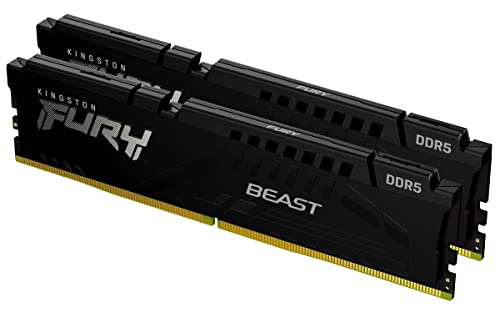
Kingston Fury Beast DDR5 16GB (2x8GB) 5200MHz
Kingston Fury Beast brings DDR5 speed to small builds. Its low profile heat spreader is only 34mm tall. It offers plug and play simplicity with Intel XMP 3.0.
Pros
- Low profile for DDR5
- Fast performance
- Easy overclocking
Cons
- Requires DDR5 motherboard
- Higher latency than some

Samsung T7 Portable SSD 1TB
Samsung T7 is a pocket sized external drive. It measures just 85 x 57 x 8mm and weighs 58g. It delivers sequential read speeds up to 1050MB/s via USB 3.2 Gen 2.
Pros
- Ultra compact
- Fast transfer speeds
- Durable aluminum body
Cons
- Not NVMe internal
- Requires USB port

SanDisk Extreme Pro Portable SSD 1TB
SanDisk Extreme Pro is built for tough environments. It is IP65 water and dust resistant. It reaches read speeds up to 2000MB/s with USB 3.2 Gen 2×2.
Pros
- Very fast
- Rugged design
- Compact form factor
Cons
- Requires Gen 2×2 port for max speed
- Slightly heavier

Crucial X6 Portable SSD 1TB
Crucial X6 offers a compact and affordable external SSD. It measures 69 x 64 x 11mm. It provides read speeds up to 800MB/s.
Pros
- Affordable
- Small size
- Good performance
Cons
- Slower than high end rivals
- Plastic case
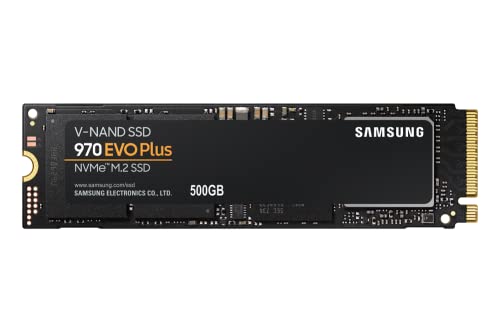
Samsung 970 EVO Plus SSD 500GB M.2 NVMe
Samsung 970 EVO Plus is a top performing M.2 drive. It takes up minimal space on the motherboard. It offers read speeds up to 3500MB/s.
Pros
- Extremely fast
- No cables needed
- Reliable
Cons
- Requires M.2 slot
- Heatsink recommended for sustained load
Compared at a glance
| # | Model | Capacity | Best for | Score | Price |
|---|---|---|---|---|---|
| 1 | Corsair Vengeance LPX 16GB (2x8GB) DDR4 3200MHz | 16GB (2x8GB) | Low-profile DDR4 builds | 9.4 | Check price |
| 2 | G.Skill Ripjaws V Series 32GB (2x16GB) DDR4 3600MHz | 32GB (2x16GB) | High capacity with low height | 9.2 | Check price |
| 3 | Kingston Fury Beast DDR5 16GB (2x8GB) 5200MHz | 16GB (2x8GB) | Compact DDR5 builds | 9.0 | Check price |
| 4 | Samsung T7 Portable SSD 1TB | 1TB | Portable storage | 9.3 | Check price |
| 5 | SanDisk Extreme Pro Portable SSD 1TB | 1TB | Rugged portable use | 9.1 | Check price |
| 6 | Crucial X6 Portable SSD 1TB | 1TB | Budget portable storage | 8.8 | Check price |
| 7 | Samsung 970 EVO Plus SSD 500GB M.2 NVMe | 500GB | Internal compact storage | 9.4 | Check price |
How to pick the right one
Common questions
What is considered low profile RAM?
Low profile RAM typically has a height under 40mm. Common heights are 34mm or less. This allows clearance for large air coolers.
Can I use DDR5 RAM in a DDR4 motherboard?
No. DDR5 and DDR4 have different physical designs and voltages. They are not interchangeable. Check your motherboard’s supported memory type.
How do I know if a portable SSD is compatible with my laptop?
Most portable SSDs use USB connections. They work with any device that has a USB port. For best speeds, use USB 3.2 Gen 2 or Thunderbolt. Older USB 2.0 ports will limit speed.
What is the advantage of an M.2 SSD over a 2.5 inch SSD?
M.2 SSDs are smaller and require no cables. They attach directly to the motherboard. This saves space and simplifies cable management. They also offer faster speeds with NVMe.
How much RAM do I need for gaming?
For modern gaming, 16GB is the sweet spot. Some demanding titles benefit from 32GB. If you multitask heavily, consider 32GB.
Are higher RAM speeds always better?
Higher speeds can improve performance, but returns diminish. For Intel systems, 3200MHz is enough. For AMD Ryzen, 3600MHz is optimal. Check your CPU’s memory controller.
Can I mix different RAM brands or speeds?
Mixing modules can work but may cause instability. It is best to use identical modules. If mixing, the system will run at the slowest speed and timings.
What does the CAS latency mean?
CAS latency is the delay between a command and data availability. Lower latency is better. It is part of the timing sequence like CL16 or CL18. Combined with speed, it affects performance.
Is it safe to carry a portable SSD in a pocket?
Yes, most portable SSDs are designed for portability. They have no moving parts. Always protect them from physical damage. Some have rugged casings.
Do I need a heatsink for M.2 SSDs?
High performance NVMe drives can get hot. Many motherboards include heatsinks. If not, consider adding one to prevent throttling. Some drives come with their own.
Our take
For most compact builds, the Corsair Vengeance LPX is the clear winner. It combines low height, reliable performance, and accessible price. If you need more capacity, the G.Skill Ripjaws V offers 32GB with manageable height. For DDR5, the Kingston Fury Beast is a solid pick. When external storage is needed, the Samsung T7 provides excellent speed and portability. For internal expansion, the Samsung 970 EVO Plus delivers top NVMe performance in a tiny footprint. Choose based on your platform and storage needs.


