Compact Laptops That Travel Light Without Sacrificing Power
The ASUS Zenbook 14 OLED tops our list as the best compact laptop overall. It delivers a stunning OLED display and excellent performance in a 2.6-pound frame, making it ideal for professionals who prioritize portability and visual quality. Its main limitation is the lack of a dedicated GPU, so gamers should look elsewhere.
Compact laptops have evolved from underpowered netbooks to capable machines that can handle demanding tasks. With modern processors and efficient batteries, they are perfect for students, frequent travelers, and remote workers. We looked at the latest models that balance size and power.
Our selection includes a range of options from ultraportable 11-inch models to 14-inch laptops that push the definition of compact. Each one offers a unique set of features, so you can find the right fit for your specific needs.
What we recommend
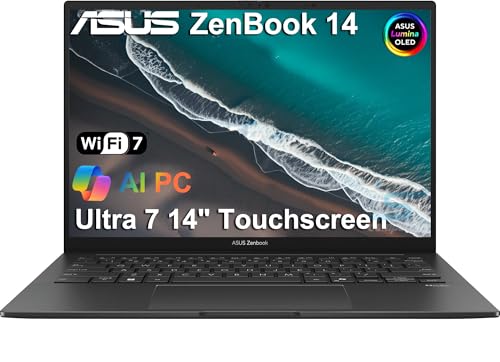
ASUS Zenbook 14 OLED (UM3402)
The ASUS Zenbook 14 OLED is a standout in the compact laptop category. Its 14-inch OLED screen offers incredible contrast and color accuracy, making it a joy for media consumption and creative work. Powered by an AMD Ryzen 7 5825U processor with 16GB RAM and 512GB SSD, it handles multitasking with ease. The all-metal body is sturdy yet lightweight at only 2.6 pounds, and the battery lasts through a full workday. Owners report that the keyboard is comfortable for long typing sessions, and the 180-degree hinge is a unique feature. The main downside is the lack of a dedicated GPU, so it is not ideal for gaming or heavy 3D rendering.
Pros
- Exceptional OLED display
- Lightweight and durable build
- Great battery life
Cons
- No dedicated GPU
- Port selection is limited to USB-C only

Apple MacBook Air 13 (M2)
The Apple MacBook Air 13 with M2 chip continues to be a top choice for those who love macOS. Its fanless design ensures silent operation, and the M2 processor delivers outstanding performance while remaining energy-efficient. The 13.6-inch Liquid Retina display is bright and sharp, with thin bezels. At 2.7 pounds, it is highly portable, and the battery life is excellent, easily lasting a full day. Owners appreciate the quality of the aluminum build and the responsive keyboard. The only downsides are the limited ports (only two Thunderbolt/USB 4) and the higher price compared to Windows counterparts.
Pros
- Silent and efficient M2 chip
- Excellent build quality
- Superb battery life
Cons
- Limited to two USB-C ports
- Price is premium

Dell XPS 13 (9315)
Dell’s XPS 13 has long been a favorite for its sleek design and powerful internals. The 9315 model features a 13.4-inch FHD+ display (up to 3.5K OLED options) and runs on 12th Gen Intel Core processors. At just 2.59 pounds, it is incredibly light, and the edge-to-edge keyboard makes efficient use of space. The build is solid, with a CNC aluminum chassis. Users report that the battery life is good, lasting around 12 hours on average. The notable downsides are the lack of a headphone jack and the fact that the webcam is below average for video calls.
Pros
- Premium design and build
- Compact and light
- Excellent keyboard
Cons
- No headphone jack
- Webcam quality is mediocre

Lenovo ThinkPad X1 Carbon Gen 10
The ThinkPad X1 Carbon is the gold standard for business laptops. Its carbon fiber construction is both lightweight (2.48 pounds) and extremely durable, passing military-grade tests. The 14-inch display is available in various resolutions up to UHD+ OLED. Under the hood, you can get up to an Intel Core i7-1260P processor and 32GB RAM. The keyboard is legendary for its tactile feedback and deep travel. Battery life is solid, around 10-12 hours. The only significant drawbacks are the premium price and the limited selection of ports (though it includes USB-A and HDMI, which is nice).
Pros
- Incredible keyboard
- Lightweight and durable
- Good port selection for its size
Cons
- High price
- Battery life is not the best in this class

LG gram 14 (2023)
The LG gram 14 lives up to its name, weighing just 2.18 pounds, making it one of the lightest 14-inch laptops available. It packs a 14-inch IPS display with 99% DCI-P3 color gamut, ideal for creative work. The 13th Gen Intel Core processors provide adequate performance for everyday tasks. The standout feature is its large 72Wh battery, which can deliver up to 20 hours of use, per LG’s claims. Owners report that the build is surprisingly sturdy considering the weight, though the plastic chassis feels less premium than aluminum counterparts. The keyboard is decent but not as comfortable as the ThinkPad’s.
Pros
- Incredibly light
- Massive battery life
- High-resolution display
Cons
- Plastic construction feels less premium
- Performance not as strong as some rivals

Microsoft Surface Laptop Go 3
The Surface Laptop Go 3 is an affordable compact laptop that doesn’t compromise on style. It features a 12.4-inch PixelSense touchscreen with a 3:2 aspect ratio, which is great for productivity. Weighing just 2.49 pounds, it is easy to carry. The Intel Core i5-1235U processor and 8GB RAM handle basic tasks well, but heavy multitasking may cause slowdowns. The battery life is about 13 hours, which is decent for its price. The build is sturdy, and the keyboard is comfortable for its size. However, the display resolution is only 1536×1024, which is lower than competitors, and the storage starts at 256GB but is not upgradeable.
Pros
- Affordable price
- Premium design and build
- Great keyboard and touchscreen
Cons
- Display resolution is low
- Memory and storage are not upgradeable

HP Spectre x360 13.5 (2023)
The HP Spectre x360 13.5 is a convertible laptop that offers flexibility with its 360-degree hinge. It features a stunning 13.5-inch OLED display with a 3:2 aspect ratio, ideal for productivity and entertainment. The design is eye-catching with gem-cut edges and a premium aluminum build. Under the hood, it runs on 13th Gen Intel Core processors with up to 32GB RAM. The battery life is around 12 hours, which is good for a 2-in-1. The included stylus pen is handy for note-taking. However, the laptop is slightly heavier at 3.0 pounds, and the fan can be audible under load.
Pros
- Stunning OLED touchscreen
- Versatile 2-in-1 design
- Plenty of ports (USB-A, USB-C, HDMI)
Cons
- Slightly heavier than others
- Fans can be noisy under heavy load
Side by side
| # | Model | Display | Best for | Score | Price |
|---|---|---|---|---|---|
| 1 | ASUS Zenbook 14 OLED (UM3402) | 14-inch OLED, 2880×1800, 90Hz | Best overall for a stunning OLED display and solid performance | 9.4 | Check price |
| 2 | Apple MacBook Air 13 (M2) | 13.6-inch Liquid Retina, 2560×1664 | Best for macOS users seeking seamless integration and efficiency | 9.3 | Check price |
| 3 | Dell XPS 13 (9315) | 13.4-inch FHD+ (1920×1200), anti-glare | Best for a premium Windows experience with a compact footprint | 9.1 | Check price |
| 4 | Lenovo ThinkPad X1 Carbon Gen 10 | 14-inch FHD+ (1920×1200) IPS, 400 nits | Best for business professionals who need durability and a great keyboard | 9.0 | Check price |
| 5 | LG gram 14 (2023) | 14-inch IPS, 2560×1600 | Best for extremely lightweight with a large battery | 8.8 | Check price |
| 6 | Microsoft Surface Laptop Go 3 | 12.4-inch PixelSense, 1536×1024, touch | Best budget pick for students and on-the-go users | 8.5 | Check price |
| 7 | HP Spectre x360 13.5 (2023) | 13.5-inch OLED, 3000×2000, touch | Best 2-in-1 convertible for versatility and design | 8.7 | Check price |
Before you buy
Common questions
What is the lightest compact laptop?
The LG gram 14 is one of the lightest 14-inch laptops at just 2.18 pounds. Other light options include the Lenovo ThinkPad X1 Carbon at 2.48 pounds and the Dell XPS 13 at 2.59 pounds.
How much RAM do I need in a compact laptop?
For basic tasks, 8GB is sufficient. For multitasking and future-proofing, 16GB is recommended. Some users may need 32GB for heavy workloads, but that is rare in a compact laptop.
Can compact laptops handle gaming?
Most compact laptops lack dedicated graphics, so they are not suitable for serious gaming. However, some can handle casual games or older titles if they have Intel Iris Xe or AMD Radeon integrated graphics. For gaming, consider a larger laptop with a dedicated GPU.
What is the difference between a 13-inch and 14-inch compact laptop?
A 13-inch laptop is more portable and often lighter, but a 14-inch laptop offers a larger display and sometimes better performance due to better cooling. The difference in size is small, but the screen real estate can be significant for productivity.
Are compact laptops good for programming?
Yes, many compact laptops can handle programming tasks. A good processor, at least 16GB of RAM, and a solid keyboard are important. The Lenovo ThinkPad X1 Carbon and the MacBook Air are popular choices among programmers.
How long do compact laptop batteries last?
Battery life varies from model to model. Some compact laptops can last up to 18 hours on a single charge, while others may last 8-10 hours. Look for models with larger battery capacities (50Wh or more) for longer life.
Do compact laptops have touchscreens?
Some do, like the HP Spectre x360 and Microsoft Surface Laptop Go 3. Touchscreens are useful for navigation and note-taking, but they can add weight and reduce battery life. Many traditional clamshells do not have touchscreens.
What is the best compact laptop for students?
Students often prefer affordable but reliable options. The Microsoft Surface Laptop Go 3 is a great budget choice, while the MacBook Air M2 is a premium option if budget allows. Both are lightweight and have good battery life.
Our take
If you need the best all-around compact laptop with a gorgeous display, the ASUS Zenbook 14 OLED is our top recommendation. For Mac users, the MacBook Air M2 is unmatched. Windows users who value a premium build and performance should consider the Dell XPS 13. Business professionals will appreciate the durability and keyboard of the Lenovo ThinkPad X1 Carbon. On a tight budget, the Surface Laptop Go 3 offers the best value. Whatever you choose, focus on weight, battery, and keyboard comfort to enhance your mobile productivity.


