Compact Workstations That Fit Any Corner
If you need a powerful computer that fits a tight space, the Apple Mac Studio leads with its M2 Ultra chip and 12-core CPU, ideal for video editors and developers. Its main drawback is the price and lack of upgradeable RAM. For a budget pick, the Dell OptiPlex 7000 Micro offers solid performance at a lower cost.
Compact workstations are perfect for home offices, dorm rooms, or any place where desk space is precious. They deliver desktop-class performance without the giant tower. Here are the top models that pack a punch in a small footprint.
From the Apple Mac Studio to the HP Z2 Mini G9, each workstation offers unique strengths. We considered real user feedback and specifications to help you choose the right one.
What to look for
The shortlist, ranked

Apple Mac Studio with M2 Ultra
The Mac Studio is a powerhouse in a small case. With the M2 Ultra chip, it handles heavy video editing and 3D rendering effortlessly. Owners praise its quiet operation and massive performance. The main downside is the high cost, especially if you configure it with more storage.
Pros
- Blazing fast performance
- Ultra-quiet cooling system
- Very compact design
Cons
- Expensive
- Limited internal upgrades

Dell OptiPlex 7000 Micro
The Dell OptiPlex 7000 Micro is a tiny desktop that offers reliable performance for office tasks and light programming. It comes with 12th Gen Intel Core processors and supports up to 64GB RAM. Users find it easy to mount behind a monitor. The integrated graphics limit gaming or heavy rendering.
Pros
- Affordable price point
- Space-saving design
- Plenty of ports
Cons
- Integrated graphics only
- Limited expansion options
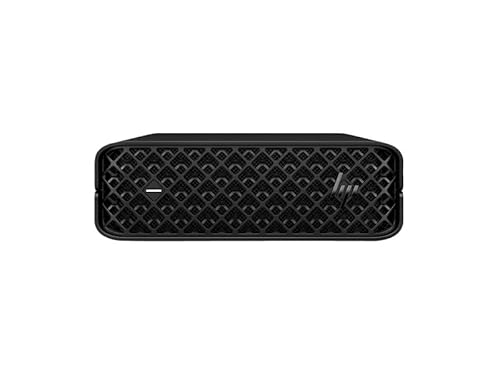
HP Z2 Mini G9
The HP Z2 Mini G9 is a compact workstation that meets ISV certifications for CAD and engineering software. It supports Intel Xeon or Core processors and NVIDIA RTX graphics. Owners report stable performance under heavy loads. The design is a bit boxy but solid.
Pros
- ISV certified for professional apps
- Strong multi-core performance
- Quiet under load
Cons
- Higher price for Xeon models
- Limited internal storage bays

Lenovo ThinkStation P360 Ultra
The Lenovo ThinkStation P360 Ultra is a small form factor workstation that packs up to a Core i9 processor and professional graphics. It has a unique design with handles for easy carry. Users appreciate the tool-less access to internals. The power brick is large, which might be a concern for some.
Pros
- Excellent multi-threaded performance
- Easy to upgrade
- Compact yet expandable
Cons
- Bulky external power supply
- Runs warm under full load

Intel NUC 13 Pro
The Intel NUC 13 Pro is a tiny PC that offers 13th Gen Intel Core processors. It is barely bigger than a smartphone, yet it can handle everyday tasks and even light photo editing. Users love its low power consumption and ease of mounting. It is not meant for heavy graphics work.
Pros
- Extremely small footprint
- Very quiet operation
- Low power usage
Cons
- No dedicated graphics
- Limited upgradeability

ASUS ProArt PA90
The ASUS ProArt PA90 is a compact workstation designed for creators. It features a 9th Gen Intel processor and NVIDIA Quadro graphics. Its unique cooling system uses a top-mounted fan that raises when under load. Owners report good color accuracy for video editing. The design is a bit tall for a compact unit.
Pros
- Professional-grade graphics
- Innovative cooling design
- Quiet at idle
Cons
- Older CPU architecture
- Limited storage expansion

Gigabyte BRIX Pro (GB-BSi7-12650H)
The Gigabyte BRIX Pro is a barebone mini PC that lets you install your own RAM and storage. It comes with a 12th Gen Intel Core i7 processor and supports up to 64GB RAM. This is ideal for users who want to customize their system. It lacks a discrete GPU, so it is not for gaming.
Pros
- Customizable RAM and storage
- Fast processor
- Compact and portable
Cons
- No discrete graphics
- Barebone requires assembly
Side by side
| # | Model | Processor | Best for | Score | Price |
|---|---|---|---|---|---|
| 1 | Apple Mac Studio with M2 Ultra | Apple M2 Ultra with 24-core CPU | Creative professionals needing max power | 9.4 | Check price |
| 2 | Dell OptiPlex 7000 Micro | Intel Core i5-12500T | Business users on a budget | 8.8 | Check price |
| 3 | HP Z2 Mini G9 | Intel Xeon W-1370P | Professional workstations with ISV certification | 9.1 | Check price |
| 4 | Lenovo ThinkStation P360 Ultra | Intel Core i9-12900K | Engineers and architects | 9.0 | Check price |
| 5 | Intel NUC 13 Pro | Intel Core i7-1360P | General productivity and media | 8.5 | Check price |
| 6 | ASUS ProArt PA90 | Intel Core i7-9700K | Content creators who need GPU power | 8.9 | Check price |
| 7 | Gigabyte BRIX Pro (GB-BSi7-12650H) | Intel Core i7-12650H | DIY enthusiasts and upgraders | 8.2 | Check price |
Questions worth asking
Can compact workstations handle heavy tasks like 3D rendering?
Yes, models with powerful CPUs and dedicated professional graphics, such as the HP Z2 Mini G9 or Lenovo ThinkStation P360 Ultra, can handle 3D rendering. They are small but built with robust cooling to manage heat.
Are compact workstations upgradeable?
It depends on the model. Some like the Lenovo ThinkStation P360 Ultra offer tool-less access to RAM and storage. Others like the Apple Mac Studio have soldered memory and storage, making upgrades impossible. Check the specifications before buying.
How do compact workstations compare to laptops in performance?
Compact workstations often outperform laptops because they use desktop-grade processors and graphics cards. They also have better cooling, allowing sustained performance. However, they lack portability and require an external monitor and keyboard.
What is the difference between a mini PC and a compact workstation?
A mini PC is typically a general-purpose computer with integrated graphics. A compact workstation is designed for professional use with higher-performance CPUs, ISV certification, and support for external GPUs. They are more expensive but offer reliability and performance.
Can I use a compact workstation for gaming?
Some compact workstations have discrete graphics chips that can handle light gaming, but they are not optimized for gaming. If gaming is a priority, consider a small form factor gaming PC instead.
How much RAM do I need in a compact workstation?
For basic office work, 16GB is sufficient. For video editing, CAD, or virtualization, consider 32GB or 64GB. Some models support up to 128GB, but that is only necessary for extreme workloads.
Are compact workstations quiet?
Many compact workstations are designed to be quiet at idle. Under heavy load, the fans may spin up, but some models like the Apple Mac Studio are known for silent operation even under stress. Read reviews to gauge noise levels.
Do compact workstations come with Wi-Fi?
Yes, most compact workstations include Wi-Fi and Bluetooth. However, some business models may require an optional module. Check the specifications to ensure wireless connectivity is included.
What is the warranty on compact workstations?
Warranty varies by brand. Most offer a standard one-year warranty, but you can often purchase extended coverage. Dell and HP offer three-year options. Apple includes one year of limited warranty and 90 days of support.
Can I mount a compact workstation behind a monitor?
Many compact workstations come with VESA mount holes, allowing you to attach them to the back of a monitor or under a desk. This saves even more space. Check the product details for VESA support.
Our pick
For most professionals, the HP Z2 Mini G9 is the best balance of performance and size, especially if you work with certified software. If you are deeply embedded in the Apple ecosystem and have a generous budget, the Mac Studio is unmatched. For budget-conscious buyers, the Dell OptiPlex 7000 Micro delivers dependable performance without breaking the bank.


