Top Computer Memory Picks for Smooth Multitasking
For most users, the Corsair Vengeance LPX 16GB DDR4 kit stands out as the best all-around choice, offering reliable performance and broad compatibility at a reasonable price. Its main strength is proven stability across Intel and AMD platforms, but it lacks RGB lighting, which some builders desire.
Upgrading your computer’s memory is one of the most cost-effective ways to boost system responsiveness. With so many options, choosing the right kit can be overwhelming.
We analyzed specifications and user feedback to help you find memory that fits your build and budget.
The best picks, ranked

Corsair Vengeance LPX 16GB (2x8GB) DDR4 3200MHz
The Corsair Vengeance LPX is a classic DDR4 kit known for its low-profile design and reliable performance. With 3200MHz speed and CL16 latency, it offers a great balance for gaming and daily tasks. Its heat spreader is efficient and fits under large CPU coolers.
Pros
- Proven stability on many motherboards
- Low profile fits most coolers
- Excellent price-to-performance
Cons
- No RGB lighting
- Not the fastest for extreme overclocking

G.Skill Trident Z5 RGB 32GB (2x16GB) DDR5 6000MHz
This G.Skill kit delivers cutting-edge DDR5 performance with 6000MHz speed and CL36 latency. The stylish RGB lighting and aluminum heat spreaders make it a visual centerpiece. It is optimized for Intel 12th/13th gen and AMD Ryzen 7000 platforms.
Pros
- High bandwidth for demanding games
- Stunning RGB with customizable lighting
- Great overclocking headroom
Cons
- Requires DDR5 motherboard and CPU
- Higher cost than DDR4

Crucial Ballistix 3200 MHz DDR4 16GB (2x8GB) CL16
Crucial Ballistix memory is built with carefully screened chips that often overclock well. This 16GB kit runs at 3200MHz but many users push it beyond 3600MHz with ease. Its rugged heat spreader keeps temperatures low during intense sessions.
Pros
- Excellent overclocking potential
- Solid build quality
- Competitive price
Cons
- Tall heat spreader may block some coolers
- No RGB option
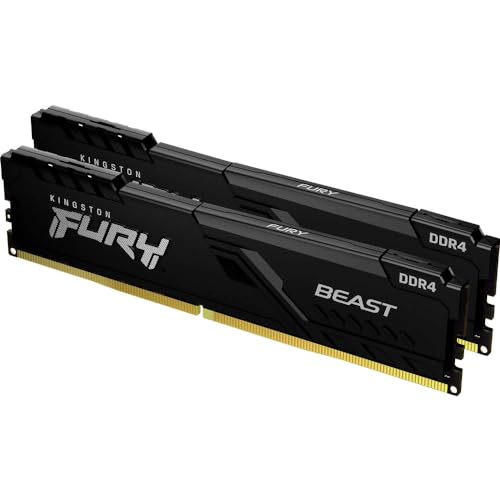
Kingston Fury Beast 32GB (2x16GB) DDR4 3200MHz
With 32GB capacity, this Kingston kit lets you run heavy applications, edit video, and keep dozens of browser tabs open without slowdown. It runs at 3200MHz with CL16 latency, offering dependable performance for productivity. The heat spreader has a sleek, aggressive look.
Pros
- Large capacity for multitasking
- Plug-and-play XMP support
- Reasonable price for 32GB
Cons
- Not the fastest latency
- No RGB on this model
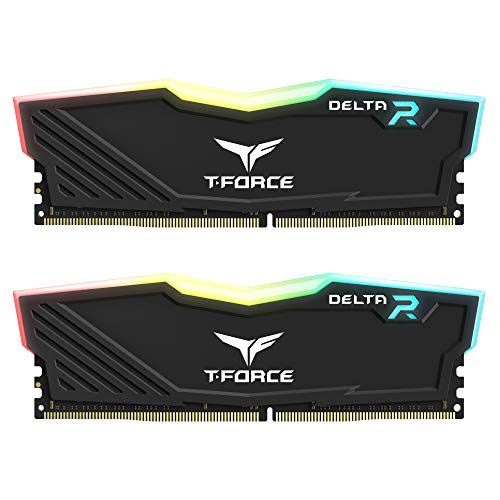
TEAMGROUP T-Force Delta RGB 16GB (2x8GB) DDR4 3600MHz
This T-Force kit is a favorite among AMD users because 3600MHz pairs well with Ryzen’s Infinity Fabric. The RGB lighting is vibrant and can be synced with major motherboard software. With CL18 latency, it delivers strong performance in gaming and productivity.
Pros
- Optimized for Ryzen performance
- Stunning RGB effects
- Good price for speed
Cons
- RGB requires software setup
- Slightly higher latency than CL16

Silicon Power Value Gaming DDR4 16GB (2x8GB) 3200MHz
If you are on a tight budget, this Silicon Power kit offers dependable 3200MHz performance at an attractive price. It has a simple black heat spreader that gets the job done. Many users report it runs at advertised speeds with XMP enabled.
Pros
- Very affordable
- Stable at advertised speeds
- Low-profile design
Cons
- No RGB or fancy aesthetics
- Limited overclocking potential
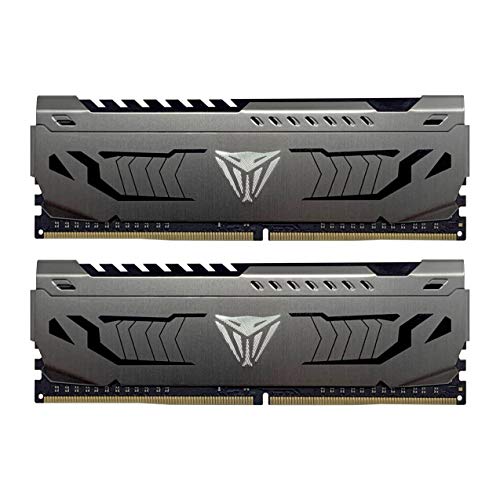
Patriot Viper Steel 16GB (2x8GB) DDR4 3600MHz
Patriot’s Viper Steel offers 3600MHz speed with CL17 latency, making it one of the fastest kits under a modest price. The steel heat shield looks sharp and provides efficient cooling. It works well on both Intel and AMD platforms.
Pros
- High speed for the price
- Attractive industrial design
- Good thermal performance
Cons
- No RGB
- Some boards may need manual tuning
What matters most
Side by side
| # | Model | Capacity | Best for | Score | Price |
|---|---|---|---|---|---|
| 1 | Corsair Vengeance LPX 16GB (2x8GB) DDR4 3200MHz | 16GB (2 x 8GB) | Best Overall for Most Builds | 9.4 | Check price |
| 2 | G.Skill Trident Z5 RGB 32GB (2x16GB) DDR5 6000MHz | 32GB (2 x 16GB) | Best for High-End Gaming and Performance | 9.2 | Check price |
| 3 | Crucial Ballistix 3200 MHz DDR4 16GB (2x8GB) CL16 | 16GB (2 x 8GB) | Best for Overclocking Enthusiasts | 9.0 | Check price |
| 4 | Kingston Fury Beast 32GB (2x16GB) DDR4 3200MHz | 32GB (2 x 16GB) | Best for Content Creators and Multitaskers | 8.8 | Check price |
| 5 | TEAMGROUP T-Force Delta RGB 16GB (2x8GB) DDR4 3600MHz | 16GB (2 x 8GB) | Best for AMD Ryzen Builds | 8.7 | Check price |
| 6 | Silicon Power Value Gaming DDR4 16GB (2x8GB) 3200MHz | 16GB (2 x 8GB) | Best Budget Option | 8.5 | Check price |
| 7 | Patriot Viper Steel 16GB (2x8GB) DDR4 3600MHz | 16GB (2 x 8GB) | Best for Performance on a Mid-Range Budget | 8.6 | Check price |
Good to know
What is the difference between DDR4 and DDR5?
DDR5 is the newer standard with higher speeds, lower power consumption, and increased bandwidth. It requires a compatible motherboard and CPU. DDR4 is older but still widely used and more affordable. Most new high-end systems use DDR5, while budget builds often use DDR4.
How much RAM do I need for gaming?
For modern gaming, 16GB is recommended as the minimum, while 32GB provides extra headroom for streaming or multitasking. Some games may recommend 16GB, but having more can prevent stuttering when running background applications.
Can I mix different brands of RAM?
Technically you can, but it is not recommended. Mixing different speeds, latencies, or voltages can lead to instability. For best performance, use identical modules from the same kit. If you must mix, ensure they have similar specifications and run at the slower speed.
What does CL (CAS Latency) mean?
CAS latency is the delay between the memory controller requesting data and the memory delivering it. Lower CL numbers mean faster response. For example, CL16 is faster than CL18 at the same speed. However, the impact is small in real-world use.
How do I install new RAM?
Power off your computer, unplug it, and open the case. Locate the memory slots on the motherboard. Align the notch on the module with the slot, then press down firmly until the clips click into place. Consult your motherboard manual for the correct slot configuration.
Do I need to enable XMP or DOCP?
Yes, to achieve the advertised speed, you must enable XMP (Intel) or DOCP (AMD) in the BIOS. Without it, memory runs at default lower speeds. This is a simple setting that unlocks the rated performance.
Can I use 32GB of RAM if my motherboard supports only 16GB?
No, the motherboard’s maximum capacity is a hard limit. Using more than supported will not work. Check your motherboard’s specifications before purchasing. If it supports a maximum of 16GB, stick to that limit.
Is RGB RAM worth the extra cost?
RGB RAM adds visual flair but does not improve performance. If you have a glass side panel and want aesthetic appeal, it may be worth it. Otherwise, non-RGB kits offer the same performance for less money.
What is the best RAM speed for Ryzen processors?
For Ryzen CPUs, 3600MHz is often considered the sweet spot because it aligns with the Infinity Fabric clock. However, 3200MHz also works well. The difference in gaming is minimal, so choose based on price.
Final word
For most users, the Corsair Vengeance LPX 16GB DDR4 kit remains the top pick due to its reliability and value. If you are building a new high-end system with DDR5 support, the G.Skill Trident Z5 32GB kit is an excellent investment. Budget-conscious builders will be satisfied with the Silicon Power Value Gaming memory, which offers solid performance without breaking the bank.


