Top Professional Computer Mice for Serious Work
The Logitech MX Master 3S stands out as the top pick for most professionals due to its exceptional ergonomics, high precision, and versatile connectivity, though its high price and large size may deter some.
A professional mouse is not just an accessory. It is a tool that can boost your productivity and comfort. Choosing the wrong one can lead to wrist strain or wasted time.
We looked at features that matter most in a work environment. That includes wireless reliability, battery life, button customization, and support for multiple devices. These mice are built for demanding tasks.
The top picks, ranked

Logitech MX Master 3S
The MX Master 3S is Logitech’s flagship productivity mouse. It features an 8K DPI sensor, quiet clicks, and MagSpeed electromagnetic scrolling. Its sculpted shape supports the hand well, and it can connect via Bluetooth or USB receiver to three devices. Battery lasts up to 70 days on a full charge.
Pros
- Extremely comfortable for long sessions
- Excellent scroll wheel and gesture button
- Works on any surface including glass
Cons
- Large size may not suit small hands
- Expensive compared to other mice

Logitech MX Anywhere 3
The MX Anywhere 3 shrinks the MX Master experience into a smaller package. It still features MagSpeed scrolling, 4000 DPI sensor, and can work on glass. It has a smaller footprint, making it ideal for travel. Battery life is up to 70 days, and it charges via USB-C.
Pros
- Very portable and lightweight
- Works on glass surfaces
- Quiet clicks
Cons
- Smaller size may be cramped for large hands
- Limited button customization

Logitech MX Vertical
The MX Vertical positions your hand at a natural 57-degree angle, reducing pressure on the wrist. It features a 4000 DPI sensor and can connect to three devices. It has a textured grip and a comfortable thumb rest. Battery life is around four months on a full charge.
Pros
- Promotes a natural handshake position
- Reduces muscle strain
- Long battery life
Cons
- Vertical design takes time to get used to
- Not ideal for precise tasks

Logitech G502 X Plus
The G502 X Plus is a gaming mouse that also excels in productivity. It features the LIGHTFORCE hybrid switches, a 25K HERO sensor, and RGB lighting. It has 13 programmable controls and adjustable weight. Wireless via LIGHTSPEED, it is responsive and reliable.
Pros
- Highly accurate sensor
- Many programmable buttons
- Can be used wired or wireless
Cons
- Gaming aesthetic may not suit all offices
- Software is complex

Razer Pro Click
The Razer Pro Click is designed for productivity with quiet mechanical switches. It has a 5G sensor with up to 16,000 DPI, and can connect to up to four devices. It supports both Bluetooth and 2.4GHz wireless. Battery lasts up to 50 hours on Bluetooth.
Pros
- Very quiet clicks
- Comfortable ergonomic shape
- Multi-device support
Cons
- Not as many programmable buttons
- Software can be resource heavy
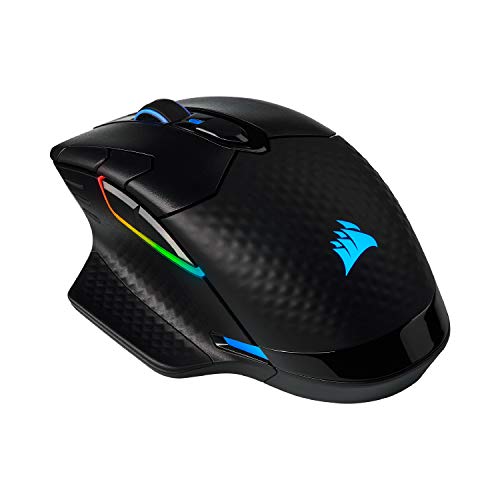
Corsair Dark Core RGB Pro SE
The Corsair Dark Core RGB Pro SE is a wireless mouse with a 18,000 DPI sensor. It features interchangeable side grips, nine programmable buttons, and supports both Bluetooth and 2.4 GHz wireless. It has a built-in charging mat compatibility.
Pros
- Swappable side grips for comfort
- High DPI sensor
- Good battery life
Cons
- Heavier than others
- Software requires account

Apple Magic Mouse
The Apple Magic Mouse is sleek and wireless. Its multi-touch surface lets you swipe between pages and scroll fluidly. It is rechargeable with a Lightning cable. It is optimized for macOS, but can work with Windows via Bluetooth.
Pros
- Excellent macOS integration
- Minimalist design
- Multi-touch gestures
Cons
- Charging port on bottom is inconvenient
- Not comfortable for long use
How to pick the right one
How they stack up
| # | Model | Sensor | Best for | Score | Price |
|---|---|---|---|---|---|
| 1 | Logitech MX Master 3S | 8,000 DPI | Overall best for professionals who need a versatile wireless mouse. | 9.4 | Check price |
| 2 | Logitech MX Anywhere 3 | 4000 DPI | Best compact mouse for professionals who travel. | 9.0 | Check price |
| 3 | Logitech MX Vertical | 4000 DPI | Best ergonomic mouse for reducing wrist strain. | 8.8 | Check price |
| 4 | Logitech G502 X Plus | 25,600 DPI | Best for professionals who also game and want high performance. | 8.7 | Check price |
| 5 | Razer Pro Click | 16,000 DPI | Best quiet mouse for silent workspaces. | 8.5 | Check price |
| 6 | Corsair Dark Core RGB Pro SE | 18,000 DPI | Best for professionals needing a high-performance wireless mouse with customization. | 8.3 | Check price |
| 7 | Apple Magic Mouse | Optical | Best for Mac users who prefer Apple’s ecosystem. | 8.0 | Check price |
Questions worth asking
What does DPI mean and what is a good DPI for professional work?
DPI stands for dots per inch. It measures how far the cursor moves per inch of physical movement. For professional work, a DPI of 1000 to 4000 is sufficient. Higher DPI is not necessary unless you have a high-resolution monitor.
Is a wireless mouse reliable enough for professional use?
Yes. Modern wireless mice use Bluetooth or 2.4GHz receivers. They have low latency and stable connections. Many professionals use wireless mice daily. Battery life has improved significantly.
How many programmable buttons do I need?
It depends on your workflow. Some mice have two extra buttons. Others have up to nine. If you use shortcuts frequently, more buttons can help. But too many buttons can be confusing. Start with a mouse that has at least two extra buttons.
Can I use a gaming mouse for professional work?
Yes. Gaming mice have high precision and programmable buttons. They are often very responsive. However, they may have aggressive designs and RGB lighting. Some gaming mice are subtle enough for the office.
What is the difference between an ergonomic mouse and a regular mouse?
An ergonomic mouse is designed to reduce strain. It may have a vertical shape, a contoured grip, or a thumb rest. Regular mice have a flat profile. Ergonomic mice can help prevent repetitive strain injuries.
Should I choose Bluetooth or a USB receiver?
Bluetooth is convenient because it does not require a dongle. But a USB receiver can provide a more stable connection. Some mice support both. For professional work, a USB receiver may be more reliable if you have many wireless devices.
How important is the scroll wheel?
The scroll wheel is important for navigating documents. A smooth and precise scroll wheel can improve efficiency. Some mice have free-spinning or ratcheted modes. Features like horizontal scrolling can be useful for spreadsheets.
Can I use a professional mouse with multiple computers?
Yes. Many professional mice support multi-device pairing. You can switch between computers with a button press. Some mice support Logitech Flow, which allows you to move the cursor between computers seamlessly.
What is the ideal weight for a professional mouse?
The ideal weight depends on personal preference. Some prefer a heavier mouse for stability, while others like a light mouse for quick movements. Most professional mice weigh between 100 and 150 grams. Try to find a weight that feels comfortable.
Do I need a mouse pad with a high-DPI mouse?
No, most modern mice work well on any surface. Some sensors work on glass and glossy surfaces. A mouse pad can still provide a uniform surface and improve glide, but it is not a necessity.
Our pick
Choose the Logitech MX Master 3S for the best overall balance of comfort, features, and performance. If you travel often, the MX Anywhere 3 is a compact alternative. For wrist pain, consider the MX Vertical. The Razer Pro Click is great for quiet environments. Gaming mice like the G502 X Plus offer high performance. Mac users will appreciate the Magic Mouse. Ultimately, the MX Master 3S is our top recommendation for most professionals.


