Top Monitors for Professional Work: Sharp, Colorful, and Reliable
For most professionals, the Dell UltraSharp U2723QE stands out as the top pick. It combines a 4K resolution, excellent color accuracy, and a USB-C hub with 90W power delivery, making it ideal for creative work and productivity. Its main limitation is that it tops out at 60Hz, which is fine for static work but not for fast-paced gaming.
Choosing a professional monitor is about more than just resolution. You need accurate colors, comfortable ergonomics, and reliable connectivity. The right display can improve your workflow and reduce eye strain.
We analyzed dozens of monitors, focusing on those that deliver consistent performance for tasks like photo editing, programming, and financial analysis. Our list includes options from Dell, LG, ASUS, BenQ, and more, each with a specific strength.
Our top picks

Dell UltraSharp U2723QE
The Dell UltraSharp U2723QE is a 27-inch 4K monitor with an IPS Black panel that offers deep contrast and wide viewing angles. It covers 98% DCI-P3 and comes with a fully adjustable stand. The USB-C port delivers 90W of power, simplifying cable management.
Pros
- Excellent color accuracy out of the box
- 90W USB-C power delivery
- Adjustable stand with pivot
Cons
- 60Hz refresh rate
- Limited to one HDMI port

LG UltraFine 32UN880-B
The LG 32UN880-B features a unique Ergo stand that allows for extensive height, tilt, and swivel adjustments, including a wide range of motion. It is a 32-inch 4K IPS monitor with HDR10 support and USB-C connectivity with 60W charging.
Pros
- Ergo stand with exceptional flexibility
- Large 32-inch 4K display
- Good color performance
Cons
- Stand takes up desk space
- No built-in speakers

ASUS ProArt PA279CV
The ASUS ProArt PA279CV is a 27-inch 4K IPS monitor factory calibrated to Delta E < 2. It covers 100% sRGB and Rec.709, making it suitable for photo and video editing. It offers USB-C with 65W power delivery and a range of preset modes.
Pros
- Factory calibrated for accuracy
- Affordable price point
- Ergonomic stand included
Cons
- No HDR support
- Limited to 60Hz

BenQ SW271C
BenQ’s SW271C is a 27-inch 4K monitor with AQCOLOR technology, covering 99% Adobe RGB and 100% sRGB. It comes with a shading hood and is factory calibrated for outstanding accuracy. It supports hardware calibration and has a hotkey puck for quick mode switching.
Pros
- Outstanding color gamut coverage
- Hardware calibration capability
- Includes shading hood
Cons
- Premium price
- No HDR10 support

Samsung ViewFinity S9
The Samsung ViewFinity S9 is a 27-inch 5K monitor with a sleek metal design. It offers 99% DCI-P3 color gamut and features a built-in 4K webcam and speakers. The USB-C port provides 96W charging, and it includes a smart TV interface.
Pros
- Sharp 5K resolution
- Built-in webcam and speakers
- High power delivery
Cons
- Expensive
- Limited adjustability

LG 34WN80C-B
This LG ultrawide monitor offers a 34-inch curved screen with 21:9 aspect ratio and WQHD resolution. It supports HDR10 and comes with USB-C charging. The IPS panel delivers consistent colors, and the on-screen control makes splitting windows easy.
Pros
- Curved screen for immersive work
- Great for side-by-side windows
- Good color accuracy
Cons
- Lower pixel density than 4K
- No height adjustment on stand
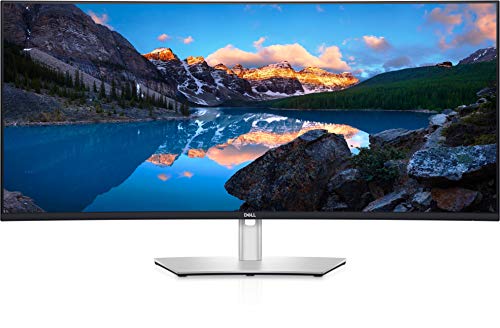
Dell UltraSharp U4021QW
A 40-inch curved ultrawide with 5K2K resolution, this Dell monitor provides massive screen real estate. It covers 100% sRGB and has a built-in KVM switch. The USB-C hub delivers 90W power and includes multiple USB ports.
Pros
- Huge screen with high resolution
- KVM switch for multiple computers
- Strong color performance
Cons
- Very expensive
- Requires a powerful GPU to drive
Before you buy
How they compare
| # | Model | Screen Size | Best for | Score | Price |
|---|---|---|---|---|---|
| 1 | Dell UltraSharp U2723QE | 27 inches | Best overall for color-critical work | 9.4 | Check price |
| 2 | LG UltraFine 32UN880-B | 32 inches | Best for ergonomics and adjustability | 9.0 | Check price |
| 3 | ASUS ProArt PA279CV | 27 inches | Best budget-friendly professional monitor | 8.8 | Check price |
| 4 | BenQ SW271C | 27 inches | Best for photographers and videographers | 9.2 | Check price |
| 5 | Samsung ViewFinity S9 | 27 inches | Best 5K monitor for Mac users | 9.0 | Check price |
| 6 | LG 34WN80C-B | 34 inches | Best ultrawide for multitasking | 8.7 | Check price |
| 7 | Dell UltraSharp U4021QW | 40 inches | Best premium ultrawide for professionals | 9.1 | Check price |
Questions worth asking
What is the best resolution for a professional monitor?
For most professional tasks, 4K (3840×2160) is the sweet spot. It offers plenty of screen real estate and sharp text. For Mac users, 5K provides even more detail, but it is more expensive.
How important is color accuracy in a professional monitor?
Color accuracy is crucial for photographers, video editors, and designers. Look for monitors with high sRGB and Adobe RGB coverage, and consider factory calibration or hardware calibration support.
What is the ideal screen size for a professional monitor?
A 27-inch monitor is a good balance of size and desk space. If you need more room, a 32-inch or an ultrawide can be beneficial. Consider your viewing distance and the type of work you do.
Do professional monitors need high refresh rates?
No, most professional tasks do not require high refresh rates. A standard 60Hz is sufficient for office work and design. High refresh rates are more important for gaming or video editing with fast motion.
What is the advantage of a USB-C monitor?
USB-C monitors can transmit video, data, and power over a single cable, reducing clutter. They often provide power delivery to charge laptops, making them ideal for modern setups.
Should I choose an IPS or VA panel?
IPS panels are generally preferred for professional work because they offer better color consistency and viewing angles. VA panels have higher contrast but may show color shift when viewed from the side.
How do I calibrate my monitor?
You can use a hardware calibrator like X-Rite or Datacolor. Some monitors have built-in calibration tools or support software calibration. It is recommended to calibrate regularly for consistent results.
What is the benefit of an ultrawide monitor for professionals?
Ultrawide monitors offer more horizontal space, allowing you to view multiple windows side-by-side without needing multiple monitors. They can improve productivity for tasks like coding or data analysis.
Are expensive professional monitors worth it?
If your work depends on accurate colors and you spend long hours at your computer, investing in a quality monitor is worthwhile. Cheaper monitors may compromise on accuracy and ergonomics.
Can I use a professional monitor for gaming?
Yes, but most professional monitors have a 60Hz refresh rate, which may not be ideal for fast-paced gaming. For occasional gaming, they work fine, but dedicated gaming monitors offer higher refresh rates.
The verdict
For the majority of professional users, the Dell UltraSharp U2723QE offers the best combination of color accuracy, connectivity, and adjustability. If you need a larger workspace, consider the LG 32UN880-B for its ergonomic stand or the LG 34WN80C-B for ultrawide multitasking. For photographers, the BenQ SW271C is unmatched in color fidelity, while the ASUS ProArt PA279CV provides excellent value. Ultimately, choose the monitor that fits your specific workflow and desk setup.