Top Tablets That Can Replace Your Laptop
The Apple iPad Pro 12.9-inch leads our list for creative professionals who need desktop-class performance in a portable tablet. It features the M2 chip and a stunning mini-LED display, but its high price and accessory costs are limitations.
Modern tablets have evolved far beyond media consumption, now rivaling laptops for productivity and creativity. With powerful processors, detachable keyboards, and precise styluses, they serve as full computers for many users.
Choosing the right one depends on your primary tasks, preferred operating system, and budget. We compared popular models to help you find the best fit for work, study, or creative projects.
The top picks, ranked

Apple iPad Pro 12.9-inch (M2)
The iPad Pro with M2 chip delivers blazing speed for video editing, 3D design, and multitasking. Its Liquid Retina XDR display offers exceptional brightness and contrast, ideal for HDR content creation.
Pros
- Outstanding performance
- Stunning XDR display
- Supports Apple Pencil hover
Cons
- Expensive with accessories
- iPadOS limits some desktop workflows

Microsoft Surface Pro 9
The Surface Pro 9 runs full Windows 11, providing compatibility with traditional desktop software. Its 13-inch PixelSense display is sharp, and the built-in kickstand offers flexibility.
Pros
- Full Windows OS
- Replaceable SSD
- Excellent typing cover
Cons
- Keyboard sold separately
- Fan noise under load

Samsung Galaxy Tab S9 Ultra
The Galaxy Tab S9 Ultra features a massive 14.6-inch AMOLED display, perfect for media and split-screen productivity. Its Snapdragon 8 Gen 2 processor handles demanding apps smoothly.
Pros
- Gorgeous AMOLED screen
- S Pen included
- Multitasking features
Cons
- Very large and heavy
- App optimization varies
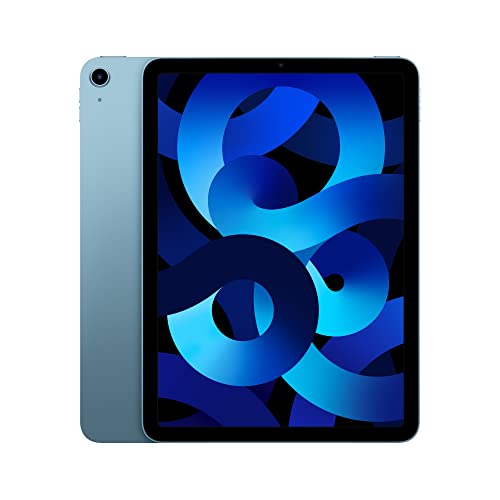
Apple iPad Air (5th Gen)
The iPad Air uses the M1 chip, delivering near-Pro performance at a lower price. It supports the second-generation Apple Pencil and Magic Keyboard, making it a versatile choice.
Pros
- Fast M1 chip
- Lightweight design
- Compatible with Magic Keyboard
Cons
- 60Hz refresh rate
- Limited to 256GB storage

Microsoft Surface Go 3
The Surface Go 3 is a compact tablet that runs full Windows, ideal for basic tasks like web browsing and email. It is lightweight and affordable, but performance is modest.
Pros
- Very portable
- Runs Windows
- Great for travel
Cons
- Weak performance
- Keyboard not included

Samsung Galaxy Tab S8
The Galaxy Tab S8 offers a 11-inch LTPS TFT display with a 120Hz refresh rate, providing smooth scrolling and note-taking. It includes the S Pen and has expandable storage.
Pros
- Included S Pen
- 120Hz display
- Good performance
Cons
- Display not AMOLED
- Software updates slower

Lenovo Tab P12 Pro
The Tab P12 Pro sports a 12.6-inch AMOLED display and four JBL speakers tuned by Dolby Atmos, making it excellent for streaming. It runs Android and supports the Precision Pen 3.
Pros
- Vibrant AMOLED panel
- Great speakers
- Sleek design
Cons
- Average performance
- Accessories can be pricey
How to pick the right one
The lineup, side by side
| # | Model | Chip | Best for | Score | Price |
|---|---|---|---|---|---|
| 1 | Apple iPad Pro 12.9-inch (M2) | Apple M2 with 8-core CPU | Creative professionals needing maximum performance | 9.4 | Check price |
| 2 | Microsoft Surface Pro 9 | 12th Gen Intel Core i5 or i7 | Windows users wanting a laptop replacement | 9.1 | Check price |
| 3 | Samsung Galaxy Tab S9 Ultra | Snapdragon 8 Gen 2 | Android fans who want a large screen | 9.0 | Check price |
| 4 | Apple iPad Air (5th Gen) | Apple M1 | Most users seeking a balanced iPad | 9.2 | Check price |
| 5 | Microsoft Surface Go 3 | Intel Pentium Gold or Core i3 | Budget-conscious users needing portability | 8.3 | Check price |
| 6 | Samsung Galaxy Tab S8 | Snapdragon 8 Gen 1 | Android users who want a premium tablet without the Ultra size | 8.7 | Check price |
| 7 | Lenovo Tab P12 Pro | Snapdragon 870 | Media lovers who watch a lot of video | 8.0 | Check price |
Common questions
Can a tablet really replace a laptop?
For many users, yes. Tablets with powerful processors and keyboard attachments can handle email, document editing, and even creative work. However, if you need specialized desktop software or extensive multitasking, you might still prefer a laptop.
What is the difference between iPadOS and Windows tablets?
iPadOS is optimized for touch and has a vast library of tablet-specific apps. Windows tablets run full Windows, giving access to traditional desktop applications like Microsoft Office and Adobe Creative Cloud. Windows offers more desktop compatibility, while iPadOS often feels smoother for touch.
Do I need a stylus for a productivity tablet?
Not necessarily, but a stylus is helpful for note-taking, drawing, or precise navigation. Many tablets support active styluses, such as the Apple Pencil or S Pen, which offer pressure sensitivity and palm rejection.
How much storage do I need?
For light use, 64GB is sufficient. For storing large files, videos, or many apps, consider 256GB or more. Some Android tablets offer expandable storage via microSD, which can be a cost-effective option.
Are tablets good for gaming?
Tablets with high refresh rate displays and powerful chips can run many mobile games smoothly. However, the game selection is more limited compared to PC or console. Some games offer controller support, enhancing the experience.
What is the best tablet for students?
Students often benefit from a lightweight tablet with a good stylus for note-taking and long battery life. The Apple iPad Air and Samsung Galaxy Tab S8 are popular choices due to their performance and accessory support.
How long do tablets typically last?
With proper care, a tablet can last four to five years or more. Software updates and battery degradation are factors. Higher-end models often receive updates longer than budget ones.
Can I connect my tablet to an external monitor?
Many tablets support video output via USB-C or proprietary connectors. This allows you to extend your display for presentations or productivity. Check the specifications for DisplayPort Alt Mode support.
The bottom line
The Apple iPad Pro 12.9-inch remains the ultimate tablet for creative professionals who demand top-tier performance and display quality. However, for most users, the iPad Air provides nearly 90 percent of the experience at a much lower cost, making it the sensible recommendation for students and office workers alike.


