Computers That Deliver: Top Picks for Every User
The Apple iMac (M4) is the best all-around computer for most people, offering a stunning 24-inch display and silent performance, but its limited ports and higher price may not suit everyone.
Finding the right computer can feel overwhelming with endless options. We’ve narrowed it down to seven standout models across categories.
Whether you need a powerful workstation, a gaming rig, or a simple family PC, this list covers it. Each pick is chosen for its value and reliability.
Our top picks

Apple iMac (M4, 24-inch)
The latest iMac combines the M4 chip with a vivid 4.5K Retina display in a slim all-in-one design. It’s whisper-quiet and handles demanding tasks with ease, though it lacks upgradeability.
Pros
- Stunning display with true-to-life colors
- Silent operation, no fan noise
- Excellent performance for creative apps
Cons
- Limited ports (only two Thunderbolt)
- Not user-upgradeable

Dell XPS 13 (9345)
The Dell XPS 13 is a sleek laptop with a virtually borderless display and long battery life. It’s perfect for on-the-go productivity, but the webcam placement is less than ideal.
Pros
- Featherlight and portable
- Battery lasts over 12 hours
- Premium build quality
Cons
- Limited port selection
- Webcam positioned below screen

MacBook Pro 14 (M4 Pro)
With the M4 Pro chip, this MacBook Pro handles 4K video editing and complex code compilation effortlessly. The Liquid Retina XDR display is bright and accurate, but the price is steep.
Pros
- Monster performance for demanding tasks
- Outstanding display for HDR content
- Great selection of ports (HDMI, SDXC)
Cons
- Expensive, especially with upgrades
- Heavier than some rivals

ASUS ROG Strix G16 (2024)
This gaming laptop packs an RTX 4060 GPU and a high-refresh-rate display, delivering smooth gameplay at 1080p. It also has a comfortable keyboard, but fans get loud under load.
Pros
- Excellent gaming performance for the price
- High refresh rate (165Hz) display
- Good thermal design for long sessions
Cons
- Bulky and heavy
- Battery life is short
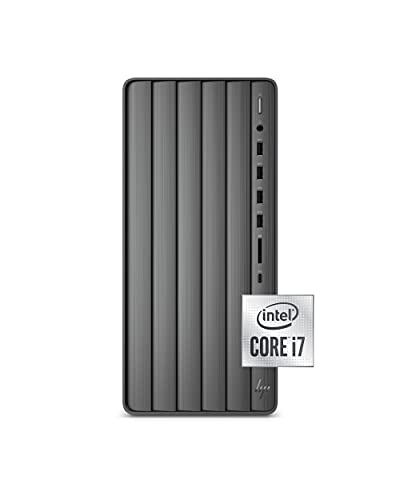
HP Envy Desktop (i7, 16GB)
The HP Envy Desktop offers a strong mix of performance and expandability at a reasonable price. It handles everyday tasks and light photo editing, but the design is a bit dated.
Pros
- Spacious storage combo
- Easy to open and upgrade
- Reliable performance for productivity
Cons
- Integrated graphics not for gaming
- No USB-C ports on front

Lenovo Yoga 7i (2-in-1)
The Lenovo Yoga 7i converts from laptop to tablet, offering touch and pen support. It’s great for note-taking and media consumption, but the stylus is sold separately.
Pros
- Versatile 2-in-1 design
- Bright and responsive touchscreen
- Good keyboard and trackpad
Cons
- Pen not included
- Average battery life

Microsoft Surface Studio 2+
The Surface Studio 2+ is an all-in-one with a stunning 28-inch PixelSense display that tilts into a canvas. It’s a niche tool with premium pricing, but its zero-gravity hinge is unmatched.
Pros
- Exceptional display with true color accuracy
- Unique adjustable hinge for drawing
- Powerful specs for creative workloads
Cons
- Very expensive
- Older processor generation
The lineup, side by side
| # | Model | Processor | Best for | Score | Price |
|---|---|---|---|---|---|
| 1 | Apple iMac (M4, 24-inch) | Apple M4 chip with 10-core CPU | Best overall for creative professionals and families | 9.4 | Check price |
| 2 | Dell XPS 13 (9345) | Intel Core Ultra 7 155H | Best Windows ultraportable for professionals | 9.2 | Check price |
| 3 | MacBook Pro 14 (M4 Pro) | Apple M4 Pro chip with 12-core CPU | Best for video editors and developers | 9.3 | Check price |
| 4 | ASUS ROG Strix G16 (2024) | Intel Core i7-13650HX | Best gaming laptop under current price | 9.0 | Check price |
| 5 | HP Envy Desktop (i7, 16GB) | Intel Core i7-13700 | Best budget desktop for home office | 8.6 | Check price |
| 6 | Lenovo Yoga 7i (2-in-1) | Intel Core Ultra 5 125U | Best 2-in-1 for versatility | 8.8 | Check price |
| 7 | Microsoft Surface Studio 2+ | Intel Core i7-11370H | Best for digital artists and designers | 8.9 | Check price |
How to pick the right one
Frequently asked questions
What is the best computer for everyday use?
For most people, a mid-range laptop like the Dell XPS 13 or the HP Envy Desktop is ideal. They handle web browsing, office apps, and streaming without breaking the bank.
How much RAM do I need in a computer?
8GB is the minimum for basic tasks, but 16GB is recommended for smooth multitasking and future-proofing. Creative pros and gamers may want 32GB.
Is a desktop or laptop better for gaming?
Desktops generally offer better performance per dollar and easier upgrades. However, laptops like the ASUS ROG Strix G16 provide good gaming performance in a portable form.
What is the difference between an SSD and an HDD?
SSDs are much faster, more durable, and quieter than HDDs. They make booting up and loading programs quicker. Opt for an SSD as your primary drive.
Can I upgrade my computer’s RAM later?
Many desktops allow easy RAM upgrades. Some laptops have soldered RAM, so check the specifications. For example, the HP Envy Desktop is easy to upgrade, while the MacBook Pro is not.
What is the best computer for video editing?
The MacBook Pro 14 with M4 Pro is excellent for video editing due to its high-performance chip and color-accurate display. The Microsoft Surface Studio 2+ is also great for editing on a large screen.
Are 2-in-1 laptops worth it?
If you enjoy touch input and pen support, a 2-in-1 like the Lenovo Yoga 7i is versatile. But if you rarely use the touchscreen, a traditional laptop may offer better value.
How long do computers last?
With proper care, a computer can last 5 to 8 years. Upgrading RAM and storage can extend its life. However, software demands increase, so performance may become outdated.
Final word
For most users, the Apple iMac (M4) delivers the best combination of performance, design, and user experience. If you need portability, the Dell XPS 13 is the top Windows choice. Gamers should pick the ASUS ROG Strix G16 for its price-to-performance ratio.