Controller Charging Docks That Keep You in the Game
The PowerA DualSense Charging Station stands out as the top pick for PlayStation owners, offering a snug fit and fast charging without the bulk. Its main advantage is the simple drop-and-charge design with LED indicators. The main limitation is that it only works with DualSense controllers, not other brands.
Tired of swapping batteries or dealing with tangled cables? A charging dock keeps your controllers powered and ready. With so many options, finding the right one can be tricky. We compared top models to help you choose the best for your setup.
Whether you own an Xbox Series X|S or a PlayStation 5, a good dock eliminates the hassle of low battery warnings. Our selection includes docks with different features and price points. Read on to see which one fits your gaming style.
The shortlist, ranked

PowerA DualSense Charging Station
The PowerA DualSense Charging Station is an officially licensed product that charges two controllers simultaneously. Its design mirrors the PS5 aesthetic, and the controllers snap in securely with a satisfying click. LED indicators show charging status, and the included USB-C cable connects to the console or a wall adapter.
Pros
- Snug fit for controllers
- Fast charging speed
- Compact footprint
Cons
- Only for PS5 controllers
- Cable is short

Insignia Dual Charging Station for Xbox Series X|S
Insignia’s charging station offers a reliable way to charge two Xbox controllers at once. It comes with two rechargeable battery packs, eliminating the need for AA batteries. The dock uses a simple drop-in design, and the controllers sit upright, saving space. An LED on each bay indicates charging status.
Pros
- Affordable price
- Battery packs included
- Space-saving vertical design
Cons
- LED indicators are small
- No overcharge protection
Razer Universal Quick Charging Stand for Xbox
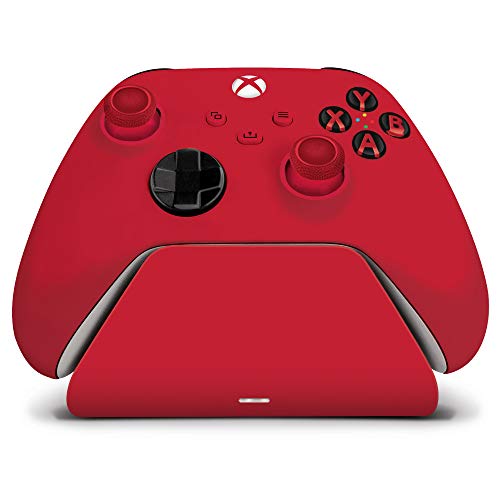
Razer’s Quick Charging Stand is designed for Xbox Series X|S and Xbox One controllers. It delivers a full charge in under three hours, making it one of the fastest options. The stand features a weighted base and rubber grips to keep controllers secure. It includes a 3-meter braided cable for flexible placement.
Pros
- Very fast charging
- Sturdy build
- Long cable included
Cons
- No battery packs included
- Premium price
OIVO Charging Dock for PS5 Controller
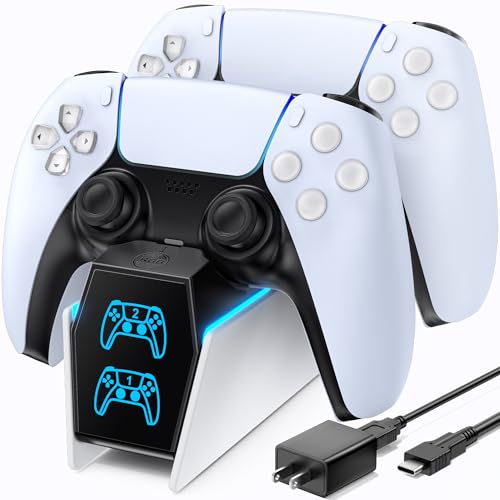
OIVO’s charging dock goes beyond simple charging. It charges two DualSense controllers and also includes a cooling fan for the console and two headset hooks. The dock has a sleek black design with LED indicators. Controllers are placed on the dock with the charging port facing down, which is a bit different but works well.
Pros
- Multi-function design
- Charges and cools
- Good value for features
Cons
- Controllers sit horizontally
- Fan can be noisy

NexiGo PS5 Controller Charging Dock
NexiGo’s charging dock is a straightforward solution for PS5 owners. It charges two controllers simultaneously and uses a USB-C connection. The dock has a low-profile design that fits well under a monitor. Users report that the magnetic connection is strong, and the LED indicators clearly show charging status.
Pros
- Strong magnetic connection
- Compact design
- Long cable
Cons
- No battery packs included
- Only for PS5 controllers

Venom Dual Charging Dock for Xbox Series X|S
Venom’s Dual Charging Dock comes with two high-capacity rechargeable battery packs (1500mAh each). The dock charges both controllers at once and features a sleek black design. The battery packs snap into the controllers, and the dock has a simple drop-in mechanism. It includes a USB-C cable but no wall adapter.
Pros
- High-capacity battery packs
- Dual charging
- Good build quality
Cons
- No wall adapter included
- Indicator lights are dim
Amazon Basics Dual Charging Station for Xbox
Amazon Basics offers a simple dual charging station for Xbox controllers. It includes two rechargeable battery packs and a charging dock. The design is functional rather than flashy, with two bays that hold controllers vertically. It uses a USB-C connection and has basic LED indicators. This is a good entry-level option.
Pros
- Very affordable
- Battery packs included
- Easy to set up
Cons
- Lower battery capacity
- Basic design
How they compare
| # | Model | Compatibility | Best for | Score | Price |
|---|---|---|---|---|---|
| 1 | PowerA DualSense Charging Station | PlayStation 5 DualSense and DualSense Edge | PlayStation 5 owners who want a sleek, official-licensed dock | 9.4 | Check price |
| 2 | Insignia Dual Charging Station for Xbox Series X|S | Xbox Series X|S, Xbox One | Xbox users who want a budget-friendly dual charger | 9.0 | Check price |
| 3 | Razer Universal Quick Charging Stand for Xbox | Xbox Series X|S, Xbox One | Xbox players who want fast charging with a premium feel | 9.2 | Check price |
| 4 | OIVO Charging Dock for PS5 Controller | PlayStation 5 DualSense | PS5 owners who want extra features like cooling and headset stands | 8.7 | Check price |
| 5 | NexiGo PS5 Controller Charging Dock | PlayStation 5 DualSense | PS5 users who want a simple, reliable dock with a long cable | 8.9 | Check price |
| 6 | Venom Dual Charging Dock for Xbox Series X|S | Xbox Series X|S, Xbox One | Xbox gamers who want a dock with replaceable battery packs | 8.5 | Check price |
| 7 | Amazon Basics Dual Charging Station for Xbox | Xbox Series X|S, Xbox One | Budget-conscious Xbox users who want a no-frills dock | 8.2 | Check price |
How to pick the right one
Questions worth asking
Can I charge my controller with the console off?
Most docks require the console to be on or in rest mode to provide power through USB. Some docks come with a wall adapter for independent charging. Check the product specifications to see if it includes an adapter.
Will a charging dock damage my controller’s battery?
No, modern controllers use lithium-ion batteries that handle charging well. Most docks have overcharge protection, which stops charging once the battery is full. Leaving a controller on the dock overnight is generally safe.
Do I need to remove my controller’s battery pack to use an Xbox charging dock?
Yes, for Xbox controllers, you must replace the AA batteries with the included rechargeable battery packs. The dock charges these packs directly through the controller’s charging contacts. The packs are designed to fit perfectly.
Can I use a PS5 charging dock with a PS4 controller?
No, PS5 charging docks are specifically designed for the DualSense controller. The charging pins are positioned differently. PS4 controllers require their own dock or can be charged via USB cable.
How long does it take to fully charge a controller?
Charging times vary by dock and battery capacity. Typically, it takes 3 to 5 hours for a full charge. Some fast-charging docks can do it in under 3 hours. Refer to the product manual for exact times.
What should I do if my controller doesn’t fit the dock?
If your controller doesn’t fit, check compatibility. For Xbox, ensure you have installed the rechargeable battery pack correctly. For PS5, make sure the controller is aligned with the charging pins. If problems persist, contact the manufacturer.
Are there docks that charge both Xbox and PlayStation controllers?
Yes, there are universal docks that have interchangeable inserts for different controllers. However, they may not charge both at the same time. Look for products that specifically mention multi-platform support.
Can I use a dock while my controller is in a protective case?
Most docks require direct contact with the controller’s charging port or contacts. A thick case may prevent proper alignment. It is best to remove the controller from its case before placing it on the dock.
What is the difference between a charging dock and a charging cable?
A charging dock provides a convenient place to store and charge controllers without plugging in a cable each time. It often charges two controllers simultaneously. A cable is cheaper but requires connecting each controller individually and leaves it lying around.
Do all charging docks come with a wall adapter?
No, many docks rely on the console’s USB port for power. Some include a wall adapter, while others do not. If you want to charge without the console on, look for a dock that includes a wall adapter.
Our take
For PlayStation 5 owners, the PowerA DualSense Charging Station is the best overall choice due to its perfect fit and reliable charging. For Xbox players, the Razer Universal Quick Charging Stand offers the fastest charging and a premium build, making it worth the investment. If you are on a budget, the Insignia Dual Charging Station provides solid performance at a lower price.