Which Controller Charging Station Fits Your Setup?
OIVO’s PS5 Controller Charging Station leads for most DualSense owners, with dual contact-pin slots and an LED indicator for fast status checks. Fosmon’s PS5 DualSense Charging Station matches that speed for less. BEBONCOOL’s Xbox Series X/S Controller Charging Station suits owners who want rechargeable packs instead of AA batteries.
OIVO’s PS5 Controller Charging Station suits most DualSense owners who want two controllers charged without cables. Dual contact pins line up automatically, and an LED strip flags status at a glance. It only works with PS5 controllers, so Xbox and Switch owners need a different dock entirely.
Battery type, connector style, and console lineup complicate this pick fast. We compared listed specifications and owner feedback on Amazon against real setups, from Xbox AA-battery replacement to Switch Joy-Con charging.
Our top picks
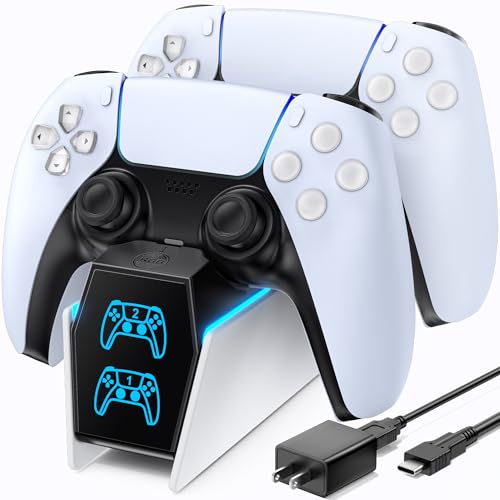
OIVO PS5 Controller Charging Station
Two gold-plated contact pins let this dock charge a pair of DualSense controllers the moment they’re set down. A single LED strip cycles color to flag charging progress and full status. Flat and compact, the base sits on a shelf or TV stand without extra clamps.
Pros
- Charges two controllers at once without any cables
- Contact pins line up controllers automatically on contact
- Compact base fits tight desk and shelf spaces
Cons
- Works only with PS5 DualSense controllers
- LED strip skips individual battery percentage readouts

Fosmon PS5 DualSense Charging Station
Fosmon uses the same contact-pin layout as pricier docks but at a lower cost. Each slot gets its own LED that switches off once a controller reaches full charge. A weighted base keeps the dock from tipping when a controller drops in fast.
Pros
- Separate LED per slot instead of one shared light
- Weighted base resists tipping during quick drop-offs
- Costs less than similarly specced PS5 docks
Cons
- No pass-through port for the PS5 console itself
- Included cable runs shorter than some rival docks

BEBONCOOL Xbox Series X/S Controller Charging Station
Two rechargeable battery packs ship with this dock, replacing the AA compartment cover on Xbox Series controllers. Setting a controller on the contact pins charges that pack directly. A shared LED confirms both slots are drawing power.
Pros
- Rechargeable packs replace disposable AA batteries
- Included adapter extends compatibility to Xbox One pads
- Cuts the recurring cost of buying AA cells
Cons
- Shared LED can’t show which slot is charging
- Battery packs hold less capacity than standalone rechargeable kits

PowerA Charging Stand for Xbox Series X|S
Xbox licenses this vertical dock, and its dual-slot layout echoes the console’s own design. It charges Xbox Play and Charge Kit battery packs, sold separately from the stand. Each slot carries its own status LED to track progress.
Pros
- Officially licensed styling matches the Xbox Series console
- Vertical layout uses less desk space than flat docks
- Per-slot LED tracks charge progress individually
Cons
- Xbox Play and Charge battery packs aren’t included
- Needs that specific rechargeable pack, not AA batteries

Insten 4-Port Charging Dock for Nintendo Switch Joy-Con
Four Joy-Con controllers fit at once on this dock’s spring-loaded contact rails. Every one of the four slots has its own LED that shuts off at full charge. An upright design keeps the Joy-Cons visible instead of stashed in a drawer.
Pros
- Charges four Joy-Con controllers at the same time
- Spring-loaded rails hold each Joy-Con securely
- Upright layout keeps controllers visible and ready to grab
Cons
- Doesn’t fit the Switch Pro Controller or PS5/Xbox pads
- Joy-Con straps have to come off before docking

Venom Twin Docking Station
Rather than contact pins, this cradle holds two controllers upright while short USB cables plug directly into each one. That approach spans PS4, PS5, and Xbox controllers as long as the port matches, not just one console family. The tradeoff is plugging in every cable instead of just setting a controller down.
Pros
- Fits any controller with a USB-C or Micro-USB port
- One cradle covers mixed console setups at once
- No proprietary contacts around to wear out
Cons
- No dock-side LED, so status depends on the controller
- Cables need reconnecting each time, unlike contact-pin docks
Skywin PS5 Controller Charging Dock
A wood-grain finish sets this single-slot dock apart, built to sit visibly on a desk rather than hide behind a monitor. A ring LED at the base glows while charging and fades once the DualSense is full. Multi-player households will need a second unit, since it holds just one controller.
Pros
- Wood-grain finish looks intentional on an open desk
- Ring LED signals charging without checking the controller itself
- Stable base keeps a single controller upright and visible
Cons
- Holds only one controller at a time
- Costs more per controller than multi-slot docks
How to choose
Contact-Pin Docks Versus Cable-Based Charging Spring-loaded contact pins line up with the metal strip on a DualSense or Joy-Con. Setting the controller down completes the circuit, no cable required. Cable-based stands like the Venom Twin Docking Station work differently, holding a short USB cord that plugs into the controller’s port. Daily charging favors contact pins for speed, while cable cradles adapt across console families on one stand.
How Many Controllers Does a Dock Actually Need to Charge? Two-slot docks dominate the PS5 and Xbox market, matching how most households keep a backup controller for local co-op. Four slots appear on the Insten Switch dock instead, since Joy-Cons sell and get used in pairs per player. Households with three or more regular players should look at four-slot docks rather than doubling up two-slot units.
Matching a Charging Dock to Xbox, PS5, or Switch Every contact-pin dock is built around one console’s controller shape. A PS5 dock will not charge an Xbox controller, and the reverse holds true too. Xbox Series X/S controllers complicate things further, since they ship with AA batteries instead of a built-in rechargeable cell. BEBONCOOL solves that gap with included rechargeable packs that swap in for the AA cover. PowerA’s licensed stand takes the opposite route, expecting buyers to already own an Xbox Play and Charge Kit.
When a Single-Slot or Display Dock Makes Sense A two-slot dock sits half-empty most nights in a single-player household. Skywin’s dock fills that gap with one contact-pin slot and a finish meant to stay visible on a desk. Players who want a charged controller on display, without a bulky two-slot base, fit this case well. Multi-controller households should skip single-slot docks and prioritize capacity instead.
How they compare
| # | Model | Compatible controllers | Best for | Score | Price |
|---|---|---|---|---|---|
| 1 | OIVO PS5 Controller Charging Station | PS5 DualSense | Best overall | 9.4 | Check price |
| 2 | Fosmon PS5 DualSense Charging Station | PS5 DualSense | Best value | 9.1 | Check price |
| 3 | BEBONCOOL Xbox Series X/S Controller Charging Station | Xbox Series X/S, Xbox One with adapter | Best for Xbox Series controllers | 8.8 | Check price |
| 4 | PowerA Charging Stand for Xbox Series X|S | Xbox Series X/S | Best officially licensed | 8.6 | Check price |
| 5 | Insten 4-Port Charging Dock for Nintendo Switch Joy-Con | Nintendo Switch Joy-Con, up to 4 | Best for Nintendo Switch Joy-Con | 8.4 | Check price |
| 6 | Venom Twin Docking Station | Any USB-C or Micro-USB controller | Best for cable-based charging | 8.2 | Check price |
| 7 | Skywin PS5 Controller Charging Dock | PS5 DualSense | Best for desk display | 8.0 | Check price |
Good to know
How do controller charging stations work?
Spring-loaded contact pins touch a metal strip on the back of the controller. Setting it down completes the circuit and starts the charge, no cable involved. Cable-based stands connect through the controller’s port instead.
Do Xbox Series X/S controllers need a battery pack for a dock to work?
Yes, since Xbox Series X/S controllers use AA batteries by default rather than a built-in cell. BEBONCOOL’s dock includes rechargeable packs that replace the AA cover. PowerA’s Xbox stand instead requires a separately purchased Play and Charge Kit.
Can one charging station handle both PS5 and Xbox controllers?
Contact-pin docks are shaped for a single console’s controller and won’t fit the other brand. A cable-based cradle such as the Venom Twin Docking Station can bridge console families since it plugs into each controller’s port directly.
What is the best controller charging station for Nintendo Switch Joy-Con?
Insten’s 4-Port Charging Dock is built specifically for Joy-Con controllers, holding up to four at once on spring-loaded rails. It won’t charge a Switch Pro Controller or any PS5 or Xbox pad.
Is a contact-pin dock better than a USB cable charging stand?
Contact pins win on daily convenience, since setting a controller down starts the charge automatically. Cable stands trade that ease for flexibility, working across consoles as long as the port matches.
How many controllers can a charging dock hold at once?
Most PS5 and Xbox docks charge two controllers at a time. Insten’s Switch dock charges four Joy-Cons simultaneously, while single-slot picks like the Skywin dock handle just one.
Which charging dock works best for a visible desk setup?
Skywin’s PS5 Controller Charging Dock uses a wood-grain finish built for visibility rather than hiding behind a monitor. Its single slot suits a desk used by one primary player.
Does the PowerA Xbox charging stand include battery packs?
No. It charges Xbox Play and Charge Kit packs, which are sold separately. Buyers need to already own or purchase that kit for the stand to work.
Is a two-slot or four-slot dock better for a multi-player household?
Households with three or more regular players get more use from a four-slot dock like the Insten Switch station than from doubling up two-slot PS5 or Xbox docks.
The bottom line
OIVO’s PS5 Controller Charging Station remains the strongest overall pick for most DualSense owners, since dual contact pins and a clear LED cover daily charging without extra steps. Xbox Series X/S owners should pick BEBONCOOL’s station instead, because its included rechargeable packs cut the recurring cost of AA batteries. Households running three or more Joy-Cons get more value from Insten’s 4-Port dock than from doubling up a two-slot PS5 or Xbox stand.