Top Curved Monitors for Immersive Work and Play
The Samsung Odyssey G7 leads our list for its fast 240Hz refresh rate and deep 1000R curve that wraps around your vision. It is best for competitive gamers who want immersion without sacrificing speed. Its main limitation is the aggressive curve that may bother productivity users.
Curved monitors have moved from novelty to necessity for many users. They reduce eye strain and create a more immersive viewing experience.
Whether you are gaming, editing video, or managing spreadsheets, a curved screen can boost productivity and enjoyment. Here are the top picks across categories.
What to look for
What we recommend

Samsung Odyssey G7 32-Inch Curved Gaming Monitor
This 1000R curved display offers a 240Hz refresh rate and 1ms response time, making it a top choice for serious gamers. The QLED panel delivers vivid colors and deep blacks, while G-Sync and FreeSync compatibility reduces tearing. Owners praise the immersive curve and smooth gameplay, but note that the aggressive curvature may take time to adjust.
Pros
- Excellent motion clarity
- High contrast ratio
- Adjustable stand with RGB lighting
Cons
- Curve may be too aggressive for some
- Expensive compared to flat monitors

LG 34GN850-B UltraGear Curved Gaming Monitor
This 34-inch Nano IPS panel offers a 160Hz refresh rate (overclocked) and a 21:9 aspect ratio that expands your field of view. The 3800R curvature is subtle yet effective. It covers 98% of DCI-P3 color gamut, making it great for both gaming and content creation. Users appreciate the crisp text and minimal ghosting.
Pros
- Wide color gamut
- Fast response time
- Height and tilt adjustable stand
Cons
- Requires a powerful GPU to run games
- No USB-C port

Dell S3422DWG Curved Gaming Monitor
A 34-inch VA panel with 144Hz refresh rate and 1ms MPRT response. The 1800R curve provides a comfortable wrap. It supports AMD FreeSync Premium Pro and has a solid stand. Owners say it delivers impressive performance for the price, though some note slight smearing in dark scenes.
Pros
- Great price for ultrawide
- Good contrast
- Multiple inputs including DisplayPort and HDMI
Cons
- No USB-C
- Speakers are weak

Samsung Odyssey G9 49-Inch Dual QHD Curved Gaming Monitor
This massive 49-inch monitor has a 1000R curve that mimics the human eye’s field of view. It offers a 240Hz refresh rate, 1ms response time, and Dual QHD resolution (5120×1440). The QLED panel delivers stunning visuals. It is a behemoth that requires a large desk and a high-end GPU.
Pros
- Immersive 1000R curve
- Superb contrast and brightness
- G-Sync and FreeSync support
Cons
- Very expensive
- Limited to 60Hz over HDMI
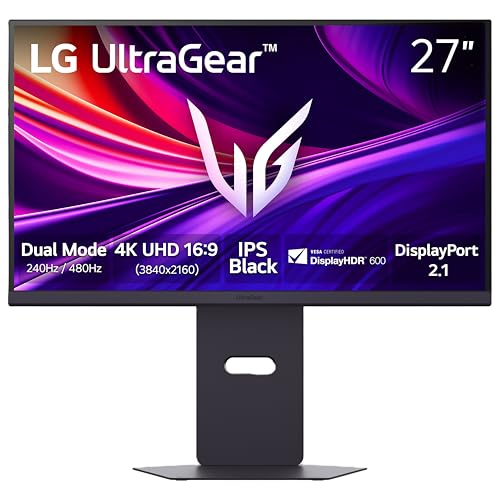
LG 27GN950-B UltraGear 4K Nano IPS Curved Gaming Monitor
This 27-inch monitor features a 4K UHD resolution with a 144Hz refresh rate (overclockable to 160Hz). The Nano IPS panel offers 98% DCI-P3 color accuracy. It supports HDMI 2.1, making it future-proof for next-gen consoles. Owners love the sharp image, but the 1000R curve is not as deep as others.
Pros
- Sharp 4K resolution
- Fast refresh rate
- Wide color gamut
Cons
- Requires powerful GPU for 4K gaming
- No built-in speakers

MSI Optix MAG342CQR Curved Gaming Monitor
A 34-inch VA panel with 3440×1440 resolution and 144Hz refresh rate. The 1500R curve is comfortable for daily use. It includes AMD FreeSync and a low blue light mode. Owners find it a solid budget ultrawide with good color reproduction, though brightness could be higher.
Pros
- Affordable for features
- Good contrast
- Thin bezels
Cons
- Stand is not very adjustable
- No USB-C

Acer Predator X34 GS Curved Gaming Monitor
This 34-inch ultrawide monitor features a 3440×1440 resolution and a 180Hz refresh rate (overclocked). It has NVIDIA G-Sync Ultimate for tear-free gaming. The 1900R curve provides a balanced wrap. Users praise the build quality and color accuracy, but the price is steep.
Pros
- G-Sync Ultimate
- Excellent color accuracy
- Fast refresh rate
Cons
- Expensive
- Large footprint
Side by side
| # | Model | Screen Size | Best for | Score | Price |
|---|---|---|---|---|---|
| 1 | Samsung Odyssey G7 32-Inch Curved Gaming Monitor | 32 inches | Competitive gaming with fast-paced action | 9.4 | Check price |
| 2 | LG 34GN850-B UltraGear Curved Gaming Monitor | 34 inches | Ultrawide immersive gaming and multitasking | 9.2 | Check price |
| 3 | Dell S3422DWG Curved Gaming Monitor | 34 inches | Budget-friendly ultrawide gaming | 9.0 | Check price |
| 4 | Samsung Odyssey G9 49-Inch Dual QHD Curved Gaming Monitor | 49 inches | Maximum immersion for sim racing and flight | 9.1 | Check price |
| 5 | LG 27GN950-B UltraGear 4K Nano IPS Curved Gaming Monitor | 27 inches | 4K gaming with high refresh rates | 8.9 | Check price |
| 6 | MSI Optix MAG342CQR Curved Gaming Monitor | 34 inches | Casual gaming and productivity | 8.7 | Check price |
| 7 | Acer Predator X34 GS Curved Gaming Monitor | 34 inches | High-end gaming with G-Sync Ultimate | 8.8 | Check price |
Frequently asked questions
What is the benefit of a curved monitor?
A curved monitor reduces eye strain by matching the natural curvature of your eyes. It also provides a more immersive viewing experience, especially for gaming and watching movies, by filling more of your peripheral vision.
What do the curve numbers mean?
The curve number represents the radius of the circle in millimeters. A lower number means a tighter curve. For example, 1800R is a gentler curve, while 1000R is more aggressive. Choose based on your usage: 1800R is good for general use, 1000R for gaming immersion.
Are curved monitors good for office work?
Yes, but the ideal curve is subtle. A 1800R or 1900R curve can reduce eye fatigue and provide a more uniform distance from your eyes to the screen. Avoid super-ultrawide curves if you work with spreadsheets or design software, as they may distort lines.
Can curved monitors be used for professional color work?
Yes, many curved monitors cover a wide color gamut like DCI-P3 or Adobe RGB. Look for factory calibration and high color accuracy ratings if you do photo or video editing. However, some professionals prefer flat panels for absolute accuracy.
Do curved monitors have dead pixels?
Dead pixels can occur on any monitor. Check the manufacturer’s warranty for dead pixel policies. Many brands have a zero dead pixel guarantee for a certain period. Read user reviews to gauge the likelihood of issues.
What is the best size for a curved monitor?
For most users, 27 to 34 inches is ideal. A 27-inch curve is subtle, while 34-inch ultrawide gives a wider field. Larger sizes like 49 inches are for specific setups and require more desk space and GPU power.
Can I use a curved monitor for console gaming?
Yes, if the monitor supports the console’s output. Look for HDMI 2.1 for 4K at 120Hz on next-gen consoles. Some curved monitors have earned ‘Designed for Xbox’ or ‘PS5 Ready’ tags. Ensure the refresh rate is supported over the connection.
Are curved monitors more expensive than flat ones?
Generally, curved monitors cost a bit more than equivalent flat models due to the manufacturing process. However, prices have dropped, and you can find budget curved monitors. Compare specs to get the best value.
The verdict
For most users, the Samsung Odyssey G7 is the best curved monitor overall, balancing performance, immersion, and reliability. If you need an ultrawide for productivity and gaming, the LG 34GN850-B is a superb choice. For a budget ultrawide, the Dell S3422DWG offers great value. Choose the Samsung G9 only if you have the space and GPU to handle its massive size.


