Desk Lamps for Home Offices That Brighten Every Task
The BenQ e-Reading LED Desk Lamp stands out as the top pick for home office workers, offering premium build and advanced features like auto-dimming and color temperature adjustment. It excels in reducing eye strain during long hours but comes with a higher price tag.
Working from home means your desk needs proper lighting, not just for visibility but to reduce eye strain and boost focus.
We compared popular desk lamps across price points to help you choose one that fits your workspace and habits.
What to look for
The best picks, ranked

BenQ e-Reading LED Desk Lamp
This lamp uses a curved light bar to illuminate a wide area without glare. Its auto-dimming sensor adjusts brightness based on ambient light. Owners report excellent build quality and a sturdy clamp. The touch controls are intuitive, but the price is high.
Pros
- Reduces eye strain with even light
- Auto-dimming adapts to surroundings
- Space-saving clamp base
Cons
- Expensive
- Clamp may not fit thick desks

TaoTronics LED Desk Lamp with USB Charging Port
This affordable lamp offers five color modes and seven brightness levels. It includes a USB port for charging devices. The flexible gooseneck allows precise positioning. Some users find the touch controls less responsive.
Pros
- Multiple brightness and color options
- Built-in USB port
- Slim, adjustable design
Cons
- Base is not weighted
- Touch controls can be finicky

Lepower LED Desk Lamp with Clamp
A clamp-on design that frees up desk surface. The aluminum arm is sturdy and holds position well. It offers three color modes and stepless dimming. Owners appreciate the minimal footprint. The clamp may require a thin desk edge.
Pros
- Clamp frees up desk space
- Smooth dimming control
- Durable aluminum arm
Cons
- Clamp may not fit thick desks
- USB power only

Newhouse Lighting LED Task Lamp with Dimmer
A straightforward lamp with a weighted base and adjustable gooseneck. It has a rotary dimmer for brightness control. The light is warm and even. Some users wish it had a cooler white option.
Pros
- Easy to use dimmer
- Stable base
- Affordable
Cons
- No color temperature adjustment
- Limited adjustability
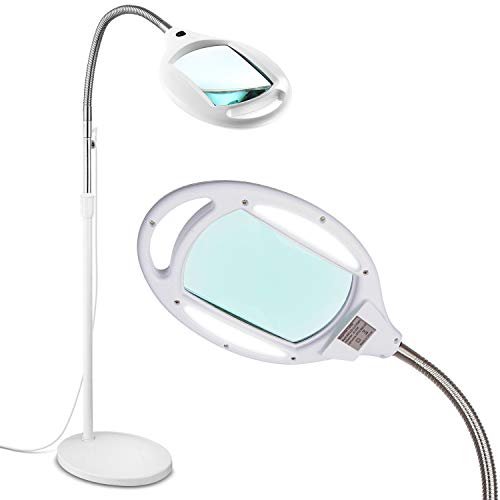
Brightech Light View Pro LED Magnifying Floor Lamp
This floor lamp combines a bright LED light with a 3x magnifying lens. It is ideal for soldering, crafts, or reading fine print. The arm is fully adjustable, and the lens flips away when not needed. Some find it bulky.
Pros
- Built-in magnifying lens
- Bright, shadow-free light
- Adjustable arm stays put
Cons
- Large footprint
- Lens can distort edges

SunSun LED Desk Lamp with Wireless Charging
This lamp features a wireless charging pad at its base, plus a USB port. It offers multiple brightness levels and color modes. The design is modern and compact. Some users report the charging pad is slow.
Pros
- Wireless charging built-in
- Sleek design
- Multiple light modes
Cons
- Charging pad may be slow
- No clamp option

Kekemi LED Desk Lamp with Dual Arms and Monitor Mount
This lamp attaches to your monitor or desk with a clamp, and its dual arms provide flexible lighting for a wide workspace. It has a remote control for adjusting brightness and color. Owners like the space-saving design and low profile.
Pros
- Fits over monitor to save space
- Dual arms cover wide area
- Remote control included
Cons
- Clamp may not fit all monitors
- USB power required
The lineup, side by side
| # | Model | Brightness | Best for | Score | Price |
|---|---|---|---|---|---|
| 1 | BenQ e-Reading LED Desk Lamp | 2700K to 5000K | Best overall for eye comfort and premium features | 9.4 | Check price |
| 2 | TaoTronics LED Desk Lamp with USB Charging Port | 5 modes, 7 levels | Best budget-friendly with adjustable color modes | 8.8 | Check price |
| 3 | Lepower LED Desk Lamp with Clamp | Dimmable 10% to 100% | Best for saving desk space | 8.6 | Check price |
| 4 | Newhouse Lighting LED Task Lamp with Dimmer | Dimmable | Best for simple, no-frills lighting | 8.2 | Check price |
| 5 | Brightech Light View Pro LED Magnifying Floor Lamp | 3x glass lens | Best for detailed work and magnification | 8.4 | Check price |
| 6 | SunSun LED Desk Lamp with Wireless Charging | 10 brightness levels | Best for charging convenience | 8.0 | Check price |
| 7 | Kekemi LED Desk Lamp with Dual Arms and Monitor Mount | Dimmable | Best for multi-screen setups | 8.5 | Check price |
Good to know
What is the ideal color temperature for a home office desk lamp?
For tasks requiring concentration, use a cooler light around 5000K to 6500K. This mimics daylight and reduces eye strain. For reading or relaxing, a warmer 2700K to 3000K is more comfortable. Many lamps offer a range of temperatures.
Is a higher wattage LED lamp always brighter?
Not necessarily. LED efficiency varies. Lumens measure brightness, not watts. Check the lumen output. A 10W LED can be as bright as a 15W LED if it is more efficient. Most desk lamps provide sufficient light for reading and work.
What is flicker-free lighting and why is it important?
Flicker-free lighting means the LED does not pulse rapidly, which can cause eye strain and headaches. Traditional LEDs may flicker at a rate invisible to the eye but still affect some people. Look for lamps that advertise flicker-free technology.
Can I use a desk lamp for video calls or Zoom meetings?
Yes, a desk lamp can improve your lighting for video calls. Position it in front of you, slightly above eye level, to avoid harsh shadows. Use a neutral color temperature around 4000K to 5000K for a natural look.
How do I choose between a clamp lamp and a base lamp?
Clamp lamps save desk space and are great for tight setups. They require a flat edge to attach to. Base lamps are portable and stable, but they take up space. Consider your desk thickness and how often you move the lamp.
What is the lifespan of LED desk lamps?
LED bulbs typically last 25,000 to 50,000 hours. That is years of regular use. However, the lamp’s driver and other components may fail sooner. Most manufacturers offer a one-year warranty, and some offer longer.
Do desk lamps with USB charging ports affect performance?
No, the USB port is separate from the light. It typically provides 5V output for charging phones or other devices. It may charge slower than a wall charger, but it does not affect lighting performance.
Can I use a desk lamp as a primary light source?
A desk lamp is task lighting, not ambient lighting. It illuminates a specific area, not the whole room. For a home office, combine it with overhead lighting or floor lamps to reduce contrast and eye strain.
What is the best way to position a desk lamp?
Place the lamp on the opposite side of your writing hand to avoid shadows. Position it so the light comes over your shoulder and onto your work. The light source should be above your head to prevent glare on your screen.
Are expensive desk lamps worth it?
Expensive lamps often have better build quality, more features, and superior eye-care technology. However, budget lamps can be adequate for basic needs. Assess your priorities: if you spend long hours at your desk, investing in a quality lamp may reduce fatigue.
The verdict
For most home office workers, the BenQ e-Reading LED Desk Lamp is worth the investment for its eye-care benefits and robust construction. If you are on a budget, the TaoTronics LED Desk Lamp offers excellent value with its color modes and USB port. For those needing to save space, the Lepower clamp lamp is a smart choice.


