Desktop Computers with USB C for Fast Connectivity
The Apple Mac mini M4 is our top pick for most people because it offers blazing performance, a compact design, and multiple USB C ports at an accessible price. Its main limitation is the lack of user upgradeability, but owners report that the base configuration handles everyday tasks and creative work with ease.
USB C has become the standard for modern peripherals, from external drives to monitors and docking stations. Finding a desktop with native USB C support eliminates the need for adapters and ensures fast data transfer speeds.
Our selection includes all-in-ones, mini PCs, and traditional towers, each with at least one USB C port. We evaluated specifications, user feedback, and practical connectivity to help you choose the right desktop for your workspace.
Before you buy
What we recommend

Apple Mac mini with M4 chip
The Mac mini with the M4 chip delivers exceptional performance in a 5×5 inch chassis. It features three Thunderbolt 4 USB C ports and one HDMI port, supporting up to two external displays. Owners praise its silent operation and energy efficiency.
Pros
- Blazing fast performance for everyday and creative tasks
- Very compact and quiet design
- Three Thunderbolt 4 ports for high-speed connectivity
Cons
- RAM and storage are not user upgradeable
- Only two USB A ports may be limiting for legacy devices
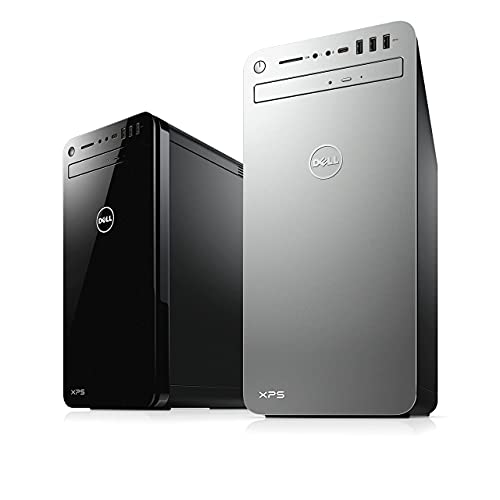
Dell XPS Desktop
The Dell XPS Desktop pairs Intel Core processors with NVIDIA GeForce RTX graphics, making it a strong choice for video editing, 3D rendering, and gaming. It includes a front USB C port with PowerShare and ample internal expansion options.
Pros
- Excellent graphics performance for creative workloads
- Tool-less access for easy upgrades
- Front USB C port convenient for quick connections
Cons
- Large tower footprint takes up desk space
- Higher price for configurations with strong GPUs

HP Pavilion Desktop
The HP Pavilion Desktop offers a balanced set of specs for home and office use, including a USB C port on the front panel. It provides upgradeable memory and storage, making it a practical choice for budget-conscious users.
Pros
- Affordable price point
- Plenty of internal bays for upgrades
- Quiet operation for daily tasks
Cons
- USB C port is slower (Gen 1) compared to others
- Graphics performance is limited to integrated or entry-level GPUs

Apple iMac 24 inch
The 24 inch iMac features Apple’s M3 chip and a 4.5K Retina display. It includes two Thunderbolt 4 ports and two USB C ports, all on the back. The slim design and color options make it a stylish addition to any desk.
Pros
- Beautiful 4.5K display with true color
- Ultra-thin all-in-one design
- Fast Thunderbolt 4 ports for high-speed peripherals
Cons
- Limited to 24 inch screen size
- RAM is not user upgradeable

ASUS ROG Strix G16 Desktop
This gaming desktop from ASUS packs an Intel Core i7 and NVIDIA GeForce RTX 4070, delivering high frame rates in modern games. It has multiple USB C ports, including one with DisplayPort 1.4 and Power Delivery for VR headsets.
Pros
- High-end graphics for smooth 1440p gaming
- Fast USB C ports with multiple functions
- Tool-free upgrade access
Cons
- Loud under heavy load
- Large RGB tower may not suit all aesthetics

Intel NUC 13 Pro
The Intel NUC 13 Pro is a compact mini PC with a 13th Gen Intel Core processor. It offers two Thunderbolt 4 ports and is highly upgradeable for its size, allowing users to add memory and storage easily.
Pros
- Ultra-compact and saves desk space
- Dual Thunderbolt 4 ports for high-speed data
- Low power consumption
Cons
- No discrete graphics for gaming or heavy rendering
- More expensive than some budget desktops with similar specs

Lenovo ThinkCentre M90a Pro Gen 4
This ThinkCentre all-in-one combines a 23.8 inch FHD display with Intel vPro technology and robust security features. It includes multiple USB C ports, one of which supports DisplayPort and Data. The design is professional and space-saving.
Pros
- Enterprise-grade security and manageability
- Integrated privacy shutter for webcam
- Multiple USB C ports for docking and displays
Cons
- Display resolution is only FHD
- Premium price for business features
How they compare
| # | Model | Processor | Best for | Score | Price |
|---|---|---|---|---|---|
| 1 | Apple Mac mini with M4 chip | Apple M4 chip with 10-core CPU | Most users seeking a compact yet powerful desktop | 9.4 | Check price |
| 2 | Dell XPS Desktop | Up to Intel Core Ultra 9 | Professionals needing high performance with immersive graphics | 9.1 | Check price |
| 3 | HP Pavilion Desktop | Up to AMD Ryzen 7 | Budget shoppers wanting USB C without breaking the bank | 8.7 | Check price |
| 4 | Apple iMac 24 inch | Apple M3 chip with 8-core CPU | Users who want an all-in-one with a stunning display | 9.0 | Check price |
| 5 | ASUS ROG Strix G16 Desktop | Intel Core i7 14700KF | Gamers who require top-tier performance and connectivity | 8.9 | Check price |
| 6 | Intel NUC 13 Pro | Intel Core i5 or i7 13th Gen | Those who need a tiny, low-power desktop for basic tasks | 8.5 | Check price |
| 7 | Lenovo ThinkCentre M90a Pro Gen 4 | Up to Intel Core i7 vPro | Business users needing reliability and security features | 8.8 | Check price |
Good to know
What is the difference between USB C and Thunderbolt?
Thunderbolt uses the USB C connector but adds PCIe data transfer and higher bandwidth up to 40Gbps. Thunderbolt ports are typically found on premium laptops and desktops, and they can support daisy-chaining of multiple devices.
Can I charge my laptop via the USB C port on a desktop?
Some USB C ports on desktop computers support Power Delivery (PD) to charge devices like laptops, but not all do. Check the port’s specifications for PD support. Dedicated charging ports are more common on laptops and monitors.
Do all USB C ports support video output?
Not all USB C ports support video. Ports with DisplayPort alternate mode or Thunderbolt can output video to monitors. Some desktops have dedicated USB C ports that are data-only, so verify the specifications before assuming video support.
How many USB C ports do I need?
It depends on your peripherals. If you connect multiple devices like an external drive, a dock, and a phone, you may want at least two to three USB C ports. Having one on the front is convenient for quick access.
Can I use a USB C hub with these desktops?
Yes, you can use a USB C hub to expand the number of ports. However, ensure the hub is compatible with the USB C version and power requirements of your desktop. For Thunderbolt ports, a Thunderbolt hub is ideal for maximum performance.
Are USB C desktop computers more expensive?
Not necessarily. Many budget desktops now include USB C ports. Prices vary based on other components like processor, RAM, and storage. USB C is becoming standard, so you can find options across all price ranges.
Can I upgrade components in these desktops?
It depends on the model. Towers like the Dell XPS and HP Pavilion offer easy access to RAM, storage, and sometimes GPU. Mini PCs like the Intel NUC allow RAM and SSD upgrades. All-in-ones and Mac mini have limited upgradeability, often only storage via external means.
What is the best operating system for a USB C desktop?
Both Windows and macOS support USB C fully. Windows offers more hardware variety, while macOS is known for its ecosystem and Thunderbolt integration. Choose based on your software needs and personal preference.
How do I know if a USB C port supports fast charging?
Check the port’s specifications for Power Delivery support. The wattage output is also important; for fast charging a smartphone, you need at least 15W, while laptops may require 60W or more. Some desktop ports may not provide enough power for large devices.
Can I connect a 4K monitor to a USB C port?
Yes, if the USB C port supports DisplayPort alt mode or is a Thunderbolt port. Most modern desktops with USB C video support can drive a 4K monitor at 60Hz, but check the maximum resolution and refresh rate supported by the port.
The verdict
For most users, the Apple Mac mini M4 offers the best combination of performance, connectivity, and value. If you need a PC with upgrade potential and strong graphics for creative work, consider the Dell XPS Desktop. Budget buyers should look at the HP Pavilion, while gamers will appreciate the ASUS ROG Strix G16. Choose the Mac mini if you want a hassle-free, compact powerhouse.


