How to Pick a Digital Angle Finder That Holds a Reading
GemRed 823 leads this list for everyday woodworking, with a magnetic base and a hold button at a fair price. Klein Tools suits electricians bending conduit thanks to neodymium magnets and a backlit display. General Tools fits machinists who need minute and second readouts for tight tolerances.
GemRed 823 tops this comparison for general woodworking, pairing a magnetic base with a hold button that locks readings before a cut. Its screen lacks a backlight, so dim garages make numbers harder to read. Klein Tools and General Tools cover jobsite and machining needs that GemRed does not.
Listings, accuracy specs and owner feedback across seven current Amazon models shaped these picks. We weighed magnet strength, display type and stated accuracy against the tasks each tool is built for, from miter saws to conduit runs.
Our top picks

GemRed 823 Digital Angle Finder
GemRed 823 clamps to metal surfaces with a magnetic base built into the body. A hold button locks the reading before you move the tool away from the cut. Accuracy lands within 0.3 degrees, tight enough for cabinet doors and trim work.
Pros
- Magnetic base grips saw blades and metal rails
- Hold button freezes the number for one-handed transfer
- Priced below most backlit competitors
Cons
- Screen has no backlight for dim garages
- Battery door pops loose after months of use

Inclinometer Digital Protractor by Klein Tools
Klein Tools built this protractor for conduit runs and jobsite leveling. Neodymium magnets hold it flat against steel and rigid conduit. A backlit display shows large digits even under a dropped ceiling.
Pros
- Neodymium magnets outperform standard ceramic magnets
- Large backlit digits read clearly in crawlspaces
- Automatically locks the last reading on screen
Cons
- Costs more than general-purpose finders
- No physical hold button, only the auto-lock display

Digital Protractor by General Tools
Two adjustable arms set this protractor apart from flat angle finders. Machinists use it to check inside and outside angles on fixtures and jigs. Readouts show degrees, minutes and seconds for tolerances tighter than a woodworking project needs.
Pros
- Dual arms measure inside and outside angles
- Minute and second readout suits tight tolerances
- Arms lock at any angle for repeat measurements
Cons
- No magnetic base for hands-free use
- Higher price than single-arm finders

Wixey WR300 Digital Angle Gauge
Wixey WR300 sticks to two buttons, power and zero, so setup takes seconds. Rare earth magnets hold it to a saw blade while you dial in bevel angles. A flip display keeps numbers readable when the tool sits upside down.
Pros
- Two-button operation with no menus to learn
- Flip display works right side up or inverted
- Recalibrates on any flat surface in seconds
Cons
- Small screen is harder to read from across a shop
- Plastic housing feels less rugged than metal-bodied rivals

Johnson Level & Tool 1882-0800 Digital Angle Locator
A rubber overmold wraps this locator to absorb drops on concrete and framing. Four magnets hold it against studs, ducts and miter saw fences. Miter and bevel modes cover crown molding without extra math.
Pros
- Rubber overmold survives jobsite drops
- Separate miter and bevel modes for trim work
- Backlit screen works in unlit basements
Cons
- Bulkier than pocket-sized finders
- Batteries drain faster with the backlight left on
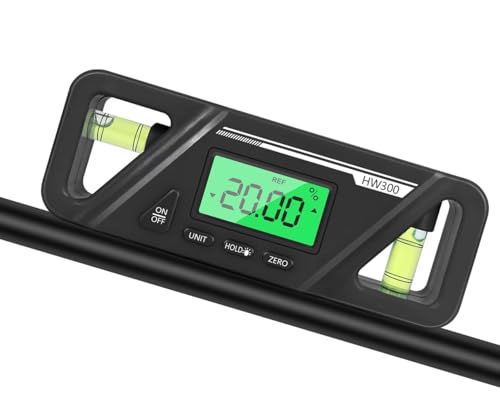
AccuMASTER 2-in-1 Digital Level & Angle Gauge
This gauge doubles as a torpedo level and an angle finder in one housing. A V-groove base centers it on pipe and conduit for plumbing work. Absolute and relative modes cover both fixed angles and custom zero points.
Pros
- Works as a level and an angle finder
- V-groove base centers on round stock
- Switches between absolute and relative readings
Cons
- Bulkier than tools built for angles alone
- Some owners report calibration drift after heavy use

Digital Level Inclinometer Protractor by eTape16
eTape16 keeps the feature list simple: a magnetic base, a hold button and a basic LCD. It covers everyday angle checks without the cost of a machinist-grade tool. Owners use it for fence posts, deck rails and general home projects.
Pros
- Lowest price point in this comparison
- Magnetic base included at no extra cost
- Hold button works reliably for basic tasks
Cons
- Plastic body flexes more than metal-bodied rivals
- No backlight for low-light readings
How to pick the right one
What to look for in a digital angle finder Accuracy separates budget tools from precision instruments. Most finders claim within 0.1 to 0.3 degrees, tight enough for framing and trim. A magnetic base frees both hands on steel studs, ductwork and saw blades. Hold buttons matter most when the display faces away from you during a cut. Backlit screens add cost but pay off in basements and unlit garages.
Setting up a miter saw with an angle finder Place the tool flat on the saw table and press zero. Tilt the blade to the target bevel, then read the number directly off the screen. Wixey WR300 and GemRed 823 both handle this in seconds thanks to strong magnets and simple controls. Crown molding cuts benefit from a dedicated miter mode, since it shows the compound angle without extra math.
Best angle finders for electricians and metal surfaces Conduit bending rewards strong magnets over screen size. Klein Tools uses neodymium magnets that hold flat against rigid conduit and steel studs. Johnson Level & Tool adds a rubber overmold for drops on concrete pads. Both trade a lower price for durability suited to daily jobsite use.
How to calibrate and check accuracy over time Set the tool on a known flat surface and hold the zero button until the display resets. Drift shows up as a small offset from true level, usually under a degree. Recalibrate monthly if the tool rides in a truck bed or toolbox. AccuMASTER owners report occasional drift, so a quick check before precision work avoids compounding errors.
The lineup, side by side
| # | Model | Measurement range | Best for | Score | Price |
|---|---|---|---|---|---|
| 1 | GemRed 823 Digital Angle Finder | 0 to 360 degrees | Best overall for woodworking and DIY | 9.4 | Check price |
| 2 | Inclinometer Digital Protractor by Klein Tools | 0 to 360 degrees | Best for electricians and conduit bending | 9.2 | Check price |
| 3 | Digital Protractor by General Tools | 0 to 360 degrees | Best for precision machining | 9.1 | Check price |
| 4 | Wixey WR300 Digital Angle Gauge | 0 to 360 degrees | Best for quick miter saw setup | 9.0 | Check price |
| 5 | Johnson Level & Tool 1882-0800 Digital Angle Locator | 0 to 360 degrees | Best for durable jobsite use | 8.8 | Check price |
| 6 | AccuMASTER 2-in-1 Digital Level & Angle Gauge | 0 to 360 degrees | Best 2-in-1 level and angle tool | 8.6 | Check price |
| 7 | Digital Level Inclinometer Protractor by eTape16 | 0 to 360 degrees | Best budget option | 8.0 | Check price |
Good to know
What is a digital angle finder used for?
Woodworkers, machinists and electricians use it to set miter saws, check conduit bends and verify angles on jigs without a manual protractor.
How accurate is a digital angle finder?
Most models land within 0.1 to 0.3 degrees, based on listed specifications. Klein Tools and Wixey WR300 both claim 0.1 degrees, tighter than typical woodworking tolerances.
Which angle finder is best for a miter saw?
Wixey WR300 and GemRed 823 both use magnetic bases and simple controls suited to quick bevel checks between cuts.
Can a digital angle finder measure on curved surfaces?
AccuMASTER’s V-groove base centers on pipe and conduit, but flat surfaces still give the most reliable reading on any model.
Do I need a magnetic base for woodworking?
A magnetic base helps on metal saw fences and ductwork, but it adds little value on a wooden workbench where clamps or hand-holding work fine.
What is the difference between absolute and relative angle measurement?
Absolute mode reads from level or plumb. Relative mode measures from a zero point you set yourself, useful for matching an existing slope.
How do I calibrate a digital angle finder?
Rest it on a flat, level surface and hold the zero button until the display resets, then repeat on a second orientation to confirm.
Is a digital angle finder better than a manual protractor?
A digital readout removes the guesswork of reading a scale, and a hold function lets you lock a number before moving the tool.
Which angle finder works best for electricians?
Klein Tools’ neodymium magnets and backlit display suit conduit bending better than lighter finders built for woodworking.
What is the cheapest reliable digital angle finder?
eTape16 offers a magnetic base and hold button at the lowest price in this comparison, though it skips a backlight.
Our pick
GemRed 823 remains the pick for general shop work, balancing a magnetic base, a hold button and a fair price. Electricians bending conduit should choose Klein Tools for its stronger magnets and backlit screen. Machinists chasing tight tolerances get more value from the General Tools protractor’s minute and second readout, even at a higher price.


