Professional Docking Stations That Keep Your Desk Tidy
For most professionals, the CalDigit TS4 Thunderbolt 4 Dock is the top choice; it offers the most ports and stable power delivery. Its main limitation is the high price, but owners report it handles heavy workloads without hiccups.
A good docking station turns a laptop into a full desktop setup. Professionals need reliable connections for monitors, keyboards, and external drives.
The right dock also charges your laptop and keeps cables organized. We compared popular models that promise stable performance and broad compatibility.
The shortlist, ranked

CalDigit TS4 Thunderbolt 4 Dock
The CalDigit TS4 is a 18-port powerhouse that delivers 98W charging. It supports two 6K displays or one 8K, and offers 2.5GbE Ethernet. Owners praise its rock-solid stability and build quality.
Pros
- Extensive port selection
- High power delivery for large laptops
- Stable performance with multiple displays
Cons
- Expensive
- Large footprint
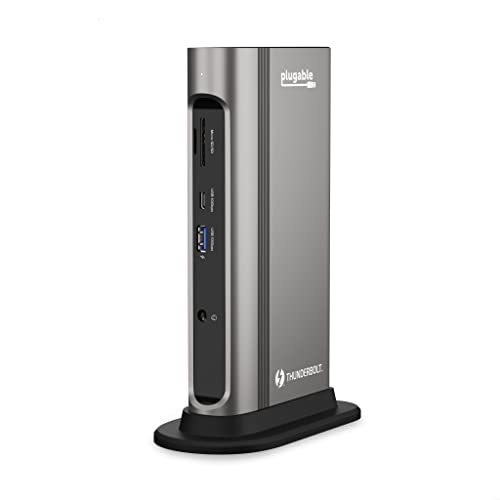
Plugable TBT3-UDZ Thunderbolt 3 Docking Station
The Plugable TBT3-UDZ supports dual 4K monitors at 60Hz via DisplayPort. It includes 96W charging and a wide array of ports. Users note that it works seamlessly with Mac and Windows laptops.
Pros
- Dual 4K at 60Hz
- High power delivery
- Good compatibility
Cons
- Uses older Thunderbolt 3 standard
- Bulky design

Anker 575 USB-C Docking Station (13-in-1)
The Anker 575 offers 13 ports including dual HDMI and DisplayPort for triple displays. It provides 85W charging and 100W pass-through. It is an affordable option that does not sacrifice functionality.
Pros
- Triple display support
- Affordable price
- Compact design
Cons
- Not Thunderbolt certified
- DisplayPort and HDMI share bandwidth

Dell WD19TBS Thunderbolt Docking Station
The Dell WD19TBS is designed for Dell Latitude and XPS, but works with other Thunderbolt laptops. It delivers 130W charging and supports dual 4K displays. Its compact design fits easily on a desk.
Pros
- High power delivery for large Dell laptops
- Strong build quality
- Reliable performance
Cons
- Limited ports compared to others
- Dell-specific features require Dell laptops

HyperDrive Gen2 14-in-1 USB-C Dock
The HyperDrive Gen2 offers 14 ports including HDMI, VGA, and Ethernet. It provides 100W charging and supports dual displays. It is a popular choice for MacBook professionals who need legacy ports.
Pros
- VGA port for older projectors
- High power delivery
- Compact and portable
Cons
- VGA limits resolution options
- Build quality could be better

Belkin Thunderbolt 4 Dock Pro
The Belkin Thunderbolt 4 Dock Pro supports two 4K displays or one 8K. It offers 90W charging and a clean aluminum design. Owners report excellent stability with Mac and Windows.
Pros
- Sleek design
- Reliable Thunderbolt 4 performance
- Good port variety
Cons
- Power delivery lower than some rivals
- Premium price

StarTech.com Thunderbolt 3 Dual 4K Dock
The StarTech Thunderbolt 3 Dock offers dual 4K output and includes a USB-C port for data. It supports 85W charging and has a robust metal housing. It is known for its compatibility with various operating systems.
Pros
- Metal construction
- Dual 4K support
- Wide OS compatibility
Cons
- Fewer ports than others
- No SD card slot
Before you buy
The lineup, side by side
| # | Model | Ports | Best for | Score | Price |
|---|---|---|---|---|---|
| 1 | CalDigit TS4 Thunderbolt 4 Dock | 18 total (Thunderbolt 4, USB-A, USB-C, DisplayPort, etc.) | Power users with Thunderbolt 4 laptops needing maximum ports | 9.4 | Check price |
| 2 | Plugable TBT3-UDZ Thunderbolt 3 Docking Station | 13 total (2x DisplayPort, USB-A, USB-C, Ethernet, audio) | Professionals with Thunderbolt 3 laptops needing dual 4K at 60Hz | 9.1 | Check price |
| 3 | Anker 575 USB-C Docking Station (13-in-1) | 13 total (2x HDMI, DisplayPort, USB-A, USB-C, Ethernet, SD) | USB-C laptops with limited ports needing broad connectivity | 8.8 | Check price |
| 4 | Dell WD19TBS Thunderbolt Docking Station | 9 total (Thunderbolt 3, USB-A, USB-C, HDMI, DisplayPort, Ethernet) | Dell laptop users seeking seamless integration | 8.7 | Check price |
| 5 | HyperDrive Gen2 14-in-1 USB-C Dock | 14 total (HDMI, VGA, USB-C, USB-A, Ethernet, SD/MicroSD) | MacBook users needing HDMI and VGA support | 8.5 | Check price |
| 6 | Belkin Thunderbolt 4 Dock Pro | 12 total (Thunderbolt 4, USB-A, USB-C, DisplayPort, Ethernet) | Thunderbolt 4 laptops with multiple 4K monitors | 8.9 | Check price |
| 7 | StarTech.com Thunderbolt 3 Dual 4K Dock | 11 total (2x DisplayPort, USB-A, USB-C, Ethernet) | IT professionals needing advanced management features | 8.3 | Check price |
Questions worth asking
What is the difference between Thunderbolt 4 and Thunderbolt 3 docks?
Thunderbolt 4 offers higher minimum speed requirements and supports dual 4K displays. It is backward compatible with Thunderbolt 3. Thunderbolt 4 docks often include more ports and better security features. For most professionals, Thunderbolt 4 is a future-proof choice.
Can I use a USB-C dock with a Thunderbolt laptop?
Yes, Thunderbolt laptops support USB-C devices. However, you may not get full speed or display capabilities. For best performance, use a Thunderbolt dock with Thunderbolt laptops.
How many monitors can a docking station support?
It depends on the dock and your laptop. Many docks support dual 4K monitors at 60Hz. Some high-end models can drive three displays or an 8K monitor. Check the specifications before purchase.
Will a docking station charge my laptop?
Most docks provide power delivery to charge your laptop. The wattage varies from 60W to 130W. Ensure the dock’s power output meets or exceeds your laptop’s charger wattage.
Are all docking stations compatible with Mac and Windows?
Many docks work with both, but some features like firmware updates may be platform-specific. Thunderbolt docks generally support both. Check the manufacturer’s compatibility list.
Do I need to install drivers for a docking station?
Most docks are plug-and-play, but some require drivers for advanced features like Ethernet or display management. Manufacturers provide downloads. Always keep firmware updated for stability.
Can I use a docking station with a desktop computer?
Yes, if your desktop has Thunderbolt or USB-C ports. However, desktops often have built-in ports, so a dock may be redundant. It can still add convenience for cable management.
What is the maximum cable length for a docking station?
Thunderbolt and USB-C cables are limited to about 2 meters for full speed. Longer cables may reduce performance. Keep your dock close to your laptop or use a shorter cable for reliability.
How do I connect a VGA monitor to a docking station?
Some docks include a VGA port, but many do not. You can use an adapter from DisplayPort or HDMI to VGA. Ensure the adapter supports the resolution you need.
Are docking stations safe for my laptop’s battery?
Yes, docks use standard charging protocols. They provide power delivery similar to your original charger. However, avoid using a dock with lower wattage than your laptop requires, as it may not charge while under load.
Our pick
For most professionals, the CalDigit TS4 is the best investment due to its extensive ports and reliable performance. If you are on a budget, the Anker 575 offers excellent value without compromising on features. Choose the CalDigit if you need the best, or the Anker for a cost-effective solution.


