How Duplex Scanners Compare on Speed and Capacity
Fujitsu’s ScanSnap iX1600 leads with a touchscreen ADF and one-touch cloud scanning built in. Brother’s ADS-1700W costs less yet still clears 25 duplex pages a minute. Running high daily volume instead? Epson’s WorkForce ES-580W handles 50-sheet batches with no computer attached at all.
Fujitsu’s ScanSnap iX1600 suits the busiest offices best, pairing a 50-sheet feeder with a touchscreen that skips separate scanning software. Brother’s ADS-1700W and Epson’s WorkForce ES-580W round out the shortlist for smaller desks and PC-free bulk jobs. Every model here flips a page automatically and captures both sides in one pass, so nobody re-stacks paper by hand.
Rated speed and real throughput rarely match, because duplex mode, color settings and paper weight all slow a scanner down. We compared ADF sheet capacity, documented duplex speed, wireless or network options and owner reports on jams, then matched each pick to the office size it fits.
What matters most
What duplex scanning saves you Manual page flipping doubles the time any scan job takes. Both sides capture in a single pass through a duplex ADF, so a 40-page contract needs only one trip through the feeder. That difference adds up fast for anyone processing mail, invoices or contracts daily.
ADF capacity and speed for daily batches Fewer trips back to the scanner come from a bigger feeder. Home offices scanning a handful of pages a day do fine with a 20-sheet ADF like the Brother ADS-1700W. Businesses running daily invoice batches want 50 sheets or more, which is where the Fujitsu and Epson models take over.
Wireless and network scanning for shared desks Single users rarely need Ethernet, since Wi-Fi or a USB cable covers most home setups. Shared desks work differently. Both the Brother ADS-4700W and Xerox D70n add Gigabit Ethernet, keeping scan speed steady even when several people queue jobs on one device.
Choosing for legal-size or archival volume Standard letter-size scanners often reject longer legal pages or crop them at 11 inches. Confirm maximum paper length before buying if contracts or court documents pass through your office regularly. Epson’s DS-770 II handles legal-size sheets directly, and its 100-sheet ADF suits archival scanning projects too.
The best picks, ranked

Fujitsu ScanSnap iX1600
Anyone can pick a scan destination on its 4.3 inch touchscreen without opening software first. Mixed stacks of receipts and letter paper clear the 50-sheet ADF at 40 pages per minute duplex. Wi-Fi and USB both work, sending files straight to cloud folders or a connected laptop.
Pros
- Skips separate scanning software entirely
- Clears mixed paper sizes in one pass
- Sends files to cloud storage over Wi-Fi
Cons
- Touchscreen raises the price over button models
- Initial software setup takes extra time

Brother ADS-1700W
Daily invoices and mail suit this desktop unit’s 25 duplex pages a minute from a 20-sheet feeder. Wi-Fi Direct links a phone or tablet without needing a router nearby. Its footprint stays small enough for a shared desk corner.
Pros
- Fits a tight desk corner
- Connects over Wi-Fi Direct without a router
- Costs less than most duplex rivals
Cons
- 20-sheet feeder needs frequent refilling
- Runs slower than higher capacity models

Epson WorkForce ES-580W
Thick batches clear fast thanks to a 50-sheet ADF and 45 page per minute duplex speed. PC-free scanning to a USB drive works with no computer powered on at all. Wi-Fi and Ethernet ship standard, useful for desks that move between networks.
Pros
- Clears thick batches at speed
- Scans without a connected computer
- Ethernet suits shared office networks
Cons
- Larger footprint than compact desktop models
- Touch panel is smaller than the Fujitsu’s

Canon imageFORMULA R40
Pricier scanners get real competition from this 60-sheet ADF running 40 pages per minute duplex. USB is the only connection, keeping setup simple but skipping wireless scanning. Bundled software converts scans to searchable PDF with OCR included.
Pros
- Large ADF for the price point
- OCR software included at no extra cost
- Duplex speed rivals costlier models
Cons
- No Wi-Fi or network scanning
- Bulkier than compact wireless models

Brother ADS-4700W
Several desks can share this scanner thanks to an 80-sheet ADF plus both Wi-Fi and Ethernet. One-touch profiles on its 4.3 inch touchscreen store repeat jobs like invoicing or HR intake. Gigabit Ethernet keeps large batches moving on a busy network.
Pros
- Large feeder suits multi-person offices
- Keeps performance steady on busy networks
- Custom profiles speed up repeat jobs
Cons
- Overkill for a single desk user
- Costs more upfront than desktop models
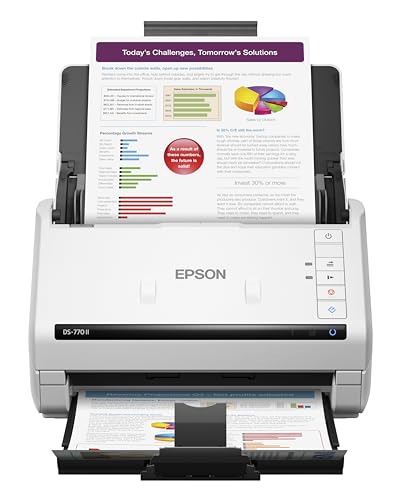
Epson DS-770 II
Long runs of contracts and legal-size pages feed through a 100-sheet ADF without a midway reload. Duplex speed holds at 45 pages per minute even on longer paper. USB-only connectivity ties it to a single desktop.
Pros
- Feeds legal-size pages without jamming
- 100-sheet ADF needs fewer reloads
- Speed holds steady on longer paper
Cons
- Offers no wireless scanning at all
- Larger housing takes up more desk space

Xerox D70n
Daily bulk jobs are this scanner’s specialty, running 70 duplex pages a minute from a 100-sheet ADF. Ethernet networking lets it sit in a supply room and serve an entire floor. Ultrasonic double-feed detection catches stuck pages before they jam a batch.
Pros
- Runs the fastest duplex speed here
- Reduces jams with double-feed detection
- Suits a shared office location over Ethernet
Cons
- Too large and loud for a personal desk
- Costs more than desktop-class scanners
Compared at a glance
| # | Model | Duplex speed | Best for | Score | Price |
|---|---|---|---|---|---|
| 1 | Fujitsu ScanSnap iX1600 | 40 ppm / 80 ipm | Best overall | 9.4 | Check price |
| 2 | Brother ADS-1700W | 25 ppm | Best value | 9.1 | Check price |
| 3 | Epson WorkForce ES-580W | 45 ppm / 90 ipm | Best for high-volume scanning | 8.9 | Check price |
| 4 | Canon imageFORMULA R40 | 40 ppm | Best budget | 8.6 | Check price |
| 5 | Brother ADS-4700W | 40 ppm | Best for network sharing | 8.4 | Check price |
| 6 | Epson DS-770 II | 45 ppm | Best for legal-size documents | 8.2 | Check price |
| 7 | Xerox D70n | 70 ppm | Best for shared office use | 8.0 | Check price |
Good to know
What does duplex mean on a scanner?
Duplex means a scanner captures both sides of a page in one pass through the feeder. Single-sided models need the stack flipped and run through twice.
How fast should a duplex scanner be for an office?
Daily invoice or mail batches call for at least 40 pages per minute duplex. Lighter home use gets by fine with 25 pages per minute like the Brother ADS-1700W offers.
Can a duplex scanner work without a computer?
Yes, models like the Epson WorkForce ES-580W scan straight to a USB drive with no PC involved. Others need at least an initial Wi-Fi or USB connection to a device.
Duplex ADF versus flatbed: which is better?
An ADF duplex scanner moves faster through stacks of loose pages. Flatbed scanning still wins for bound books or fragile originals that cannot feed through rollers.
How many pages can a duplex scanner ADF hold?
Capacity ranges from 20 sheets on compact desktop models up to 100 sheets on office-class scanners like the Xerox D70n. Match capacity to how often you can reload.
Which duplex scanner is best for a home office?
Tight desks and typical household paperwork suit the Brother ADS-1700W well. Daily scanners should size up to the Fujitsu ScanSnap iX1600 instead.
Do duplex scanners need Wi-Fi to share on a network?
Wi-Fi handles casual sharing fine, but Ethernet manages heavier multi-user traffic more reliably. Brother’s ADS-4700W offers both, so the choice depends on your router setup.
Can duplex scanners handle legal-size paper?
Not every model does, since some cap out at standard letter size. Check the maximum paper length spec first, and consider the Epson DS-770 II if legal-size pages are routine.
Is a duplex scanner worth it over a single-sided model?
Two-sided documents cut scanning time roughly in half with a duplex feeder. Anyone regularly handling double-sided mail, contracts or forms recovers that cost in saved time.
Our take
Offices scanning paperwork daily should start with the Fujitsu ScanSnap iX1600, since its touchscreen and 50-sheet ADF cover the widest range of jobs. Budget-conscious buyers lose little by choosing the Brother ADS-1700W instead. Anyone feeding legal-size contracts or running a shared desk needs the longer paper support of the Epson DS-770 II or the network readiness of the Brother ADS-4700W.