Ergonomic Notebooks That Save Your Neck and Wrists
The top pick is the LG gram SuperSlim, a featherlight 15.6 inch notebook with a full size keyboard and 16:10 display, ideal for frequent travelers who need portability without sacrificing typing comfort. Its main advantage is the ultralight build that reduces shoulder strain, but its main limitation is the limited port selection requiring dongles.
Ergonomic notebooks are more than a marketing buzzword. They focus on reducing strain on your neck, wrists, and shoulders through thoughtful design. You need a keyboard with good travel, a screen that tilts back far enough, and a lightweight chassis that does not weigh you down.
We compared seven popular models that claim ergonomic benefits. Owners report that the right choice depends on your primary use case, whether that is travel, desk work, or note taking. Here is what to look for and which models stand out.
The best picks, ranked

LG gram SuperSlim 15.6 inch
The LG gram SuperSlim is a marvel of engineering, weighing just 2.2 pounds. Despite its slim profile, it offers a full size keyboard with decent key travel, and the 16:10 display provides more vertical space, reducing the need to scroll. Owners praise its all day battery life and comfortable palm rest.
Pros
- Extremely light and portable
- Long battery life
- Bright and sharp OLED display
Cons
- Limited ports (requires adapter)
- No dedicated number pad
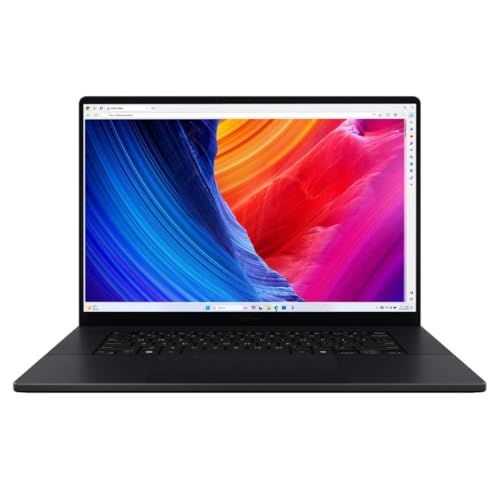
ASUS ProArt P16
The ASUS ProArt P16 is a powerhouse for designers and video editors. It features a 4K OLED display with excellent color accuracy and a comfortable keyboard with a large touchpad. The laptop is heavier but offers robust performance and a sturdy build that supports long hours of work.
Pros
- Top tier color accuracy
- High performance CPU and GPU
- Comfortable tactile keyboard
Cons
- Heavy for travel
- Battery drains quickly under load

Lenovo ThinkPad X1 Carbon Gen 12
The ThinkPad X1 Carbon is renowned for its legendary keyboard, offering deep key travel and a comfortable layout. Owners report reduced finger fatigue even after hours of typing. The laptop is lightweight and durable, with military grade build quality that survives daily commutes.
Pros
- Best in class keyboard
- Excellent build quality
- Very light for a 14 inch
Cons
- Pricey
- Limited graphics performance

Dell XPS 13 (9345)
The Dell XPS 13 combines a sleek design with a comfortable keyboard. The keycaps are well spaced and the palm rest is soft. Owners appreciate the tall 16:10 display that improves posture by reducing hunching. It is a solid choice for professionals who value aesthetics and build quality.
Pros
- Premium design and feel
- Excellent battery life
- Compact and light
Cons
- Limited ports
- No USB A port

Framework Laptop 13
The Framework Laptop 13 stands out for its modular design, allowing users to upgrade components easily. Its keyboard is comfortable, and the 3:2 display ratio gives more vertical space, which is ergonomic for reading and writing. Owners love the ability to replace ports and parts, reducing waste.
Pros
- User upgradeable and repairable
- Great screen ratio
- Strong community support
Cons
- Heavier than some rivals
- Battery life is average

Apple MacBook Air 13 (M3)
The MacBook Air with M3 chip offers a fanless design and all day battery. Its keyboard is comfortable with stable scissor switches, and the trackpad is large and precise. Owners report that the laptop runs cool and quiet, which reduces distractions during deep work.
Pros
- Outstanding battery life
- Silent operation
- Premium aluminum build
Cons
- Limited to two Thunderbolt ports
- No touch screen

Samsung Galaxy Book4 Pro
The Samsung Galaxy Book4 Pro features a stunning AMOLED display that is easy on the eyes. Its keyboard is well spaced and comfortable, and the laptop is extremely thin and light. Owners enjoy the vibrant colors and deep blacks, which make reading and media consumption a pleasure.
Pros
- Gorgeous AMOLED display
- Slim and light design
- Good selection of ports
Cons
- Battery life is moderate
- Webcam quality is average
Compared at a glance
| # | Model | Processor | Best for | Score | Price |
|---|---|---|---|---|---|
| 1 | LG gram SuperSlim 15.6 inch | Intel Core Ultra 7 155H | Ultraportable typing comfort | 9.4 | Check price |
| 2 | ASUS ProArt P16 | AMD Ryzen AI 9 HX 370 | Creative professionals with color critical work | 9.1 | Check price |
| 3 | Lenovo ThinkPad X1 Carbon Gen 12 | Intel Core Ultra 7 165U | Business users who type all day | 9.3 | Check price |
| 4 | Dell XPS 13 (9345) | Snapdragon X Elite | Style and portability | 8.9 | Check price |
| 5 | Framework Laptop 13 | AMD Ryzen 7 7840U | Customization and repairability | 8.8 | Check price |
| 6 | Apple MacBook Air 13 (M3) | Apple M3 chip | Seamless ecosystem and battery life | 9.0 | Check price |
| 7 | Samsung Galaxy Book4 Pro | Intel Core Ultra 7 155H | Windows users wanting a vivid AMOLED screen | 8.7 | Check price |
What to look for
Good to know
What makes a notebook ergonomic?
An ergonomic notebook has a keyboard that encourages a natural hand position, a screen that can be positioned to reduce neck strain, and a lightweight build that minimizes shoulder load. Features like key travel, palm rest, and display aspect ratio contribute.
Is a lighter laptop always better for ergonomics?
Yes, generally a lighter laptop reduces the strain on your shoulders and back when carrying it. But the keyboard and screen placement are equally important once you are seated. A light laptop that is comfortable to type on is ideal.
What is the best keyboard type for typing comfort?
Most users prefer scissor switch keyboards with at least 1.5 mm of key travel. They provide tactile feedback without being too mushy. The ThinkPad X1 Carbon is often praised for its keyboard, but many other models offer good options.
Does a 16:10 display really help with ergonomics?
Yes, a taller display ratio like 16:10 or 3:2 shows more vertical content, so you do not have to scroll as often. This reduces the need to tilt your head down or lean forward, which can prevent neck strain.
Can I use any external keyboard with these notebooks?
Absolutely. If you are at a desk, an external ergonomic keyboard and mouse can greatly improve your posture. These notebooks all have USB ports or Bluetooth, so you can connect your preferred peripherals.
Are there any health risks from using a notebook?
Prolonged use of any laptop without proper setup can lead to muscle strain, eye fatigue, and repetitive stress injuries. Using an ergonomic notebook and maintaining good posture reduces these risks, but breaks and stretching are still important.
Which operating system is more ergonomic?
Neither macOS nor Windows is inherently more ergonomic. The key is the hardware design and how you use it. Both the MacBook Air and Windows laptops like the LG gram offer comfortable keyboards and screens. Choose based on your software needs.
How often should I take breaks when typing?
Experts recommend a 5 minute break every 25 to 30 minutes. This helps prevent eye strain and muscle stiffness. Many people use the Pomodoro technique, but even standing and stretching helps.
What is the ideal weight for a portable notebook?
For maximum portability, aim for under 3 pounds. Heavier laptops can cause shoulder strain if you carry them often. The LG gram at 2.2 pounds and the MacBook Air at 2.7 pounds are good examples.
Are 2 in 1 notebooks more ergonomic?
2 in 1s offer flexibility, but they often have smaller keyboards or less stable screens. For typing, a traditional clamshell is usually better. However, if you use touch frequently, a 2 in 1 might reduce reaching for a separate tablet.
The bottom line
If you type all day and prioritize keyboard comfort, choose the Lenovo ThinkPad X1 Carbon Gen 12. For the best blend of portability and typing comfort without compromising battery life, the LG gram SuperSlim is the clear winner. The MacBook Air is the best pick for Apple fans who value silent, cool operation and long battery life. No matter your choice, pair it with a laptop stand for optimal ergonomics.


