Ethernet Switches That Actually Fit a Home Network
The TP-Link TL-SG108E suits most homes with eight gigabit ports and optional VLANs. Need fewer ports for less money? The TP-Link TL-SG105 covers five. Running cameras or access points instead? The NETGEAR GS316P powers them over the same cable run.
Eight gigabit ports and a fanless case make the TP-Link TL-SG108E the pick for most houses. VLANs sit ready in its Easy Smart software for anyone who wants them later. Five spare ports fill fast once a second TV or console joins the network, and that gap is where a larger switch like the D-Link DGS-1016A takes over.
PoE budgets, backplane capacity, and fan choice vary sharply between switches that otherwise look identical online. We compared published port speeds, PoE wattage, and switching capacity against what owners report about heat, coil whine, and long-term uptime.
How to choose
What actually matters when wiring a home network A switch turns one wired connection into several, but the deciding specs rarely show up on the box art. Port count sets how many devices fit before a second switch becomes necessary. Gigabit speed covers nearly everything a household streams or downloads. PoE and management features only matter once cameras, access points, or VLANs enter the picture.
How many ports, and how fast One port on any switch connects back to the router, so an eight port model gives seven usable ones. Homes with drops in several rooms often need sixteen ports rather than eight. Browsing, streaming, and most backups never come close to saturating gigabit. Multi-gig ports only pay off with a NAS or an internet plan already faster than a gigabit.
Managed vs unmanaged, and when VLANs matter Unmanaged switches need no login, no IP address, and no firmware, which is why most homes never notice they exist. Smart managed models add VLANs and QoS through a lightweight web page, useful once smart home gear needs isolating from a work laptop. Can’t name a setting worth changing? Stick with unmanaged, since it also runs cooler with fewer parts to fail.
PoE budgets, noise, and where the switch will live Power over Ethernet lets a camera or access point run on one cable, but every switch shares a fixed wattage budget across its PoE ports. Adding up each device’s rated draw before buying prevents a switch that quietly refuses to power the last camera. Fanless metal switches suit a living room or bedroom shelf, while larger PoE models sometimes run a fan and fit better in a closet.
The best picks, ranked

TP-Link TL-SG108E 8-Port Gigabit Easy Smart Managed Switch
Eight gigabit ports work the moment they’re plugged in, no login required. TP-Link’s Easy Smart software adds VLANs, QoS, and port mirroring for anyone who later needs them. A fanless metal case keeps it silent behind a router or TV.
Pros
- Works instantly with zero configuration needed
- VLAN and QoS available if requirements grow
- Silent fanless metal housing
Cons
- No PoE ports for cameras or access points
- Management software adds a learning curve if used

TP-Link TL-SG105 5-Port Gigabit Desktop Switch
Five gigabit ports and nothing else make this the low-cost route to expanding a router in one room. Its plastic case skips the metal shielding found on pricier models. A TV, console, and streaming box share the five ports without waste.
Pros
- Low-cost way to add gigabit ports
- No setup or software required
- Compact size fits behind a TV easily
Cons
- Plastic housing runs warmer than metal rivals
- Only four usable ports once uplinked to a router

Ubiquiti UniFi Flex Mini USW-Flex-Mini 5-Port Switch
This switch fits into a case smaller than a deck of cards, tucking behind a smart display or inside a cabinet. Power arrives over PoE or USB-C, and one port passes PoE through to a downstream camera or access point. The UniFi app shows per-port traffic for anyone curious, though the switch runs fine without it.
Pros
- Extremely small footprint for tight spots
- Runs on USB-C power or PoE input
- Optional app shows live per-port traffic
Cons
- Only five ports limits larger expansions
- Passthrough PoE budget is too small for multiple devices

NETGEAR GS316P 16-Port Gigabit PoE+ Unmanaged Switch
All sixteen ports supply PoE+, sharing a 183 watt budget across cameras, access points, and doorbells. That leaves headroom for a house wired with several outdoor cameras plus two or three access points. Being unmanaged, it needs no configuration despite the higher port and power count.
Pros
- Every port supplies PoE+, not just half
- Generous power budget for multiple cameras
- No configuration needed despite the port count
Cons
- Large chassis needs more shelf or rack space
- Overkill for a house with only one or two PoE devices

NETGEAR GS110MX 8-Port Gigabit Switch with Multi-Gig Uplinks
Eight standard gigabit ports handle everyday devices, while two multi-gig ports scale up to 10 Gbps for a NAS or a fast desktop. That mix removes the bottleneck between a fast internet plan and the rest of a gigabit network. A fanless metal case keeps the faster ports from adding noise.
Pros
- Multi-gig uplinks remove NAS bottlenecks
- Backwards compatible with existing gigabit gear
- Stays silent despite the higher port speeds
Cons
- Only two ports get the multi-gig speed boost
- Costs more than an all-gigabit switch of similar size
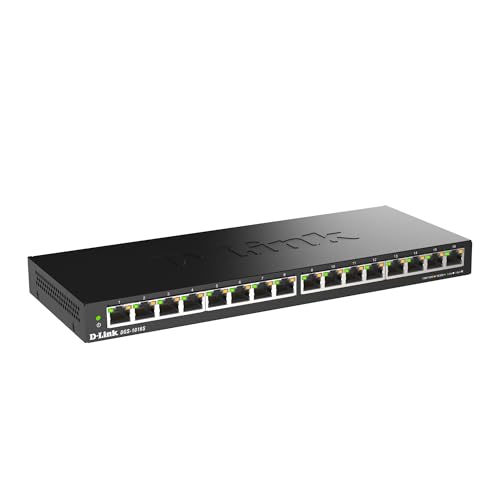
D-Link DGS-1016A 16-Port Gigabit Unmanaged Switch
Sixteen gigabit ports fill a metal desktop case built for a house with drops running to several rooms. There’s no PoE and no management, just a straightforward switch in the traditional sense. Fanless cooling keeps a closet or cupboard install quiet even at this port count.
Pros
- Highest port count on this list for the cost
- Fanless design stays quiet in a cupboard
- Metal housing sheds heat without a fan
Cons
- No PoE support for cameras or access points
- Too large to sit on an open desk

Linksys LGS108P 8-Port Business Desktop Gigabit PoE+ Switch
Four of the eight gigabit ports supply PoE+ within a 45 watt budget, enough for a couple of access points or cameras. Linksys backs its business line with a limited lifetime warranty, longer than most home-grade rivals offer. A fanless metal case matches the quiet operation buyers expect at this size.
Pros
- Backed by a limited lifetime warranty
- PoE+ ports handle higher-draw devices
- Fanless metal case runs silent
Cons
- PoE budget limits it to a few devices
- Only half the ports supply power
Side by side
| # | Model | Ports | Best for | Score | Price |
|---|---|---|---|---|---|
| 1 | TP-Link TL-SG108E 8-Port Gigabit Easy Smart Managed Switch | 8 x Gigabit Ethernet | Best overall | 9.4 | Check price |
| 2 | TP-Link TL-SG105 5-Port Gigabit Desktop Switch | 5 x 10/100/1000 Mbps | Best budget | 9.2 | Check price |
| 3 | Ubiquiti UniFi Flex Mini USW-Flex-Mini 5-Port Switch | 5 x Gigabit Ethernet | Best for tight spaces and smart home wiring | 9.0 | Check price |
| 4 | NETGEAR GS316P 16-Port Gigabit PoE+ Unmanaged Switch | 16 x Gigabit, PoE+ on all ports | Best for PoE cameras and access points | 8.8 | Check price |
| 5 | NETGEAR GS110MX 8-Port Gigabit Switch with Multi-Gig Uplinks | 8 x Gigabit + 2 x Multi-Gig | Best for NAS and fast file transfers | 8.6 | Check price |
| 6 | D-Link DGS-1016A 16-Port Gigabit Unmanaged Switch | 16 x 10/100/1000 Mbps | Best for larger homes needing the most ports | 8.3 | Check price |
| 7 | Linksys LGS108P 8-Port Business Desktop Gigabit PoE+ Switch | 8 x Gigabit, 4 with PoE+ | Best for long-term reliability | 8.0 | Check price |
Questions worth asking
What is the best ethernet switch for a home network?
For most houses, an eight port unmanaged or easy smart switch like the TP-Link TL-SG108E covers current devices with room to grow. Bigger homes with drops in several rooms usually need a sixteen port model such as the D-Link DGS-1016A instead.
How many ethernet ports do I need for a home network?
Count wired devices, add one for the port that connects back to the router, then leave two or three spare. An eight port switch suits a single room, while a full house with multiple drops often needs sixteen.
Managed vs unmanaged switch: which is better for a home network?
Unmanaged switches need no setup and suit almost every home. Managed or smart managed switches earn their keep once VLANs, guest network isolation, or per-port monitoring become useful, which is rare outside home labs.
Can a PoE switch power my security cameras?
Yes, as long as the camera’s PoE standard matches the switch and total draw stays under its power budget. Adding several high-draw cameras to a switch with a small budget causes devices to drop out or fail to power on.
Is a multi-gig ethernet switch worth it for home use?
Only if a NAS, desktop, or internet plan on the other end already supports speeds above one gigabit. Otherwise a standard gigabit switch handles streaming, gaming, and backups without any bottleneck.
How do I connect an ethernet switch to a WiFi router?
Plug one cable from the router’s LAN port into the switch, then wire devices into the remaining switch ports. The switch expands wired capacity only, since the router still handles the internet connection and addressing.
How do I keep a home network switch quiet?
Choose a fanless metal cased switch, since these dissipate heat through the housing instead of a fan. Give it a few inches of open space and avoid stacking it under other warm equipment like a modem.
What is the difference between an ethernet switch and a router?
A router connects a network to the internet, assigns addresses, and runs a firewall. A switch only adds more wired ports to a network that already exists behind that router.
Do I need a managed switch for VLANs at home?
Yes, VLANs require at least a smart managed switch like the TP-Link TL-SG108E, since unmanaged models have no interface to create them. Most homes only need VLANs to separate smart home devices from personal computers.
Our pick
The TP-Link TL-SG108E takes the top spot for most homes: eight silent gigabit ports with VLANs waiting in reserve. Wiring cameras or access points instead? The NETGEAR GS316P powers a full set from one switch. Anyone filling a house with drops in five or more rooms should skip straight to the sixteen port D-Link DGS-1016A.


