Professional External Hard Drives That Won’t Let You Down
The LaCie Rugged SSD Pro 2TB leads as the top pick for professionals who need speed and durability. It offers Thunderbolt 3 speeds up to 2800MB/s and IP67 water and dust resistance. The main limitation is its premium price, but for on-location shoots and large file transfers, it is worth it.
Professionals need external storage that can keep up with demanding workflows. Whether you are editing 4K video, backing up a server, or transporting sensitive client data, the right drive makes all the difference.
We compared top-rated external drives from trusted brands. Our selection includes rugged models, high-speed SSDs, and desktop drives with massive capacities. We considered real-world performance and durability.
What we recommend

LaCie Rugged SSD Pro 2TB
The LaCie Rugged SSD Pro is a Thunderbolt 3 portable drive with read speeds up to 2800MB/s. It is IP67 rated, drop-proof up to 3 meters, and crush-proof up to 2 tons. Comes with a 5-year limited warranty and includes a USB-C cable for broader compatibility.
Pros
- Blazing fast for large file transfers
- Rugged build for harsh environments
- Includes 5-year warranty
Cons
- Expensive compared to other SSDs
- Requires Thunderbolt 3 for full speed

SanDisk Extreme PRO Portable SSD 4TB
The SanDisk Extreme PRO offers NVMe performance with read speeds up to 2000MB/s. It features a forged aluminum chassis that acts as a heat sink, and it is IP65 water and dust resistant. With capacities up to 4TB, it is perfect for storing large photo and video libraries.
Pros
- High capacity and fast speeds
- Sleek, durable design
- Backward compatible with USB-C
Cons
- May get warm during extended use
- No hardware encryption

G-Technology G-DRIVE Mobile SSD 1TB
G-Technology is known for reliability. This mobile SSD offers read speeds up to 560MB/s via USB-C. It is bus-powered and formatted for Mac, but can be reformatted for Windows. Includes a 5-year limited warranty.
Pros
- Reliable performance
- Good for Time Machine
- 5-year warranty
Cons
- Not as fast as NVMe drives
- Limited capacity options

WD My Passport Ultra 5TB
The WD My Passport Ultra offers up to 5TB in a portable form factor. It has hardware encryption with password protection and automatic backup software. USB 3.2 Gen 1 provides speeds up to 5Gbps, sufficient for backups.
Pros
- Huge capacity in a small size
- Hardware encryption
- Automatic backup software
Cons
- Slower than SSDs
- Spinning disk may be less durable
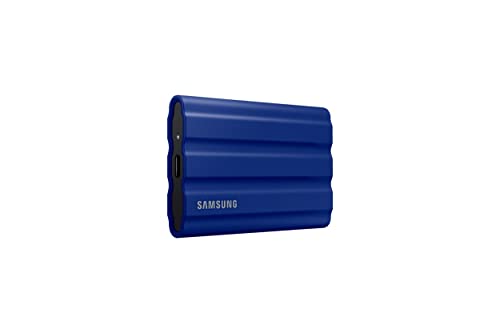
Samsung T7 Shield 2TB
The Samsung T7 Shield is a portable SSD with IP65 water and dust resistance and a drop-resistant design up to 3 meters. It offers read speeds up to 1050MB/s and has dynamic thermal guard to prevent overheating. Includes USB-C to C and USB-C to A cables.
Pros
- Fast and rugged
- Compact and lightweight
- Thermal protection
Cons
- No hardware encryption
- Slightly slower than Thunderbolt drives

Seagate Expansion Desktop 14TB
The Seagate Expansion Desktop drive provides up to 14TB of storage in a simple, external desktop unit. It connects via USB 3.2 Gen 1 and is ready to use out of the box. Ideal for bulk storage and backups, with a 2-year limited warranty.
Pros
- Massive capacity
- Simple plug and play
- Cost per TB is low
Cons
- Requires external power
- Large and not portable

OWC Envoy Pro Elektron 1TB
The OWC Envoy Pro Elektron is a slim, all-aluminum SSD with hardware encryption and a USB-C interface. It offers read speeds up to 1011MB/s and is bus-powered. Its rugged design is water and dust resistant. Backed by a 3-year warranty.
Pros
- Hardware encryption
- Slim, portable design
- Fast enough for many tasks
Cons
- Limited capacity option
- Pricey for the capacity
How they compare
| # | Model | Capacity | Best for | Score | Price |
|---|---|---|---|---|---|
| 1 | LaCie Rugged SSD Pro 2TB | 2TB | Video editors and field professionals needing extreme speed and durability | 9.4 | Check price |
| 2 | SanDisk Extreme PRO Portable SSD 4TB | 4TB | Photographers and content creators who need high capacity and speed | 9.2 | Check price |
| 3 | G-Technology G-DRIVE Mobile SSD 1TB | 1TB | Mac users who need reliable, fast storage with Time Machine support | 9.0 | Check price |
| 4 | WD My Passport Ultra 5TB | 5TB | Professionals who need large storage for backups and archives | 8.8 | Check price |
| 5 | Samsung T7 Shield 2TB | 2TB | On-the-go professionals needing a rugged and compact SSD | 9.1 | Check price |
| 6 | Seagate Expansion Desktop 14TB | 14TB | IT professionals needing massive archival storage | 8.7 | Check price |
| 7 | OWC Envoy Pro Elektron 1TB | 1TB | Professionals needing a bus-powered, secure drive for sensitive data | 8.9 | Check price |
What matters most
Frequently asked questions
How much storage do I need for professional use?
It depends on your field. Video editors often need 2TB or more per project. Photographers may get by with 1TB. For backups and archives, 5TB or more is common. Consider your current usage and future growth.
What is the difference between SSD and HDD external drives?
SSDs use flash memory and have no moving parts. They are faster and more durable. HDDs use spinning disks and are slower but offer more capacity for the price. Professionals often use SSDs for active work and HDDs for storage.
Are Thunderbolt drives worth it?
If you work with large files, yes. Thunderbolt 3 offers speeds up to 40Gbps, which can significantly reduce transfer times. However, you need a Thunderbolt port. Many newer laptops and desktops have it.
Can I use an external drive with both Mac and Windows?
Yes, but you may need to reformat. Most drives come formatted for one OS. You can use exFAT for cross-compatibility, but it lacks some features. Some drives include software for both.
What is hardware encryption?
Hardware encryption uses a dedicated chip to encrypt data automatically. It protects your data if the drive is lost or stolen. You need a password or PIN to access it. It is more secure than software encryption.
How do I ensure my drive lasts?
Handle it with care, avoid extreme temperatures, and safely eject it. For spinning drives, avoid moving them while they are operating. Regularly back up your data to multiple locations.
Do external drives come with software?
Many come with backup software and utilities. For example, WD provides backup software, and LaCie includes a toolkit. You can also use built-in OS tools like Time Machine or File History.
What is the best way to transfer files quickly?
Use a drive with USB 3.2 Gen 2 or Thunderbolt. Connect directly to your computer’s port. Avoid using hubs that may limit speed. For large transfers, use a cable that supports the speed.
Can I run applications from an external drive?
Yes, but performance may be slower than an internal SSD. For applications, use an SSD with fast speeds. Some professionals run virtual machines or large databases from external SSDs.
How do I choose between portable and desktop drives?
Portable drives are small and bus-powered. They are easy to carry. Desktop drives are larger and need external power. They offer higher capacities and are often faster. Choose based on your mobility needs.
The verdict
For most professionals, the LaCie Rugged SSD Pro is the clear winner. It offers unmatched speed and ruggedness. If you need more capacity for less money, the WD My Passport Ultra is a solid choice. For a balance of speed and portability, the SanDisk Extreme PRO is excellent.