Gaming Mice for Competitive and Casual Players
The Logitech G Pro X Superlight is our overall pick for its ultralight body, reliable wireless, and precise sensor that competitive players favor. The Razer DeathAdder V3 wins for its proven ergonomic shape, while the SteelSeries Rival 3 offers strong performance for budget-minded gamers.
If you want a gaming mouse that feels fast and accurate, the Logitech G Pro X Superlight leads our list for its ultralight body, dependable wireless, and precise sensor, followed by the Razer DeathAdder V3 for its ergonomic shape and the SteelSeries Rival 3 for value. Below we rank 7 real models so you can match one to your grip and game.
Choosing a gaming mouse is trickier than it looks because shape and weight are personal, and a high DPI number matters far less than a stable sensor and comfortable fit. To pick these 7, we compared published specifications, weights, shapes, and connectivity, then weighed them against how owners report each mouse feels across long sessions and different grip styles.
Our top picks

Logitech G Pro X Superlight
The G Pro X Superlight weighs under 63 grams and pairs a precise HERO sensor with low-latency Lightspeed wireless, a combination competitive players widely favor. Owners report the simple ambidextrous shape and long battery life make it easy to live with, though it keeps the button count minimal to stay light.
Pros
- Ultralight body under 63 grams
- Precise HERO sensor with low-latency wireless
- Long battery life for its class
Cons
- Minimal side button count
- No RGB lighting to save weight

Razer DeathAdder V3
The DeathAdder V3 refines Razer’s long-running ergonomic shape into a lighter body with a high-precision Focus Pro sensor. Owners report the sculpted right-handed design supports the palm well over long sessions, making it a strong pick for people who prefer a contoured mouse to a flat, symmetrical one.
Pros
- Refined ergonomic shape for palm grip
- High-precision Focus Pro sensor
- Lighter than earlier DeathAdder models
Cons
- Right-handed shape only
- Wireless version costs more than wired

Glorious Model O
The Model O uses a honeycomb shell to reach a very low weight while keeping an ambidextrous shape suited to claw and fingertip grips. Owners report the flexible paracord-style cable feels almost wireless, though the perforated shell is a matter of personal taste and less sealed against dust.
Pros
- Very light honeycomb shell
- Flexible cable that feels near wireless
- Ambidextrous shape with side buttons
Cons
- Perforated shell is not for everyone
- Open shell is less sealed against dust

Razer Basilisk V3
The Basilisk V3 loads on programmable buttons and a tilt-scroll wheel with a free-spin mode, making it a favorite for MMO and productivity users. Owners report the ergonomic shape and thumb rest feel comfortable, though the extra features push the weight higher than minimalist competitive mice.
Pros
- Many programmable buttons and thumb rest
- Tilt wheel with free-spin scroll mode
- Comfortable ergonomic shape
Cons
- Heavier than lightweight competitive mice
- Feature set is more than pure FPS needs

Logitech G502 Hero
The G502 Hero remains popular for its adjustable weight system and eleven programmable buttons, giving players fine control over feel and mapping. Owners report the sculpted shape suits palm grip well, though the removable weights and rich button layout make it heavier than modern featherweight designs.
Pros
- Adjustable weight system for custom feel
- Eleven programmable buttons
- Reliable HERO sensor
Cons
- Heavy compared with modern light mice
- Wired connection only
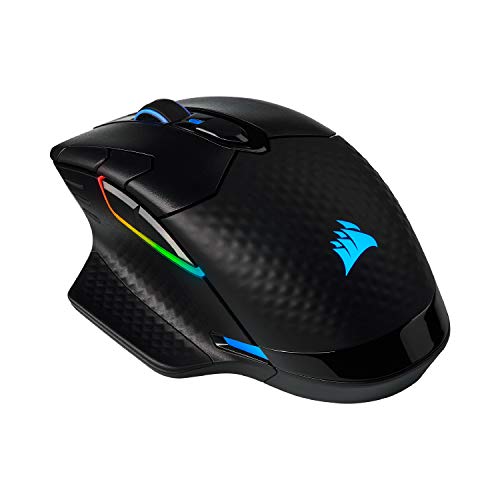
Corsair Dark Core RGB Pro
The Dark Core RGB Pro offers dual wireless modes and interchangeable side grips to match different hand sizes, plus Qi wireless charging support. Owners report a comfortable ergonomic shape and solid battery life, though it is heavier than featherweight rivals and leans toward comfort over minimal weight.
Pros
- Dual wireless modes plus Qi charging
- Swappable side grips for hand fit
- Comfortable ergonomic shape
Cons
- Heavier than lightweight rivals
- Bulkier body suits larger hands

SteelSeries Rival 3
The Rival 3 delivers a capable optical sensor, durable switches, and a comfortable symmetrical shape at a budget-friendly price. Owners report it performs well above its cost for everyday gaming, though it uses a standard rubber cable and keeps features basic to hit its low price point.
Pros
- Strong performance for a low price
- Durable switches rated for millions of clicks
- Comfortable ambidextrous shape
Cons
- Standard rubber cable is stiffer
- Lower peak DPI than premium mice
How they compare
| # | Model | Sensor / DPI | Best for | Score | Price |
|---|---|---|---|---|---|
| 1 | Logitech G Pro X Superlight | HERO, up to 25,600 DPI | Best overall | 9.4 | Check price |
| 2 | Razer DeathAdder V3 | Focus Pro, up to 30,000 DPI | Best ergonomic shape | 9.2 | Check price |
| 3 | Glorious Model O | Optical, up to 12,000 DPI | Best lightweight | 9.0 | Check price |
| 4 | Razer Basilisk V3 | Focus+, up to 26,000 DPI | Best for extra buttons | 8.8 | Check price |
| 5 | Logitech G502 Hero | HERO, up to 25,600 DPI | Best for customization | 8.6 | Check price |
| 6 | Corsair Dark Core RGB Pro | Optical, up to 18,000 DPI | Best wireless value | 8.4 | Check price |
| 7 | SteelSeries Rival 3 | TrueMove Core, up to 8,500 DPI | Best budget | 8.1 | Check price |
What matters most
Sensor and DPI A high DPI number looks impressive on a box, but most players game well below 3,000 DPI, so sensor stability matters far more than the peak figure. Every mouse on this list uses a modern optical sensor that tracks accurately at typical settings. Instead of chasing the highest DPI, focus on consistent tracking and adjustable settings, since a stable sensor at a comfortable DPI beats a jittery one pushed to its maximum.
Weight and why it matters Mouse weight has dropped sharply, with competitive models like the G Pro X Superlight and Glorious Model O sitting near 60 to 67 grams. Lighter mice are easier to flick quickly and cause less fatigue over long sessions, which is why esports favors them. Feature-rich mice like the G502 Hero and Corsair Dark Core weigh more, so decide whether you value speed and comfort or extra buttons and adjustability.
Shape and grip style Grip style should drive your choice of shape. Ergonomic, right-handed mice like the Razer DeathAdder V3 support the whole palm, while flatter ambidextrous shapes like the Model O suit claw and fingertip grips that lift the back of the hand. Larger hands generally prefer contoured mice such as the Corsair Dark Core, so match the shape to how you actually hold the mouse rather than to looks.
Wired vs wireless connectivity Modern wireless technology like Logitech Lightspeed and Corsair Slipstream has closed most of the latency gap, so wireless is now viable for competitive play. Wireless mice add cost and battery to manage but keep your desk clean, while wired mice with flexible paracord cables, like the Glorious Model O, stay light and never need charging. Choose based on whether you value cable freedom or the lower cost and simplicity of wired.
Good to know
What is the best gaming mouse overall in 2026?
Based on specifications and owner feedback, the Logitech G Pro X Superlight is our overall pick. It weighs under 63 grams, uses a precise HERO sensor with low-latency Lightspeed wireless, and offers long battery life, a combination competitive players widely favor.
Does higher DPI make a mouse better?
Not really. Most players game below 3,000 DPI, so sensor stability and consistent tracking matter more than a high peak DPI figure. Every mouse on this list tracks accurately at typical settings, so choose based on shape, weight, and features rather than the maximum DPI number.
How much does mouse weight matter?
Weight affects how quickly you can flick and how tired your hand feels over long sessions. Lightweight mice near 60 to 67 grams, like the G Pro X Superlight and Glorious Model O, are easier to move fast, while heavier feature-rich mice trade that speed for extra buttons and adjustability.
Which grip style should guide my choice?
Palm-grip players are usually most comfortable with ergonomic shapes like the Razer DeathAdder V3, while claw and fingertip grips suit flatter ambidextrous mice such as the Glorious Model O. Matching the shape to how you actually hold the mouse matters more than any single spec.
Is a wireless gaming mouse good enough for competitive play?
Yes. Modern wireless technology like Logitech Lightspeed and Corsair Slipstream has closed most of the latency gap, so wireless mice are now used at the top competitive level. Wireless adds cost and a battery to manage, but the performance is comparable to wired for most players.
Are honeycomb mice with holes durable?
The perforated shell on mice like the Glorious Model O keeps weight low and is structurally sound for normal use, but the open design is less sealed against dust and debris. Whether the look and feel appeal to you is largely a matter of personal taste.
Do I need a mouse with lots of extra buttons?
It depends on your games. MMO and productivity users benefit from the many programmable buttons on mice like the Razer Basilisk V3 and Logitech G502 Hero, while FPS players often prefer a lighter mouse with fewer buttons, such as the G Pro X Superlight.
How do I keep a gaming mouse performing well?
Wipe the sensor lens and glide feet occasionally, keep the surface clean, and update the firmware through the companion software to maintain a stable connection. For wireless mice, avoid storing them fully drained for long periods to help preserve battery health over time.
Are more expensive gaming mice worth it?
Premium mice like the G Pro X Superlight and Razer DeathAdder V3 justify their positioning through lighter builds, refined shapes, and top sensors. Budget picks such as the SteelSeries Rival 3 still perform well for everyday gaming, so the right choice depends on how competitive and comfort-focused you are.
Final word
For most people, the Logitech G Pro X Superlight is the gaming mouse to buy, thanks to its ultralight body, dependable low-latency wireless, and precise sensor. Choose the Razer DeathAdder V3 if you prefer an ergonomic palm-grip shape, or the SteelSeries Rival 3 if you want strong performance on a budget.


