Top Gaming PCs for Every Budget and Play Style
The Alienware Aurora R16 stands out as the top pick for most gamers because it blends strong current-gen components with a compact, quiet design. Its main advantage is excellent thermal performance and easy upgradability. However, its proprietary motherboard and power supply can limit future customization compared to standard ATX builds.
Finding the best gaming PC can feel overwhelming with so many options. Prebuilt desktops offer convenience and performance without the hassle of building. Our guide focuses on current models that deliver great frame rates and reliability.
We looked at systems from budget-friendly to high-end. Each product was compared based on specifications, user reviews, and value. Whether you play esports titles or demanding AAA games, there is a PC here for you.
The shortlist, ranked

Alienware Aurora R16 Gaming Desktop
The Alienware Aurora R16 is a sleek mid-tower that packs up to an Intel Core i9-14900F and NVIDIA GeForce RTX 4080 SUPER. Its redesigned chassis improves airflow and reduces noise. Owners report cool operation even during long sessions, and the tool-less side panel makes upgrades simple.
Pros
- Excellent cooling and quiet operation
- Compact design with easy access
- Strong 4K gaming performance
Cons
- Proprietary motherboard and PSU
- Premium price

Corsair Vengeance i7500 Gaming PC
The Corsair Vengeance i7500 uses a standard ATX motherboard and power supply, giving you the freedom to upgrade with off-the-shelf parts. It features liquid cooling for the CPU and a high-airflow case. With an Intel Core i7-14700KF and RTX 4070 Ti SUPER, it handles 1440p and 4K gaming with ease.
Pros
- Standard parts for easy upgrades
- Excellent airflow and cooling
- Great performance for price
Cons
- Bulky case may not fit all desks
- RGB lighting can be distracting

Skytech Gaming Nebula Gaming PC
The Skytech Nebula delivers solid 1440p performance without breaking the bank. It comes with an AMD Ryzen 7 7700X and RTX 4070, 16GB DDR5 RAM, and a 1TB SSD. Owners appreciate the clean cable management and quiet operation. It is a smart choice for gamers who want current-gen features at a lower cost.
Pros
- Great value for 1440p gaming
- Quiet operation
- Clean interior design
Cons
- Only 16GB RAM (upgradeable)
- Limited RGB customization

iBUYPOWER Y60 Gaming PC
The iBUYPOWER Y60 features a unique panoramic tempered glass case that shows off your components. It is powered by an Intel Core i7-13700KF and RTX 4070, with 32GB DDR5 RAM and a 1TB SSD. The case includes vertical GPU mounting and excellent airflow. This PC is as beautiful as it is capable.
Pros
- Stunning case design
- Vertical GPU mount for better cooling
- Strong 1440p performance
Cons
- Limited front I/O ports
- Fans can be loud under load

HP OMEN 45L Gaming Desktop
The HP OMEN 45L uses a patented Cryo Chamber cooling solution that separates the CPU cooling chamber from the main chassis, keeping temperatures low. It comes with an AMD Ryzen 9 7900X and RTX 4070 Ti, 32GB RAM, and a 2TB SSD. This PC is ready for demanding games and multitasking.
Pros
- Excellent cooling performance
- High-end CPU for productivity
- Plenty of storage
Cons
- Large and heavy case
- Proprietary motherboard

Lenovo Legion Tower 5i Gen 8 Gaming PC
The Lenovo Legion Tower 5i Gen 8 offers a balanced combination of price and performance. It features an Intel Core i5-13400F and RTX 4060, 16GB RAM, and a 512GB SSD. It handles 1080p and entry-level 1440p gaming smoothly. Owners praise its build quality and straightforward design.
Pros
- Affordable and reliable
- Good 1080p performance
- Quiet under normal load
Cons
- Limited storage capacity
- No USB-C port on front
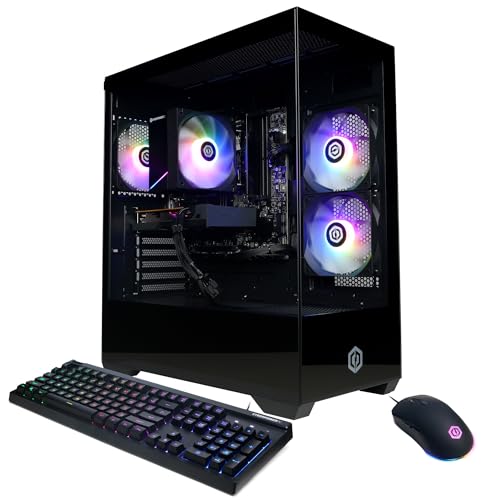
CyberPowerPC Gamer Master Gaming PC
The CyberPowerPC Gamer Master is an affordable option for casual gamers. It comes with an AMD Ryzen 5 7600 and Radeon RX 7600, 16GB RAM, and a 1TB SSD. It delivers smooth performance in popular titles like Fortnite and Minecraft. While not for heavy 4K, it offers great value for its price.
Pros
- Very affordable
- Good for esports and casual gaming
- Large SSD storage
Cons
- Graphics card entry-level
- Case has limited airflow
How to pick the right one
Side by side
| # | Model | Processor | Best for | Score | Price |
|---|---|---|---|---|---|
| 1 | Alienware Aurora R16 Gaming Desktop | Intel Core i9-14900F (up to 5.4 GHz) | Overall performance and thermals | 9.4 | Check price |
| 2 | Corsair Vengeance i7500 Gaming PC | Intel Core i7-14700KF (up to 5.6 GHz) | Customization and airflow | 9.2 | Check price |
| 3 | Skytech Gaming Nebula Gaming PC | AMD Ryzen 7 7700X (up to 5.4 GHz) | Budget 1440p gaming | 9.0 | Check price |
| 4 | iBUYPOWER Y60 Gaming PC | Intel Core i7-13700KF (up to 5.4 GHz) | Showcase aesthetics with performance | 8.8 | Check price |
| 5 | HP OMEN 45L Gaming Desktop | AMD Ryzen 9 7900X (up to 5.6 GHz) | High-end cooling and performance | 8.7 | Check price |
| 6 | Lenovo Legion Tower 5i Gen 8 Gaming PC | Intel Core i5-13400F (up to 4.6 GHz) | Reliable mid-range gaming | 8.5 | Check price |
| 7 | CyberPowerPC Gamer Master Gaming PC | AMD Ryzen 5 7600 (up to 5.1 GHz) | Entry-level 1080p gaming | 8.2 | Check price |
Good to know
How much should I spend on a gaming PC?
For 1080p gaming, budget around current price to current price. For 1440p, expect current price to current price. For 4K, you may need current price or more. Prices vary based on component availability.
Is it better to build a PC or buy a prebuilt?
Building can save money and allow full customization, but it requires time and technical knowledge. Prebuilt PCs offer convenience and support, though you may pay a premium for assembly.
What is the best GPU for gaming in 2025?
For high-end gaming, the NVIDIA RTX 4080 SUPER and AMD RX 7900 XTX are top choices. For mid-range, the RTX 4070 and RX 7800 XT are excellent for 1440p.
How much RAM do I need for gaming?
16GB is sufficient for most games, but 32GB is recommended for future-proofing and heavy multitasking. Some simulation games can use more than 16GB.
Should I choose Intel or AMD for gaming?
Both offer excellent performance. Intel’s Core i5 and i7 are strong for gaming, while AMD’s Ryzen 5 and 7 provide great value. The difference in gaming is often minimal at the same price point.
What is the difference between SSD and HDD?
SSDs are much faster, providing quicker boot times and game loading. HDDs are cheaper but slower. For gaming, an NVMe SSD is highly recommended as the primary drive.
Do gaming PCs need liquid cooling?
Not necessarily. Good air cooling can suffice for most setups. Liquid cooling is beneficial for high-end CPUs that generate more heat, especially in compact cases.
Can I upgrade a prebuilt gaming PC?
Many prebuilt PCs allow upgrades, but some use non-standard parts. Check if the motherboard and power supply are standard sizes. RAM and storage are usually easy to upgrade.
What resolution is best for gaming?
1080p is the most common and affordable. 1440p offers a good balance of visual quality and performance. 4K is the highest but requires a powerful GPU.
Are gaming PCs noisy?
Noise levels vary. Some systems with good cooling and quality fans operate quietly. High-end components under load can produce more noise. Look for reviews that mention acoustics.
Our pick
For most gamers, the Alienware Aurora R16 is the best prebuilt gaming PC because it offers top-tier performance, excellent cooling, and a compact design. However, if you value upgradability and want standard parts, the Corsair Vengeance i7500 is a smarter investment. Budget-conscious buyers should consider the Skytech Nebula for its value and solid 1440p capability.


