Handheld Gaming Consoles Worth Buying Right Now
The Steam Deck OLED is the strongest all-round handheld thanks to its vivid screen and huge PC library, while the Nintendo Switch OLED remains the easy pick for exclusives and family play. For raw AAA power, the ASUS ROG Ally X pulls ahead.
If you want the best all-round handheld, the Steam Deck OLED leads for most players, the Nintendo Switch OLED wins on exclusives and simplicity, and the ASUS ROG Ally X is the pick when you want the most horsepower.
Choosing is tricky because these devices split into two worlds, console-style Nintendo hardware and Windows PC handhelds, each with very different libraries, battery behavior and setup. We compared seven models on published specs and what owners consistently report so you can match a device to how you actually play.
Our top picks

Valve Steam Deck OLED
The Steam Deck OLED pairs a bright HDR OLED panel with a mature SteamOS and access to most of the Steam catalog. Owners report it hits a comfortable balance of performance, battery life and price that few rivals match.
Pros
- Excellent OLED screen with HDR
- Massive Steam game library
- Strong battery gains over the LCD model
Cons
- SteamOS has an initial learning curve
- Bulkier than Nintendo handhelds

ASUS ROG Ally X
The ROG Ally X runs full Windows with a Ryzen Z1 Extreme chip and a larger battery than the original. Based on specifications it targets demanding PC titles at higher settings, though that power comes with heavier thermals.
Pros
- Very strong performance for AAA games
- Large 80Wh battery
- Runs the full Windows game ecosystem
Cons
- Windows handheld setup can feel fiddly
- Fans get loud under load

Nintendo Switch OLED
The Switch OLED remains the simplest way into Nintendo exclusives, with a vibrant 7 inch screen and effortless TV docking. Owners praise how approachable it is for families and travel despite modest raw power.
Pros
- Exclusive first-party Nintendo library
- Simple pick up and play experience
- Detachable Joy-Cons and TV docking
Cons
- Weaker hardware than PC handhelds
- Only 64GB of onboard storage

Lenovo Legion Go
The Legion Go stands out with a large 8.8 inch display and detachable controllers, one of which doubles as a mouse-style FPS grip. It is a Windows handheld built for players who want more screen and more input options.
Pros
- Large high-resolution 144Hz screen
- Detachable controllers with FPS mode
- Built-in kickstand
Cons
- Heavier and larger to hold
- Battery drains fast at full brightness
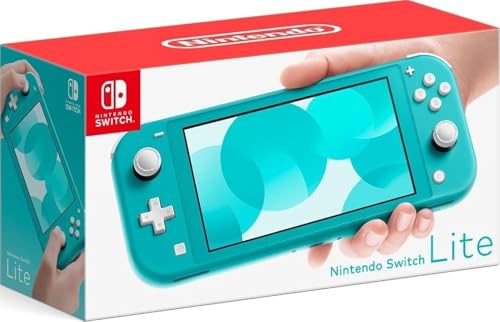
Nintendo Switch Lite
The Switch Lite is a compact, purely handheld take on the Switch at the lowest entry price in Nintendo’s lineup. Owners like its light weight and solid build, accepting that it cannot dock to a TV.
Pros
- Lowest cost route into Switch games
- Compact and lightweight
- Comfortable integrated controls
Cons
- No TV docking or detachable controllers
- Smaller LCD screen

Anbernic RG35XX Plus
The RG35XX Plus is a pocket retro handheld built for classic emulation on a crisp 3.5 inch screen. Owners report strong battery life and great value for revisiting older console libraries in a shirt pocket form factor.
Pros
- Very affordable retro focused design
- Genuinely pocketable
- Long battery life for its size
Cons
- Not meant for modern AAA titles
- Small screen limits some genres

MSI Claw 8 AI+
The MSI Claw 8 AI+ is a Windows handheld built around Intel’s newer Core Ultra platform with a roomy 8 inch screen and large battery. Based on specifications it is a capable alternative for players who prefer Intel graphics.
Pros
- Large 8 inch high refresh display
- Big 80Wh battery
- Comfortable ergonomic grips
Cons
- Driver maturity trails AMD handhelds
- Heavier than compact models
Side by side
| # | Model | Display | Best for | Score | Price |
|---|---|---|---|---|---|
| 1 | Valve Steam Deck OLED | 7.4 inch OLED HDR | Best overall | 9.4 | Check price |
| 2 | ASUS ROG Ally X | 7 inch 1080p 120Hz | Best for AAA power | 9.1 | Check price |
| 3 | Nintendo Switch OLED | 7 inch OLED | Best value | 8.9 | Check price |
| 4 | Lenovo Legion Go | 8.8 inch 1600p 144Hz | Best for versatility | 8.6 | Check price |
| 5 | Nintendo Switch Lite | 5.5 inch LCD | Best budget | 8.3 | Check price |
| 6 | Anbernic RG35XX Plus | 3.5 inch IPS | Best for retro gaming | 8.2 | Check price |
| 7 | MSI Claw 8 AI+ | 8 inch 1080p 120Hz | Best for Intel hardware | 8.0 | Check price |
How to pick the right one
Nintendo vs Windows PC handhelds The first real decision is ecosystem. Nintendo devices like the Switch OLED and Lite give you polished exclusives, instant setup and family friendly simplicity, but weaker hardware. Windows handhelds such as the ROG Ally X, Legion Go and MSI Claw run huge PC storefronts and mod support, at the cost of more setup and menu wrangling. The Steam Deck sits in between with a console-like SteamOS layer over a PC library.
Battery life and performance tradeoffs Handheld battery life swings wildly with the game and settings. Demanding PC titles on a powerful chip can drain a battery in around ninety minutes, while lighter indie or retro games can run for many hours. Larger batteries like the 80Wh packs in the Ally X and Claw help, but they also add weight. If long unplugged sessions matter more than maximum frame rates, a lower-power device or turning settings down is the practical answer.
Screen, size and comfort OLED panels on the Steam Deck OLED and Switch OLED deliver deeper contrast and richer color than LCD rivals. Bigger screens on the Legion Go and Claw look great but make the device heavier in long sessions. Consider grip shape and weight as much as resolution, since a handheld you hold for hours needs to stay comfortable in your hands.
Storage and expandability Modern games are large, so storage fills quickly. Nintendo hardware ships with limited onboard space but accepts microSD cards, while PC handhelds offer larger internal drives and, in most cases, microSD expansion too. If you keep a big library installed, favor a higher capacity model or plan to add a fast microSD card from the start.
Frequently asked questions
Which handheld console is best for most people?
For most players the Steam Deck OLED offers the best overall mix of screen quality, performance, battery and library. If you mainly want Nintendo exclusives and simple setup, the Switch OLED is the better fit.
Are Windows handhelds hard to set up?
They take more effort than Nintendo devices. You manage Windows, storefronts and drivers yourself, which gives flexibility but adds a learning curve. Owners often spend the first session tuning settings before things feel smooth.
How long do handheld batteries last?
It depends heavily on the game. Demanding titles on powerful chips may last around ninety minutes, while lighter indie and retro games can run several hours. Larger batteries and lower graphics settings extend playtime.
Can these consoles connect to a TV?
The Switch OLED docks to a TV out of the box, and PC handhelds can output to a display over USB-C with the right adapter or dock. The Switch Lite is the exception, as it is handheld only.
Do I need extra storage?
Often yes. Game installs are large, so many owners add a microSD card, especially on Nintendo hardware with limited onboard space. PC handhelds with bigger internal drives give more breathing room.
Is the Steam Deck OLED worth it over the LCD?
The OLED model brings a brighter HDR screen and improved battery life over the original LCD version. Owners generally consider those upgrades meaningful enough to prefer the OLED where budget allows.
What is the best budget handheld?
The Nintendo Switch Lite is the lowest cost entry into the mainstream Switch library. For classic emulation on a tighter budget, the Anbernic RG35XX Plus is a popular pocket option.
Can handhelds run modern AAA games?
PC handhelds like the ROG Ally X, Legion Go and Steam Deck can run many modern AAA titles, though you often adjust settings to balance frame rate and battery. Retro focused units are not built for these games.
Final word
The Steam Deck OLED is our overall pick for its blend of screen, library and value, while the Switch OLED stays the easiest choice for Nintendo fans and families. If you crave the most power for modern PC games, the ASUS ROG Ally X is worth the extra bulk and setup.


