Picking the Right Hard Drive Dock for Your Backup Setup
Sabrent’s dual-bay USB 3.0 dock suits most home offices with independent bay access and one-button cloning. Unitek’s single-bay UASP model fits tight desks needing one drive at a time. ORICO’s 2-bay offline clone dock duplicates drives up to 18TB without a computer attached.
A bare 2.5 or 3.5 inch drive becomes instant external storage once it sits in a dock, no case required.
We compared interface speed, drive compatibility, and offline cloning support across seven current Amazon listings to separate everyday docks from time-saving backup tools.
The top picks, ranked

Sabrent USB 3.0 to SATA Dual Bay External Hard Drive Docking Station
Two SATA bays sit side by side, each accepting a 2.5 or 3.5 inch drive without tools. A single button copies data from one bay to the other with no computer connected. USB 3.0 carries data at up to 5Gbps, and owners report the vented plastic shell stays cool during long transfers.
Pros
- Independent bays run two drives at once
- Offline clone button skips the need for a PC
- Tool-free insertion for both drive sizes
Cons
- No USB-C cable in the box
- Fanless shell can warm up during sustained writes

Unitek USB 3.0 to SATA Single Bay Hard Drive Docking Station
One vertical slot holds a 2.5 or 3.5 inch SATA drive and links to a computer over USB 3.0. An aluminum top plate pulls heat away faster than the plastic shells on cheaper docks. UASP support inside the chipset speeds up transfers made of many small files.
Pros
- Aluminum top improves heat dissipation
- UASP chipset speeds up small-file transfers
- Compact footprint suits tight desks
Cons
- Holds only one drive at a time
- No drive-to-drive cloning function

ORICO 2-Bay USB 3.0 Offline Clone Hard Drive Docking Station
Duplicating a drive here needs no laptop or desktop nearby. A physical switch copies data sector by sector between two SATA bays. Listed capacity support reaches 18TB per bay, well past what most desktop drives need.
Pros
- True offline cloning needs no software
- 18TB capacity ceiling per bay
- One-button operation keeps setup simple
Cons
- Sector-by-sector cloning runs slower than software imaging
- Housing is bulkier than single-bay docks
Sabrent USB Type-C to SATA External Hard Drive Lay-Flat Docking Station
A native USB-C port removes the adapter dongle that older docks require. Its single bay lays a 2.5 or 3.5 inch drive flat, which cuts down on vibration noise. The included cable plugs straight into current MacBooks and Windows ultrabooks.
Pros
- Native USB-C skips extra adapters
- Lay-flat design reduces vibration and noise
- Works with Time Machine backups
Cons
- USB-A-only PCs need a separate cable
- Single bay limits simultaneous drive access
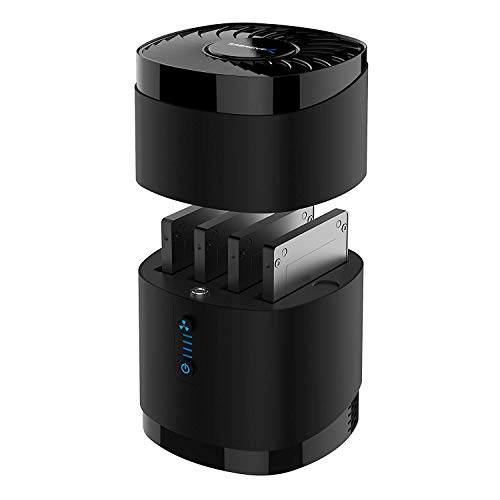
Yottamaster 2 Bay USB 3.0 Hard Drive Docking Station with Fan
A built-in fan separates this dock from passively cooled models during hours-long NAS-style backups. Its aluminum alloy body works as a heat sink alongside that fan. Both bays operate independently, so this isn’t limited to RAID or clone pairing.
Pros
- Active cooling suits long backup sessions
- Aluminum housing adds durability
- Independent bay access beyond cloning
Cons
- Fan adds a small amount of noise
- Heavier and larger than fanless docks

StarTech.com USB 3.0 to 2.5/3.5-Inch SATA Hard Drive Docking Station
IT technicians swapping drives during diagnostics or migrations are the target user here. UASP support inside the dock speeds up read performance during imaging jobs. A vertical single-bay layout keeps desk space to a minimum in a workshop.
Pros
- Reliable for frequent drive swapping
- UASP support speeds up imaging tasks
- Backed by StarTech’s business warranty
Cons
- Costs more than generic single-bay docks
- No offline cloning between bays

ineo USB 3.0 to SATA Dual Bay External Hard Drive Docking Station
Dual-bay convenience arrives here at a lower price than premium alternatives. Both bays accept 2.5 and 3.5 inch SATA drives independently of each other. A basic offline clone button handles simple duplication tasks without extra software.
Pros
- Lower price than most dual-bay docks
- Offline clone button included
- Tool-free vertical drive slots
Cons
- Plastic housing feels less premium
- Clone speed trails dedicated duplicators
How to pick the right one
What should you look for in a hard drive docking station? Interface speed sets the ceiling for every transfer. USB 3.0 tops out near 5Gbps, and current USB-C docks land in the same range or higher. Confirm the dock accepts both 2.5 inch laptop drives and 3.5 inch desktop drives before buying. UASP support inside the chipset noticeably speeds up transfers with many small files.
Single bay or dual bay, which fits your workflow? Swapping one drive at a time for backup or recovery fits a single-bay dock well. Dual-bay models add drive-to-drive cloning and let two drives run independently. Photographers and video editors managing several archive drives usually get more value from the extra bay.
Is a USB-C dock necessary for laptop-only setups? Many current MacBooks and Windows ultrabooks ship without a single USB-A port. A native USB-C dock removes the need for a separate adapter dongle. Check that the included cable actually matches your laptop’s port before ordering.
Can offline cloning replace software-based backups? Offline clone docks copy one drive to another with no computer in the loop. Shop technicians and anyone replacing a failing drive with an exact copy benefit most. Software imaging on a PC still gives more control over partition selection. Choose based on how much oversight the job actually needs.
The lineup, side by side
| # | Model | Interface | Best for | Score | Price |
|---|---|---|---|---|---|
| 1 | Sabrent USB 3.0 to SATA Dual Bay External Hard Drive Docking Station | USB 3.0 (5Gbps) | Best overall | 9.4 | Check price |
| 2 | Unitek USB 3.0 to SATA Single Bay Hard Drive Docking Station | USB 3.0 (5Gbps) | Best value | 9.0 | Check price |
| 3 | ORICO 2-Bay USB 3.0 Offline Clone Hard Drive Docking Station | USB 3.0 (5Gbps) | Best for offline cloning | 8.8 | Check price |
| 4 | Sabrent USB Type-C to SATA External Hard Drive Lay-Flat Docking Station | USB-C (5Gbps) | Best for USB-C laptops | 8.6 | Check price |
| 5 | Yottamaster 2 Bay USB 3.0 Hard Drive Docking Station with Fan | USB 3.0 (5Gbps) | Best for continuous use | 8.4 | Check price |
| 6 | StarTech.com USB 3.0 to 2.5/3.5-Inch SATA Hard Drive Docking Station | USB 3.0 (5Gbps) | Best for IT and workshop use | 8.2 | Check price |
| 7 | ineo USB 3.0 to SATA Dual Bay External Hard Drive Docking Station | USB 3.0 (5Gbps) | Best budget dual bay | 8.0 | Check price |
Frequently asked questions
What is a hard drive docking station used for?
It turns a bare SATA drive into external storage or a cloning target without installing it inside a case.
Can a docking station clone a drive without a computer?
Yes, dual-bay docks with an offline clone button copy data directly between two drives with nothing else connected.
Do hard drive docks fit both 2.5 and 3.5 inch drives?
Most current models support both sizes, though some budget docks limit height clearance, so check the listing first.
Is USB-C faster than USB 3.0 for a hard drive dock?
Speed comes down to the chipset, not the port shape, and many USB-C and USB 3.0 docks both cap near 5Gbps.
Docking station vs external hard drive enclosure, which should I buy?
A dock accepts bare drives you swap freely, while an enclosure permanently houses one drive, which suits people rotating several drives toward a dock.
Do I need UASP support on a hard drive dock?
UASP speeds up transfers made of many small files, which matters more for document backups than large video exports.
Can a dual-bay dock run two separate drives at once?
Most dual-bay models give independent access to each bay, so backing up two different drives at the same time works fine.
Are hard drive docking stations compatible with SSDs?
Yes, 2.5 inch SATA SSDs share the same connector as spinning drives, so they fit the same bays.
Which hard drive dock is best for frequent IT drive swaps?
StarTech’s business-grade single-bay dock targets technicians running diagnostics or migrations with UASP-backed imaging speed.
Our pick
A dual-bay USB 3.0 dock like Sabrent’s covers everyday backup and cloning needs for most desks. Laptop owners running USB-C only should prioritize a native USB-C model over one needing an adapter. Anyone duplicating drives away from a computer gets more value from a dedicated offline clone dock.


