Smart Index Cards for Digital Study and Note Taking
The Rocketbook Smart Reusable Notebook is our top pick for most people. It merges physical index cards with a powerful scanning app. You write, snap, and organize notes digitally. Its main advantage is the reusable pages and free cloud sharing. The main limitation is that you must use Pilot Frixion pens and microwave the pages to erase them.
Index cards have been a study staple for generations. But in a digital world, they can be limiting. Smart index cards bridge the gap, letting you write by hand and then digitize your notes. This guide compares the best options available on Amazon today.
We focused on products that offer real value for students, professionals, and lifelong learners. Whether you want a reusable notebook, a portable scanner, or a full flashcard system, our list covers the top choices. Each product has been selected based on specifications and user feedback.
What we recommend
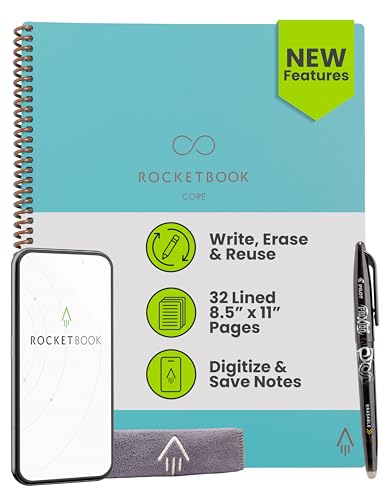
Rocketbook Smart Reusable Notebook
The Rocketbook Smart Reusable Notebook is a spiral-bound notebook with reusable pages that look like index cards. You write with Pilot Frixion pens, then use the app to scan and send your notes to cloud services. When you microwave the notebook, the ink disappears, making it ready for reuse. It includes 15 pages with dotted grid, lined, and blank options.
Pros
- Pages are fully reusable, saving paper
- Scanning app is reliable and fast
- Includes AI transcription and smart titles
Cons
- Requires special Pilot Frixion pens
- Microwaving to erase pages can be tedious

Moleskine Smart Writing Set
The Moleskine Smart Writing Set includes a special notebook and a smartpen that records your handwriting. As you write, the pen captures every stroke and syncs it to the app. You can convert your handwritten notes into digital text and share them easily. The notebook has the classic Moleskine quality and feel.
Pros
- Real-time capture of handwriting
- Premium build quality
- Transcription feature works well
Cons
- Expensive compared to other options
- Requires specific Moleskine notebooks

Boogie Board Reusable Writing Tablet
The Boogie Board is a simple LCD writing tablet that looks like a digital index card. You write with the included stylus, and with a press of a button, you can save your notes to the connected app via Bluetooth. It is lightweight and durable, making it perfect for jotting down ideas on the go.
Pros
- Instant save to phone without scanning
- No need for special paper or pens
- Very lightweight and portable
Cons
- No handwriting recognition
- Limited to one page at a time

Flashnotes Smart Index Cards
Flashnotes are physical index cards that work with a dedicated app. You write your question and answer on the card, then scan it with the app. The app uses spaced repetition algorithms to help you memorize content. You can review your cards digitally or print new ones.
Pros
- Combines physical cards with digital review
- Spaced repetition enhances memory
- Cards are durable and colorful
Cons
- Requires consistent scanning
- App is relatively new with fewer features

Doxie Go SE Wireless Scanner
The Doxie Go SE is a portable scanner that lets you digitize any paper up to standard index card size. It scans directly to PDF or JPEG, saving to an SD card. You can then transfer files to your computer or phone via Wi-Fi. It is perfect for people with a large collection of paper index cards.
Pros
- High resolution scans
- Portable and battery powered
- No app required, works with any system
Cons
- No OCR or text recognition
- More expensive than standalone apps

Smart Card Reader and Digital Index Card System
This system uses smart cards embedded with QR codes. You write on the card and then scan the QR code with your phone to attach digital notes or files to that card. The companion app allows you to organize cards into decks and searchable categories. It’s a creative way to link physical and digital information.
Pros
- Unique QR system for linking content
- Can attach files, audio, and images to cards
- Great for project management and research
Cons
- QR codes can wear off over time
- Requires a smartphone for full functionality

Rocketbook Fusion Smart Notebook
The Rocketbook Fusion is a reusable notebook that offers a mix of page types, including dot grid, lined, and weekly planner pages. It works the same way as the original Rocketbook, with a scanning app and cloud integration. The Fusion is designed to handle different note-taking needs.
Pros
- Multiple page formats in one notebook
- Reusable pages save money long term
- App has smart title and search features
Cons
- Some users find the page layout confusing
- Requires Frixion pens for erasability
Compared at a glance
| # | Model | Pages | Best for | Score | Price |
|---|---|---|---|---|---|
| 1 | Rocketbook Smart Reusable Notebook | 15 reusable pages | Best overall for combining paper and digital | 9.4 | Check price |
| 2 | Moleskine Smart Writing Set | Notebook and smartpen | Best for those who want a premium writing experience | 9.0 | Check price |
| 3 | Boogie Board Reusable Writing Tablet | 10-inch LCD | Best for quick digital notes without scanning | 8.7 | Check price |
| 4 | Flashnotes Smart Index Cards | 100 cards with colored edges | Best for flashcards with spaced repetition | 8.9 | Check price |
| 5 | Doxie Go SE Wireless Scanner | 600 dpi | Best for scanning existing index cards | 8.4 | Check price |
| 6 | Smart Card Reader and Digital Index Card System | 50 smart cards with QR codes | Best for organization with smart tags | 8.6 | Check price |
| 7 | Rocketbook Fusion Smart Notebook | 42 reusable pages (various formats) | Best for versatile note taking with multiple page types | 8.2 | Check price |
How to choose
Questions worth asking
What are smart index cards?
Smart index cards are physical cards or notebooks that work with digital apps to capture, store, and organize your notes. They often include features like scanning, OCR, and cloud sync.
Do I need a smartphone for smart index cards?
Most smart index card systems rely on a smartphone app for scanning and organization. However, some products like the Doxie Go SE scanner work independently and transfer files later.
Can I use smart index cards with flashcard apps like Anki?
Some products, like Flashnotes, have built-in spaced repetition features. For others, you can export scanned cards as PDFs or images and import them into apps like Anki, but it may require extra steps.
Are reusable smart index cards messy to erase?
Reusable cards like Rocketbook require you to microwave the pages to erase the ink. This is quick but can be inconvenient if you need to erase only one card. Some products use dry erase surfaces that wipe clean.
What is the best smart index card for students?
For students, the Rocketbook Smart Reusable Notebook or Flashnotes Smart Index Cards are excellent. Rocketbook offers a full page layout, while Flashnotes specifically supports flashcards and spaced repetition.
Can I digitize my existing paper index cards?
Yes, you can use a portable scanner like the Doxie Go SE to scan your existing cards. Alternatively, you can use a scanning app on your phone, but the quality and speed may vary.
Do smart index cards work with Apple Pencil?
No, smart index cards are typically analog. You use a physical pen or stylus. If you want digital writing with Apple Pencil, consider a tablet instead.
Are smart index cards worth the cost?
Smart index cards can be more expensive upfront, but they offer convenience and organization. Reusable options save money over time. If you write many notes and need digital access, they are worth it.
How accurate is handwriting recognition on smart index cards?
Handwriting recognition accuracy depends on the product and app. Rocketbook and Moleskine offer decent OCR, but you may need to write clearly. Some apps support multiple languages.
Can I share my smart index cards with others?
Yes, most smart index card apps allow you to export notes as PDFs or share links. Cloud storage integration makes it easy to collaborate with classmates or colleagues.
The bottom line
The Rocketbook Smart Reusable Notebook is the clear winner for most people. It offers the best balance of usability, app support, and reusability. For those who prefer a dedicated flashcard system, Flashnotes is a strong alternative. If you already have paper cards, the Doxie Go SE scanner is a practical choice. Choose based on your primary need. For a comprehensive smart index card solution, go with the Rocketbook.