Top Inkjet Printers for Crisp Photos and Sharp Text
The Canon PIXMA TS9521C leads for most users because it prints borderless photos up to 13×19 inches and has a flatbed scanner, yet its large footprint demands ample desk space.
Inkjet printers remain the go-to for home offices and creative projects due to their color accuracy and ability to handle various paper types. From photo-centric models to all-in-one workhorses, the right choice depends on your print volume and media needs.
Our selection spans budget-friendly options to professional-grade machines, each with distinct strengths. We analyzed print speeds, resolution, ink systems, and user satisfaction to help you decide.
What we recommend

Canon PIXMA TS9521C Wireless Crafting Printer
The TS9521C is a versatile all-in-one that prints up to 13×19 inches, making it ideal for scrapbookers and photographers. It includes a flatbed scanner and supports borderless printing. Owners praise its color output but note it is bulky.
Pros
- Excellent photo quality with five individual inks
- Flatbed scanner for documents and photos
- Supports creative media like iron-on transfers
Cons
- Large and heavy footprint
- Ink cartridges can be expensive

Epson EcoTank ET-2850 Wireless Color All-in-One Printer
With refillable ink tanks, the ET-2850 offers incredibly low cost per page. It prints, scans, and copies, and includes duplex printing. Users find setup straightforward, though initial price is higher than cartridge models.
Pros
- Huge ink yield (up to 4,500 black, 7,500 color)
- Auto document feeder
- Low maintenance and easy refill
Cons
- Higher upfront cost
- Photo quality not as vivid as pigment-based printers

HP OfficeJet Pro 9015e Wireless All-in-One Printer
This HP model delivers fast prints and reliable performance with a 250-sheet input tray and automatic duplexing. It supports fax and has a 2.65 inch touchscreen. Owners appreciate its robust build and mobile printing options.
Pros
- Fast printing for busy offices
- Automatic document feeder for scanning
- High-yield ink options reduce cost
Cons
- No flatbed scanner (only ADF)
- Ink cartridges may dry if unused

Brother MFC-J1010DW Wireless Color Inkjet All-in-One
The Brother MFC-J1010DW offers print, scan, copy, and fax at a low price. It features a 20-page auto document feeder and produces sharp text. Owners note it is compact and easy to set up, though photo quality is average.
Pros
- Affordable initial cost
- Space-saving design
- Includes fax capability
Cons
- No touchscreen
- Ink cartridges need frequent replacement

Canon PIXMA TR8620a Wireless Home Office Printer
The TR8620a packs print, scan, copy, and fax into a compact body with a 20-sheet ADF. It handles borderless 4×6 photos and offers an intuitive 4.3 inch touchscreen. Users like its dual paper trays but wish for lower ink costs.
Pros
- Two paper trays for different media
- Strong mobile printing support
- Automatic duplex printing
Cons
- No fax from computer if not connected
- Some users report paper jams occasionally
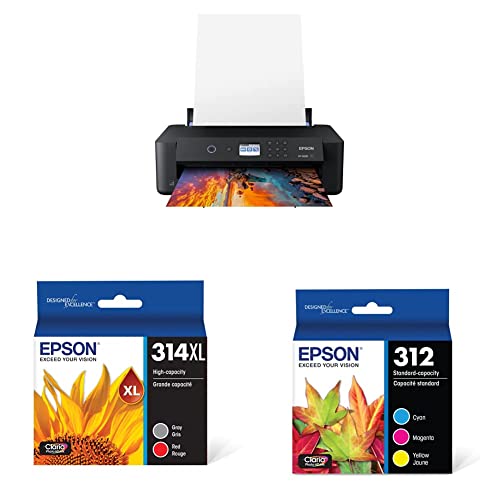
Epson Expression Photo XP-15000 Wireless Color Printer
Designed for photo enthusiasts, the XP-15000 uses six-color Claria inks for wide gamut and prints up to 13×19 inches. It supports various paper types and has a media slot. Owners praise its color accuracy but note it is slow for documents.
Pros
- Exceptional photo color depth
- Large print sizes for portfolios
- Borderless printing on various media
Cons
- No scanner or copier
- Slower print speeds for text

HP Envy 6055e Wireless All-in-One Printer
The Envy 6055e is a reliable all-in-one for homework and occasional photos. It includes a 35-page ADF and offers mobile printing. Owners find it easy to set up and use, but ink subscriptions may be required for some features.
Pros
- Compact and lightweight
- Scan and copy functions
- Supports Amazon Alexa and Google Assistant
Cons
- No touchscreen
- Ink cartridges are pricey if not on subscription
The lineup, side by side
| # | Model | Print Resolution | Best for | Score | Price |
|---|---|---|---|---|---|
| 1 | Canon PIXMA TS9521C Wireless Crafting Printer | Up to 4800×1200 dpi | Large format and photo printing with scanner | 9.4 | Check price |
| 2 | Epson EcoTank ET-2850 Wireless Color All-in-One Printer | Supertank refillable | Low running costs and high volume | 9.2 | Check price |
| 3 | HP OfficeJet Pro 9015e Wireless All-in-One Printer | 22 ppm black, 18 ppm color | Home office productivity and speed | 9.0 | Check price |
| 4 | Brother MFC-J1010DW Wireless Color Inkjet All-in-One | 10 ipm black, 6 ipm color | Budget-friendly all-around performance | 8.8 | Check price |
| 5 | Canon PIXMA TR8620a Wireless Home Office Printer | 4800×1200 dpi | Versatile functions in compact size | 8.6 | Check price |
| 6 | Epson Expression Photo XP-15000 Wireless Color Printer | 6 individual Claria inks | Professional photo quality | 9.1 | Check price |
| 7 | HP Envy 6055e Wireless All-in-One Printer | 10 ppm black, 7 ppm color | Everyday family printing and scanning | 8.4 | Check price |
What to look for
Frequently asked questions
What is the difference between inkjet and laser printers?
Inkjet printers use liquid ink sprayed onto paper, ideal for color photos and graphics. Laser printers use toner powder fused by heat, excelling at fast text printing. For mixed use, inkjet is more versatile; for heavy text, laser is more economical.
How long do inkjet prints last?
With pigment-based inks on archival paper, prints can last over 100 years without fading. Dye-based inks may fade in a few decades. Store prints away from direct sunlight and humidity to prolong their life.
Can I use third-party ink cartridges?
Yes, but compatibility varies. Third-party inks may void the printer warranty if they cause damage. Some printers have chips that block non-genuine cartridges. Check user reviews for reliable third-party options.
What is the best inkjet printer for photos?
Epson Expression Photo XP-15000 is a top choice for its six-color ink system and large format. For casual photos, the Canon TS9521C also delivers beautiful prints. Look for printers with more ink colors and high DPI for professional results.
How do I connect a printer to Wi-Fi?
Most printers have a setup wizard on their display. Choose your network and enter the password. Alternatively, use WPS button pairing. Download the manufacturer’s app to guide you through the process.
What does duplex printing mean?
Duplex printing automatically prints on both sides of the paper. It saves paper and is standard on many models. Some budget printers require manual flipping, but most have automatic duplexers.
Are tank printers worth it?
Yes for high-volume printing. Tank printers have refillable ink reservoirs that last thousands of pages. The initial cost is higher, but you save significantly over time. For occasional printing, a cartridge printer may be more practical.
Can inkjet printers print on cardstock or labels?
Yes, most can handle thick media like cardstock and labels. Check the printer’s specifications for paper weight support and use the rear manual feed slot for such media to avoid jams.
How often should I clean the printhead?
Only clean when you notice banding or missing lines. Most printers have a cleaning utility in the software. Over-cleaning wastes ink. If you print weekly, you may not need to clean often.
Our take
Choose the Canon PIXMA TS9521C if you need large-format printing and scanning versatility. For the lowest running costs, the Epson EcoTank ET-2850 is the clear winner. If speed and office features matter most, the HP OfficeJet Pro 9015e is your best bet.


