Top Internal Drives for Gamers in 2026
For most gamers, the Seagate FireCuda 2TB Internal Hard Drive stands out as the top pick because it combines a large capacity with a speedy 7200 RPM spindle speed and a multi-tier caching technology that accelerates load times. Its main limitation is that it is not an SSD, so it cannot match NVMe speeds, but it offers a budget-friendly way to store a massive game library.
Building a gaming PC often involves a choice between speed and capacity. SSDs are fast but can cost more per gigabyte. Traditional hard drives offer massive storage at a lower price, making them a practical choice for storing large game libraries.
We compared the most popular internal hard drives on the market that are still sold today. Our focus is on real-world gaming needs: quick load times, reliable performance, and enough space for modern titles that can exceed 100GB each.
Our top picks

Seagate FireCuda 2TB Internal Hard Drive
The Seagate FireCuda is a hybrid drive that pairs a 2TB platter with 8GB of NAND flash. This design caches frequently accessed data for faster load times. Owners report that games installed on this drive boot noticeably quicker than on standard HDDs. It is a reliable choice for gamers who want more space without fully committing to SSD prices.
Pros
- Faster than standard HDDs thanks to SSHD technology
- Large capacity for storing many games
- 5-year limited warranty
Cons
- Still not as fast as a dedicated SSD
- Uses more power than 5400 RPM drives

WD Black 4TB Performance Desktop Hard Disk Drive
The WD Black series is designed for performance. This 4TB model offers a 7200 RPM speed and a large cache. It is built for heavy workloads, making it ideal for gamers who need to store dozens of triple-A titles. Dual-processor technology helps reduce lag during data reads. It runs a bit warmer and louder than some competitors, but its reliability is well-regarded.
Pros
- High capacity for game hoarders
- Dual actuator technology improves performance
- Good warranty and software suite
Cons
- Noisier and hotter than average
- More expensive per GB than 5400 RPM drives

Toshiba X300 4TB High-Performance Internal Hard Drive
The Toshiba X300 offers high performance without the premium price tag of some rivals. It spins at 7200 RPM and features a 128MB cache. Users report that it handles large file transfers well. It is a solid choice for gaming as a secondary storage drive. Some owners note that it can be slightly louder during heavy access.
Pros
- Great price for performance
- Good sustained transfer rates
- Two-year warranty
Cons
- Not as quiet as some competitors
- Shorter warranty than WD Black
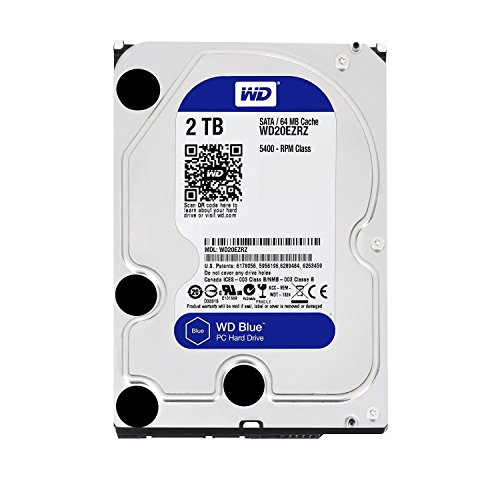
Western Digital 2TB WD Blue PC Internal Hard Drive
The WD Blue is a workhorse for everyday computing. This 2TB model runs at 5400 RPM with a 256MB cache. It is not the fastest drive, but it is affordable and reliable. Gamers often use it to store games that are played less frequently, moving them to an SSD when needed. It runs cool and quiet, making it a good choice for media storage.
Pros
- Very affordable per gigabyte
- Quiet and cool operation
- Good for bulk storage
Cons
- Slower load times for games
- Not suitable for running modern games directly

Seagate BarraCuda 2TB Internal Hard Drive
The Seagate BarraCuda is one of the most popular HDDs on the market. This 2TB model offers a 7200 RPM speed and a 256MB cache. It provides a good balance of performance and price. Many gamers use it as a secondary drive for storing games and media. It is known for its reliability and quiet operation.
Pros
- Reliable performance
- Good price to capacity ratio
- Quiet operation
Cons
- Not the fastest 7200 RPM drive
- Some units may have compatibility issues with certain systems

WD Red Plus 4TB NAS Internal Hard Drive
The WD Red Plus is designed for NAS systems, but it can also be used in a desktop for gaming. It operates at 5400 RPM with a 128MB cache. It is optimized for 24/7 operation and has a high workload rating. If you plan to stream games from a NAS, this drive provides reliable performance. It is not as fast for direct gaming, but its durability is a plus.
Pros
- Excellent for RAID and NAS environments
- High reliability for continuous operation
- Good vibration tolerance
Cons
- Slower than 7200 RPM drives
- More expensive than desktop lines

G-Technology G-Drive 4TB Desktop External Hard Drive
While this is an external drive, it is a popular choice for gamers who need extra storage without opening their PC. The G-Drive offers a 7200 RPM HDD inside a premium aluminum enclosure. It connects via USB 3.0 or Thunderbolt. It is not internal, but it can be used to store games and play them directly via a fast connection. Its rugged design is a bonus.
Pros
- Portable and durable
- Fast transfer speeds with Thunderbolt
- Sleek design
Cons
- Not internal, so requires a port
- Higher cost than internal drives
Compared at a glance
| # | Model | Capacity | Best for | Score | Price |
|---|---|---|---|---|---|
| 1 | Seagate FireCuda 2TB Internal Hard Drive | 2TB | Best overall for gaming balance | 9.4 | Check price |
| 2 | WD Black 4TB Performance Desktop Hard Disk Drive | 4TB | Best for large game libraries | 9.1 | Check price |
| 3 | Toshiba X300 4TB High-Performance Internal Hard Drive | 4TB | Best for budget 4TB performance | 8.9 | Check price |
| 4 | Western Digital 2TB WD Blue PC Internal Hard Drive | 2TB | Best budget option for secondary storage | 8.5 | Check price |
| 5 | Seagate BarraCuda 2TB Internal Hard Drive | 2TB | Best all-rounder for gaming and daily use | 8.8 | Check price |
| 6 | WD Red Plus 4TB NAS Internal Hard Drive | 4TB | Best for gaming NAS setups | 8.6 | Check price |
| 7 | G-Technology G-Drive 4TB Desktop External Hard Drive | 4TB | Best for external backup and gaming on the go | 8.3 | Check price |
What matters most
Questions worth asking
Are internal hard drives still good for gaming in 2026?
Yes, they are still good for secondary storage. They are not as fast as SSDs, but they offer much more storage per dollar. You can store your entire game library on an HDD and still play less demanding games directly from it.
What is the best RPM for a gaming hard drive?
7200 RPM is the best for gaming because it offers faster data transfer rates compared to 5400 RPM drives. This results in quicker load times for games.
How much cache do I need on a gaming HDD?
A larger cache, such as 256MB, is beneficial for gaming because it helps the drive store frequently accessed data, reducing the need to read from the platter. However, even 64MB can be sufficient for basic gaming.
Can I play games directly from an HDD?
Yes, you can play games directly from an HDD. However, you may experience longer loading times and occasional stuttering in open-world games that stream assets. For a better experience, use an SSD for the most demanding games.
What is the difference between SMR and CMR hard drives?
SMR (Shingled Magnetic Recording) drives pack more data but have slower write speeds when rewriting. CMR (Conventional Magnetic Recording) drives are faster and more reliable for frequent writes. For gaming, CMR is recommended, but many modern drives use SMR for cost savings.
How many games can a 4TB HDD hold?
On average, a 4TB drive can hold around 40 to 60 games if each game is about 70GB. This number decreases as game sizes increase.
Is it worth getting a hybrid drive for gaming?
Hybrid drives (SSHDs) combine a small SSD cache with a larger HDD. They can offer some speed benefits for frequently played games, but they are not as fast as a dedicated SSD. If you cannot afford an SSD, an SSHD is a good compromise.
Do internal hard drives affect FPS in games?
No, the storage drive does not affect your frame rate directly. It affects loading times and how quickly assets are streamed into the game. Once a level is loaded, the game runs primarily on your CPU and GPU.
The verdict
For most gamers, the Seagate FireCuda 2TB is the best internal hard drive because it offers a noticeable speed boost over standard HDDs at a reasonable price. If you need massive storage, the WD Black 4TB is a superior choice for its reliability and performance, despite being louder. For budget-conscious gamers, the Toshiba X300 4TB provides excellent value. Avoid using a 5400 RPM drive for gaming if you can, as the slower speeds will increase load times.