Joy Con Grips That Fit Your Hands and Play Style
The Satisfye ZenGrip Pro is the top pick for most players, offering a comfortable ergonomic shape that reduces hand fatigue during long sessions, but its bulk makes it less portable.
Tired of cramped hands after a long Mario Kart session? You are not alone. Many Switch owners report hand fatigue with the standard Joy-Cons.
A good grip can transform your handheld experience. We compared the most popular options to find the ones that truly help.
The best picks, ranked
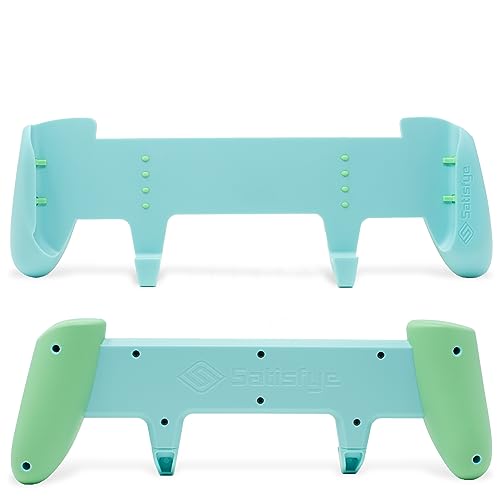
Satisfye ZenGrip Pro
The Satisfye ZenGrip Pro is a favorite among Switch owners. Its asymmetrical grip design provides a natural hold that reduces strain. The soft-touch finish and textured back offer a secure grip. It includes a thumb grip cap for the right stick, improving precision. Owners report playing for hours without discomfort.
Pros
- Ergonomic shape reduces hand fatigue
- Soft-touch material feels premium
- Includes thumb grip cap for precision
Cons
- Bulky and not very portable
- Does not fit Switch Lite

HORI Split Pad Pro
The HORI Split Pad Pro is a full-size controller alternative. It replaces the Joy-Cons with larger grips that feel like a traditional controller. It features programmable rear buttons and turbo functionality. Ideal for action games and shooters. Note: it is wired and does not support motion controls or HD rumble.
Pros
- Full-size ergonomic grips
- Programmable rear buttons
- Turbo function for rapid tapping
Cons
- No wireless or motion controls
- Not compatible with Switch Lite

GripCase for Nintendo Switch by Skull & Co.
The Skull & Co. GripCase is a snap-on grip that also serves as a protective case. It comes with three interchangeable grip styles: FPS, Action, and Racing. This allows you to customize the feel. It is compatible with the original Switch and OLED model. The case provides drop protection while adding minimal bulk.
Pros
- Three grip styles for different play
- Acts as a protective case
- Compatible with OLED
Cons
- Grips are not as ergonomic as dedicated grips
- May not fit in a standard dock with case on
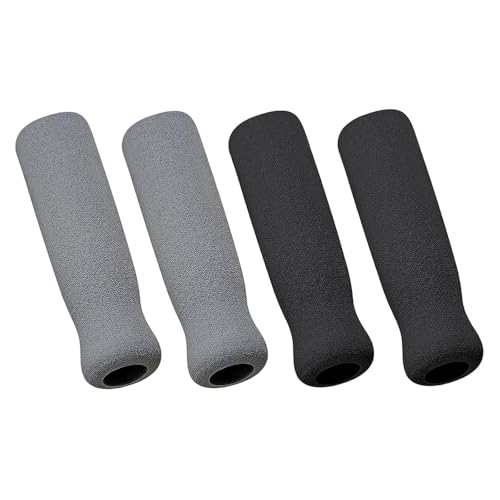
Fosmon Comfort Grip Handle
The Fosmon Comfort Grip Handle is an affordable way to improve your handheld grip. It snaps onto the Joy-Cons, adding a comfortable handle. The design is simple but effective. It includes a kickstand cutout for tabletop play. Many users find it a great value for the price.
Pros
- Very affordable
- Simple snap-on installation
- Kickstand remains accessible
Cons
- Not as ergonomic as higher-end options
- May feel flimsy to some

PowerA Joy Con Comfort Grip
The PowerA Joy Con Comfort Grip adds minimal bulk while providing a better hold. It is a simple two-piece grip that slides onto the Joy-Cons. The design is lightweight and portable. It does not add much depth, making it easy to slip into a case. It is ideal for those who want a little extra grip without changing the profile much.
Pros
- Adds very little bulk
- Lightweight and easy to carry
- Simple installation
Cons
- Less ergonomic than larger grips
- May not fit in all carrying cases

JETech Controller Grip for Nintendo Switch
The JETech Controller Grip is designed with smaller hands in mind. It has a slimmer profile and softer curves that fit children or those with smaller hands. The grip attaches securely and does not interfere with button access. It is a budget-friendly option that helps young players hold the console more comfortably.
Pros
- Great for small hands
- Slim design
- Inexpensive
Cons
- Not enough support for larger hands
- Basic feel

NexiGo Nintendo Switch Joy Con Grip
The NexiGo Joy Con Grip stands out with its textured surface that provides a secure hold even during intense play. It is a one-piece design that slides onto the console. The grip adds a bit of weight, giving a sturdier feel. The textured pattern helps prevent slipping. It is a solid choice for players who prioritize grip security.
Pros
- Excellent texture for grip
- Sturdy feel
- Easy to attach
Cons
- Not as comfortable as ergonomic grips
- May be too grippy for some
Before you buy
Compared at a glance
| # | Model | Compatibility | Best for | Score | Price |
|---|---|---|---|---|---|
| 1 | Satisfye ZenGrip Pro | Nintendo Switch (original and OLED) | Comfort and ergonomics | 9.4 | Check price |
| 2 | HORI Split Pad Pro | Nintendo Switch (handheld mode only) | Large hands and competitive play | 9.1 | Check price |
| 3 | GripCase for Nintendo Switch by Skull & Co. | Switch and Switch OLED | Versatility and portability | 8.9 | Check price |
| 4 | Fosmon Comfort Grip Handle | Nintendo Switch | Budget-friendly comfort | 8.6 | Check price |
| 5 | PowerA Joy Con Comfort Grip | Nintendo Switch | Minimal bulk and portability | 8.3 | Check price |
| 6 | JETech Controller Grip for Nintendo Switch | Nintendo Switch | Small hands | 8.0 | Check price |
| 7 | NexiGo Nintendo Switch Joy Con Grip | Nintendo Switch | Grip texture and stability | 8.1 | Check price |
Common questions
Will a Joy-Con grip fit my Nintendo Switch OLED?
Most grips designed for the original Switch also fit the OLED model, as the dimensions are the same. However, check the product description to be sure. Some grips like the Skull & Co. GripCase are explicitly compatible with both.
Do Joy-Con grips work with the Switch Lite?
No, most Joy-Con grips are designed for the standard Switch and do not fit the Switch Lite. The Switch Lite has a different shape and integrated controls. You would need a grip specifically made for the Switch Lite.
Can I use a Joy-Con grip while playing in tabletop mode?
Yes, but you may need to remove the grip to use the kickstand. Some grips have a cutout for the kickstand, like the Fosmon Comfort Grip. Others may block it, so you would need to detach the Joy-Cons or prop the console differently.
Will a grip interfere with motion controls?
Slide-on grips do not block the motion sensors in the Joy-Cons. They attach around the controllers. However, replacement controllers like the HORI Split Pad Pro do not have motion controls built in, so you lose that functionality.
Are Joy-Con grips comfortable for small hands?
Some grips are designed with a slimmer profile for smaller hands, like the JETech grip. Others are larger and may be too big. Look for grips that have adjustable or interchangeable parts to fit different hand sizes.
Do I need to remove the grip to charge my Joy-Cons?
Most grips do not block the charging port, but some may. It depends on the design. If you charge via the console’s dock, you can leave the grip on. If you use a charging grip, you may need to remove the grip to attach the Joy-Cons.
Can I use a grip with a protective case on my Switch?
It depends on the thickness of the case. Some grips are designed to fit over a slim case, while others require the console to be bare. Check the product dimensions and customer reviews to see if it works with your case.
Are there grips that add extra buttons?
Yes, the HORI Split Pad Pro includes programmable rear buttons. These can be mapped to other inputs for a competitive edge. Other grips may only offer ergonomic improvements without extra buttons.
Our take
For most players, the Satisfye ZenGrip Pro is the clear winner. It offers superior ergonomics and build quality that justify its popularity. If you have larger hands or play competitively, consider the HORI Split Pad Pro for its full-size controls and programmability. Budget-conscious players will find the Fosmon Comfort Grip a solid entry point, but for the best experience, invest in the Satisfye.