Top Keyboard and Mouse Combos for Every Workspace
For most people, the Logitech MK270 stands out as the top pick. It offers reliable wireless connectivity, a comfortable typing experience, and a compact mouse, all at an affordable price. Its main limitation is the lack of backlighting and limited gaming features.
A keyboard and mouse combo simplifies your setup, saves desk space, and often costs less than buying separately. With so many options, choosing the right one can be overwhelming. We compared top models to help you decide based on your specific needs.
Whether you type all day, game for hours, or need a portable solution for travel, there is a combo that fits. Our list includes options from trusted brands like Logitech, Microsoft, and Razer, each with unique strengths.
What matters most
The best picks, ranked

Logitech MK270 Wireless Keyboard and Mouse Combo
The Logitech MK270 is a reliable wireless combo that provides a full-size keyboard with quiet, comfortable keys and a precise mouse. It connects via a single USB receiver, ensuring a stable connection. Users report long battery life, with the keyboard lasting up to 24 months and the mouse up to 12 months. The compact design saves space, making it ideal for small desks.
Pros
- Excellent value for money
- Long battery life
- Plug-and-play simplicity
Cons
- No backlighting
- Receiver not USB-C
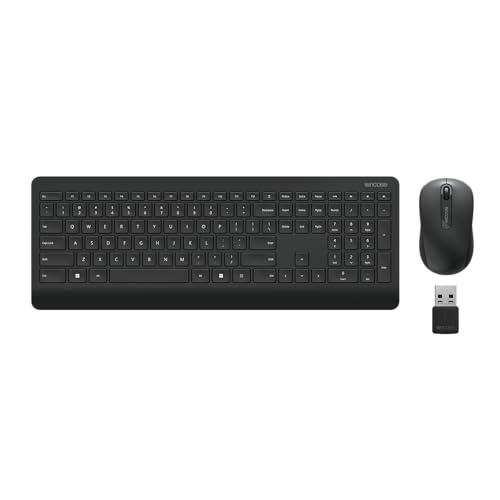
Microsoft Wireless Desktop 900
Microsoft’s Wireless Desktop 900 features a comfortable, ergonomic keyboard with a curved spacebar and a sculpted mouse that fits naturally in your hand. The keyboard includes a full number pad and function keys. Connectivity is via a single USB transceiver. Users appreciate the quiet keys and the overall build quality. Battery life is decent, with the keyboard lasting several months on two AAA batteries.
Pros
- Ergonomic design
- Quiet typing experience
- Trusted brand
Cons
- Not rechargeable
- No backlight

Logitech MK850 Performance Wireless Combo
The Logitech MK850 allows you to connect up to three devices via Bluetooth or the included USB receiver, and you can switch between them with a press of a button. The keyboard features a comfortable typing experience with a cushioned palm rest. The mouse has an ergonomic shape and a hyper-fast scroll wheel. Battery life is excellent, and it uses two AA batteries for keyboard and mouse.
Pros
- Multi-device pairing
- Comfortable palm rest
- Hyper-fast scroll wheel
Cons
- Higher price point
- Bulky for travel

Razer BlackWidow V4 X + DeathAdder Essential Bundle
This bundle combines the Razer BlackWidow V4 X mechanical keyboard with the DeathAdder Essential mouse. The keyboard features Razer Green mechanical switches with tactile feedback, while the mouse offers a 6400 DPI optical sensor. Both are wired, ensuring zero latency. The keyboard has customizable Chroma RGB lighting. This setup is ideal for gamers who prefer the feel of mechanical keys.
Pros
- Mechanical switches for fast response
- High DPI gaming mouse
- Customizable lighting
Cons
- Wired only
- Louder keys

Logitech K380 + M350 Pebble Combo
This combo includes the Logitech K380 compact keyboard and the M350 Pebble mouse. Both are Bluetooth-enabled and can connect to multiple devices. The keyboard is lightweight and features round, quiet keys. The mouse is slim and silent, perfect for on-the-go use. Battery life is impressive, with the keyboard lasting up to 2 years and the mouse up to 18 months.
Pros
- Ultra-portable
- Silent click mouse
- Multi-device pairing
Cons
- No number pad
- Smaller keys

HP Wireless Elite v2 Keyboard and Mouse
The HP Wireless Elite v2 set features a sleek, modern design with a brushed aluminum top case. The keyboard includes a built-in fingerprint reader for secure login, and the mouse has a comfortable contoured shape. Connectivity is via a USB receiver. The keyboard is low-profile with quiet keys. Users report a premium feel, though the mouse battery is not rechargeable.
Pros
- Built-in fingerprint reader
- Premium design
- Comfortable mouse
Cons
- Fingerprint reader only works on Windows
- Shorter battery life

Logitech MK235 Wireless Combo
The Logitech MK235 is an affordable wireless combo that delivers essential functionality. It features a full-size keyboard with quiet keys and a comfortable mouse. The keyboard has a 3-year battery life, and the mouse lasts up to 12 months. It uses a USB receiver for connection. While it lacks extra features, it is reliable and durable for everyday tasks.
Pros
- Very affordable
- Long keyboard battery life
- Simple setup
Cons
- No Bluetooth option
- Basic design
The lineup, side by side
| # | Model | Connectivity | Best for | Score | Price |
|---|---|---|---|---|---|
| 1 | Logitech MK270 Wireless Keyboard and Mouse Combo | 2.4GHz USB receiver | Everyday office work and budget shoppers | 9.4 | Check price |
| 2 | Microsoft Wireless Desktop 900 | 2.4GHz USB transceiver | Comfort and productivity in an office setting | 9.0 | Check price |
| 3 | Logitech MK850 Performance Wireless Combo | Bluetooth and USB receiver | Multi-device users and productivity enthusiasts | 9.2 | Check price |
| 4 | Razer BlackWidow V4 X + DeathAdder Essential Bundle | Wired USB | Gamers who want a mechanical keyboard and gaming mouse | 9.1 | Check price |
| 5 | Logitech K380 + M350 Pebble Combo | Bluetooth | Travel and compact workspaces | 8.8 | Check price |
| 6 | HP Wireless Elite v2 Keyboard and Mouse | 2.4GHz USB receiver | Professional look and advanced features | 8.6 | Check price |
| 7 | Logitech MK235 Wireless Combo | 2.4GHz USB receiver | Budget-friendly reliability | 8.4 | Check price |
Questions worth asking
Can I use a keyboard and mouse combo with a Mac?
Most combos are compatible with both Windows and macOS. However, some function keys and software features may not work fully on Mac. Check the product specifications for explicit Mac compatibility.
How long do wireless keyboard and mouse batteries last?
Battery life varies by model and usage. Many logitech combos offer up to 24 months for the keyboard and 12 months for the mouse. Some mice use a single AA battery, while others have rechargeable batteries. Always check the product details.
What is the difference between a membrane and mechanical keyboard?
Membrane keyboards use a rubber dome under each key, offering a softer, quieter feel. Mechanical keyboards use individual switches for each key, providing tactile feedback, faster response, and higher durability. Mechanical keyboards are often preferred by gamers and heavy typists.
Do all wireless combos require a USB receiver?
No, many combos use Bluetooth for connection, eliminating the need for a receiver. Some offer both options. Bluetooth combos are convenient for devices without USB ports, but you may need to pair them each time you switch devices.
Can I replace the keyboard or mouse separately if one fails?
In most cases, yes. Combos are sold as a set, but the keyboard and mouse are separate units. You can typically purchase a replacement individually if needed, though it may be more cost-effective to buy a new combo.
Are gaming combos worth the extra cost?
For gamers, a dedicated gaming combo offers advantages like mechanical switches, high DPI mice, and customizable lighting. These features can improve performance and comfort during long gaming sessions. If you only game casually, a standard combo may suffice.
How do I clean my keyboard and mouse?
Unplug or turn off the device. Use compressed air to blow out debris. Wipe surfaces with a slightly damp microfiber cloth. Avoid harsh chemicals. For deep cleaning, you can remove keycaps if they are removable, but check the manufacturer’s guide.
What is DPI in a mouse?
DPI stands for dots per inch, which measures how sensitive the mouse is. A higher DPI means the cursor moves faster across the screen with less physical movement. For gaming or high-resolution displays, a higher DPI is beneficial. Most office mice have around 1000 DPI, which is sufficient for everyday tasks.
Our pick
For most users, the Logitech MK270 is the best choice due to its unbeatable value and reliability. If you need multi-device support, opt for the Logitech MK850. For gamers, the Razer bundle delivers the performance you need. Consider your specific use case and choose accordingly.


