Top Professional Keyboards for Serious Workflows
For most professionals, the Keychron Q1 Pro stands out as the top choice. It offers a solid aluminum build, wireless connectivity, and hot-swappable switches, making it versatile for both office and home use. Its main limitation is the learning curve for reprogramming via QMK/VIA, which may intimidate non-techies.
A keyboard is more than a typing tool; it is your primary interface with work. Professionals spend hours daily, so comfort, reliability, and efficiency matter. We compared top-selling models to find those that deliver on performance and durability.
From mechanical switches to low-profile designs, each option serves different needs. Some prioritize wireless freedom, others focus on ergonomics. This roundup highlights seven professional-grade keyboards that have earned high marks from users and reviewers.
The best picks, ranked

Keychron Q1 Pro QMK/VIA Wireless Mechanical Keyboard
The Keychron Q1 Pro combines a CNC aluminum frame with gasket mount design, delivering a premium feel and acoustic. It supports both Bluetooth and 2.4GHz wireless, plus wired mode. With QMK/VIA support, you can remap every key and create macros. Users praise its solid build and smooth typing. Some note the initial setup for VIA can be tricky.
Pros
- Premium aluminum build
- Wireless with low latency
- Fully programmable
Cons
- Pricey for some budgets
- Steep learning curve for VIA

Logitech MX Mechanical Wireless Keyboard
Logitech’s MX Mechanical brings tactile switches to a slim, professional design. It pairs with up to three devices via Bluetooth and offers Logitech Flow for seamless control across computers. The backlit keys and smart illumination adjust to lighting. Owners report long battery life and quiet operation. The absence of a wrist rest is a minor complaint.
Pros
- Excellent multi-device switching
- Comfortable low-profile keys
- Long battery life
Cons
- No wrist rest included
- Not hot-swappable
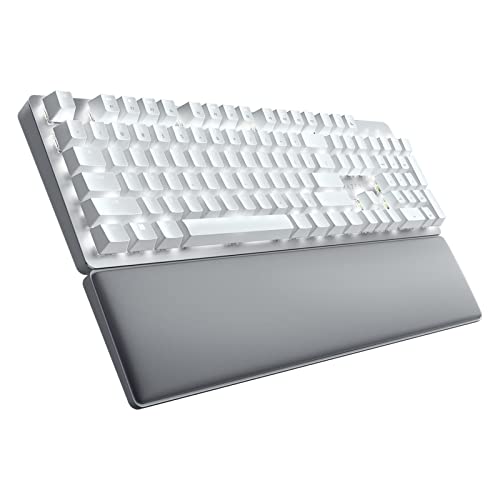
Razer Pro Type Ultra Mechanical Keyboard
The Razer Pro Type Ultra features Razer’s yellow switches, which are linear and quiet, making it suitable for open offices. It connects via Bluetooth or 2.4GHz and includes a plush wrist rest. The white and silver aesthetic fits professional setups. Some users wish for more customization without Synapse software.
Pros
- Very quiet operation
- Comfortable wrist rest
- Dual wireless modes
Cons
- Requires Synapse for advanced features
- Limited switch options

Corsair K100 RGB Optical Mechanical Gaming Keyboard
Corsair’s K100 is a powerhouse with optical-mechanical switches that register fast. It features a durable aluminum frame, dedicated macro keys, and a multifunction iCUE control wheel. While marketed for gamers, its typing experience is crisp, and the RGB lighting adds flair. It is wired only, which may deter minimalists.
Pros
- Ultra-fast response
- Solid aluminum build
- Customizable iCUE wheel
Cons
- No wireless option
- Bulky footprint

Ducky One 3 Mini Mechanical Keyboard
The Ducky One 3 Mini is a 60% keyboard that saves space while offering premium PBT keycaps and a silicone dampener for a softer sound. It comes with hot-swappable switch sockets, allowing easy switch changes. Users love its build and typing feel. The lack of arrow keys may be a drawback for spreadsheet work.
Pros
- Compact and portable
- Premium keycaps
- Hot-swappable
Cons
- No dedicated arrow keys
- Wired only

Logitech ERGO K860 Wireless Ergonomic Keyboard
The Logitech ERGO K860 features a split, curved keyframe that promotes natural wrist posture. It includes a cushioned palm rest and supports Bluetooth or Unifying receiver. The keys are scissor switches, quiet and comfortable. Many users report reduced wrist strain. It is not mechanical, which some may miss.
Pros
- Excellent ergonomic design
- Comfortable palm rest
- Multi-device pairing
Cons
- Not mechanical
- Requires time to adapt

Microsoft Sculpt Ergonomic Keyboard
The Microsoft Sculpt offers a split keyboard with a curved spacebar and separate numpad, promoting natural arm and wrist alignment. It uses a cushioned palm rest and connects via Bluetooth or USB receiver. Users find it comfortable for long sessions. The keys feel a bit mushy compared to mechanical options.
Pros
- Affordable ergonomic design
- Detached numpad for flexibility
- Reduces wrist strain
Cons
- Average build quality
- No backlighting
How to pick the right one
How they compare
| # | Model | Switch Type | Best for | Score | Price |
|---|---|---|---|---|---|
| 1 | Keychron Q1 Pro QMK/VIA Wireless Mechanical Keyboard | Hot-swappable Gateron mechanical | Customizable wireless performance | 9.4 | Check price |
| 2 | Logitech MX Mechanical Wireless Keyboard | Tactile, clicky, or linear | Multi-device productivity | 9.2 | Check price |
| 3 | Razer Pro Type Ultra Mechanical Keyboard | Razer Yellow (linear, silent) | Quiet typing with tactile feedback | 8.9 | Check price |
| 4 | Corsair K100 RGB Optical Mechanical Gaming Keyboard | Corsair OPX optical-mechanical | Performance enthusiasts who game and work | 9.0 | Check price |
| 5 | Ducky One 3 Mini Mechanical Keyboard | Cherry MX or Ducky switches | Compact desk setups and portability | 8.7 | Check price |
| 6 | Logitech ERGO K860 Wireless Ergonomic Keyboard | Scissor membrane | Ergonomic comfort for all-day typing | 9.1 | Check price |
| 7 | Microsoft Sculpt Ergonomic Keyboard | Dome membrane | Budget-friendly ergonomic solution | 8.2 | Check price |
Common questions
What is the best keyboard for programming?
Many programmers prefer mechanical keyboards with tactile switches. The Keychron Q1 Pro offers a solid build and programmability, which is ideal for coding. Alternatively, the Logitech MX Mechanical is a great choice if you want a quieter, low-profile option.
Is a mechanical keyboard worth it for office work?
Yes, mechanical keyboards often provide better tactile feedback and durability. They can reduce typing fatigue and improve accuracy. Choose switches that are quiet, like tactile or linear, to avoid disturbing colleagues.
How do I choose between linear and tactile switches?
Linear switches have a smooth keystroke with no bump, making them fast and quiet. Tactile switches provide a noticeable bump at actuation, offering feedback without clicky noise. For typing, many find tactile more satisfying; for gaming, linear is often preferred.
Can I use a wireless keyboard for gaming?
Yes, modern wireless keyboards use 2.4GHz or Bluetooth with low latency. Models like the Keychron Q1 Pro or Razer Pro Type Ultra are suitable for gaming. However, competitive gamers might prefer wired for the lowest latency.
What is a hot-swappable keyboard?
A hot-swappable keyboard allows you to change switches without soldering. You can simply pull out the existing switches and insert new ones. This is convenient for customizing the feel or replacing a faulty switch.
Do ergonomic keyboards really help with wrist pain?
Many users report reduced wrist strain with ergonomic keyboards. They encourage a more natural hand position, which can alleviate pressure on the carpal tunnel. However, results vary, and it is important to also maintain good posture and take breaks.
What is the difference between Bluetooth and 2.4GHz wireless?
Bluetooth connects directly to devices without a dongle, but may have higher latency. 2.4GHz uses a USB receiver, offering a more stable and faster connection. Some keyboards support both, letting you choose based on your use case.
Are full-size keyboards better than compact ones?
Full-size keyboards include a numpad, which is useful for data entry. Compact layouts like 75% or 60% save desk space and bring the mouse closer, reducing shoulder strain. It depends on your need for the numpad and desk space.
The verdict
If you want a premium wireless mechanical that you can customize, choose the Keychron Q1 Pro. For a quiet, comfortable office keyboard, the Logitech MX Mechanical is excellent. If ergonomics are your priority, the Logitech ERGO K860 is the best pick. For a budget ergonomic option, the Microsoft Sculpt works well.


