Which Keypad Door Lock Suits Your Front Door Best?
The Schlage Encode Plus is our top keypad door lock thanks to built-in Wi-Fi, a graded ANSI Grade 1 body and no extra bridge. The Yale Assure Lock 2 Touchscreen suits homes that want a slim, key-free face, while the Kwikset Halo delivers most of the same app control for less outlay.
The Schlage Encode Plus is the keypad door lock we would fit first, with the Yale Assure Lock 2 Touchscreen close behind for a cleaner keyless look and the Kwikset Halo covering the value end. All three unlock by code, work with a phone app and mount to a standard door prep.
Choosing gets tricky because the keypad is only half the story: a lock can have a great app and a weak bolt, or a strong bolt and a battery that drains in a season. We ranked these picks by published ANSI security grade, connectivity method, keypad style, stated battery life and what owners report about backset and door thickness fit.
Our top picks

Schlage Encode Plus Smart WiFi Deadbolt
The Encode Plus combines a physical push-button keypad with Wi-Fi and a home key style tap-to-unlock chip, so there is no hub or bridge to buy. Schlage rates the body ANSI/BHMA Grade 1, which is the strongest residential category. Owners report the raised buttons stay readable in the dark and in gloves.
Pros
- Wi-Fi built in with no separate bridge
- Highest residential security grade
- Tap-to-unlock as well as code entry
Cons
- Larger interior housing than slim rivals
- Wi-Fi use shortens battery intervals

Yale Assure Lock 2 Touchscreen
The Assure Lock 2 uses a flat capacitive touchscreen instead of buttons and is sold in a key-free version with no cylinder at all, which gives the cleanest exterior of any pick here. Module bays let you add Wi-Fi, Z-Wave or Matter connectivity later rather than buying a new lock. Owners report the compact interior escutcheon suits narrow stiles.
Pros
- Smallest exterior footprint in the group
- Connectivity module can be upgraded later
- Key-free option removes the pick target
Cons
- Touchscreen needs wiping in rain and dust
- Wi-Fi module is an extra purchase

Kwikset Halo Wi-Fi Smart Lock
The Halo puts Wi-Fi directly in the lock and pairs it with Kwikset SmartKey rekeying, so you can reset the cylinder to a new key yourself in under a minute. Code management, lock history and remote unlock all run from the Kwikset app without a hub. Based on specifications it covers most of what the premium picks offer at a lower outlay.
Pros
- SmartKey rekeying without a locksmith
- No bridge or hub needed for remote access
- Clear backlit keypad
Cons
- Bulkier interior unit
- Owners report occasional Wi-Fi re-pairing
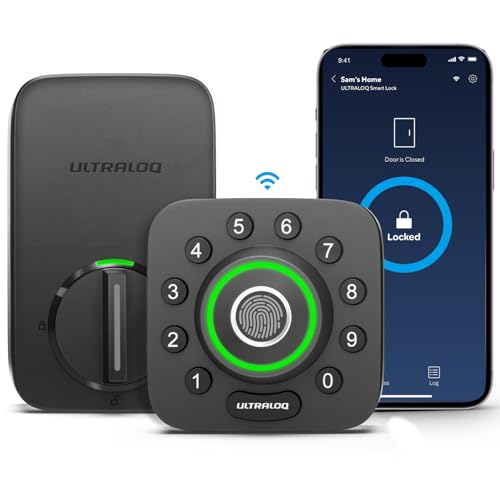
Ultraloq U-Bolt Pro
The U-Bolt Pro adds a fingerprint reader to the keypad, so family members who forget codes can still get in with a thumb. It also accepts app unlock, shared eKeys, a physical key and auto-unlock by geofence. Owners report the reader is fast in dry conditions but can need a second try with wet fingers.
Pros
- Fingerprint entry suits kids and guests
- Multiple fallback access methods
- Anti-peep code entry supported
Cons
- Wi-Fi requires the bridge model
- Reader accuracy drops when wet

Schlage BE365 Camelot Keypad Deadbolt
The BE365 is a code-only deadbolt with no radio, no app and no account, which is exactly what some households want on a rental, shed or side door. It carries the same Grade 1 rating as Schlage’s connected flagship and runs a very long time on one 9V battery. Owners report it is the least fussy lock to live with.
Pros
- Nothing to update, pair or subscribe to
- Grade 1 body at a modest outlay
- Very long battery intervals
Cons
- No remote access or usage history
- Codes must be programmed at the door

eufy Security Smart Lock C210
The C210 covers the basics well: keypad codes, a fingerprint sensor on some variants, Bluetooth app control and no monthly charge for stored access logs. It is a sensible pick for a first smart lock where remote unlocking is a nice extra rather than a requirement. Based on specifications, battery life is among the longest here.
Pros
- Low cost of entry with no subscription
- Long stated battery life
- Straightforward retrofit install
Cons
- Lowest security grade in this group
- Remote features need the separate bridge

Wyze Lock Bolt
The Lock Bolt is a compact fingerprint and keypad deadbolt that installs with a screwdriver and leaves no wiring behind, which makes it easy to swap back at the end of a lease. It runs on Bluetooth only, so codes and prints are managed at the door or from a phone nearby. Owners report the small body suits doors with limited edge clearance.
Pros
- Simple to install and reverse
- Fingerprint unlock at a low outlay
- Small footprint on narrow doors
Cons
- No remote access of any kind
- No physical key override
Before you buy
Check your door before you check the features Nearly every failed keypad lock install comes down to fit, not electronics. Measure door thickness, the backset from edge to bore centre and the bore diameter itself, then match those against the lock listing. Most picks here handle standard one and three eighths to one and three quarter inch doors with a 2 3/8 or 2 3/4 inch backset, but thick storm doors and metal gates often need a specific model.
Decide how much connectivity you actually want A code-only lock like the Schlage BE365 never drops off the network because it was never on one. Bluetooth locks let you manage codes from a phone at the door. Wi-Fi locks add remote unlock, guest codes on demand and an access log you can read from work. Each step up costs battery life, so pick the lowest tier that solves your real problem.
Security grade tells you more than the app screenshots ANSI/BHMA grades run from 3 up to 1, with Grade 1 taking the most force and cycles in standardised testing. Grade 1 bodies use longer bolts and heavier internals, which matters far more than code count. If the lock is on the main entry of an occupied home, treat Grade 1 or a strong Grade 2 as the floor and reinforce the strike plate with three inch screws.
Plan for the day the batteries die Every pick here warns before power runs out, but people miss the beeps. Locks with a physical key cylinder give you a guaranteed way in. Key-free models like the Yale variant and the Wyze Lock Bolt rely on external jump terminals or a spare key held elsewhere, so decide that fallback before install rather than on a cold doorstep.
Side by side
| # | Model | Security grade | Best for | Score | Price |
|---|---|---|---|---|---|
| 1 | Schlage Encode Plus Smart WiFi Deadbolt | ANSI/BHMA Grade 1 | Best overall | 9.4 | Check price |
| 2 | Yale Assure Lock 2 Touchscreen | ANSI/BHMA Grade 2 | Best for a key-free look | 9.2 | Check price |
| 3 | Kwikset Halo Wi-Fi Smart Lock | ANSI/BHMA Grade 2 | Best value | 9.0 | Check price |
| 4 | Ultraloq U-Bolt Pro | ANSI/BHMA Grade 2 | Best for fingerprint entry | 8.8 | Check price |
| 5 | Schlage BE365 Camelot Keypad Deadbolt | ANSI/BHMA Grade 1 | Best for no app at all | 8.6 | Check price |
| 6 | eufy Security Smart Lock C210 | ANSI/BHMA Grade 3 | Best budget | 8.3 | Check price |
| 7 | Wyze Lock Bolt | ANSI/BHMA Grade 3 | Best for renters | 8.0 | Check price |
Good to know
Are keypad door locks less secure than a normal deadbolt?
Not inherently. Security comes from the bolt, strike and door frame, all of which are the same on a keypad model. A Grade 1 keypad deadbolt resists force as well as its keyed equivalent, and removing the cylinder on a key-free model actually eliminates lock picking as an attack route.
How long do the batteries last?
Owners commonly report six to twelve months on a code-only or Bluetooth lock and three to eight months on a Wi-Fi lock with frequent remote checks. Cold weather shortens this noticeably. Keep a spare set of alkaline AA cells nearby and replace all four at once rather than mixing old and new.
Can I install a keypad lock myself?
Yes, if you are replacing an existing deadbolt. Most installs need only a Phillips screwdriver and take twenty to thirty minutes. Cutting a new bore into a door that has never had a deadbolt is a different job and needs a hole saw and a lock installation jig, or a locksmith.
Do keypad codes wear a visible pattern into the buttons?
Over years, heavily used buttons can show wear that hints at your digits. Two habits fix it: change the code periodically, and use models with an anti-peep or scramble feature so you can press extra random digits before or after the real code without triggering a lockout.
Will these work with Alexa, Google Home or Apple Home?
Support varies by model and by connectivity tier. Wi-Fi models like the Schlage Encode Plus and Kwikset Halo generally integrate with voice assistants directly. Bluetooth-only locks usually need a bridge first. Check the current listing for the specific assistant you use before buying, since platform support changes with firmware.
Can I give a cleaner or dog walker a temporary code?
Yes on any of the connected picks. You can set a code that works on chosen days and hours, or one that expires after a date. Code-only locks like the Schlage BE365 support extra user codes too, but you have to add and delete them at the keypad yourself.
Do keypad locks work when the internet is down?
The keypad keeps working. Codes are stored on the lock itself, not in the cloud, so entry by code and by physical key is unaffected by an outage. What stops is remote unlocking, notifications and the access log syncing until the connection returns.
Is a fingerprint reader worth paying for?
It helps most in households with children, older relatives or anyone who struggles to remember a code. Readers work well with dry hands and are less reliable when wet, cold or dirty, so treat fingerprint as a convenience layer on top of a code rather than the only way in.
Our take
For most front doors the Schlage Encode Plus is the safest pick, pairing a Grade 1 body with Wi-Fi that needs no bridge. Choose the Yale Assure Lock 2 Touchscreen if a slim key-free face matters more than raw grade, or the Kwikset Halo if you want app control without the flagship outlay. Households that never want an account at all should look straight at the Schlage BE365.



