Top Label Printers for Every Type of User
The Brother P-Touch P750W is our top pick for most people, offering crisp prints, wireless connectivity, and a wide range of tape sizes. Its main limitation is the higher cost of genuine Brother tapes over time.
Label printers have become essential tools for organizing homes, offices, and shipping stations. With so many models on the market, choosing the right one can be overwhelming.
We compared the most popular label printers currently available, focusing on print quality, speed, connectivity, and ease of use. Owners report that the best label printers save time and reduce errors, whether you are labeling file folders or shipping packages.
What we recommend

Brother P-Touch P750W
This wireless label maker prints crisp text and barcodes on tapes up to 24mm wide. It connects via Wi-Fi or USB, and works with a mobile app for on-the-go printing.
Pros
- Excellent print quality
- Wireless printing from phones
- Large selection of tape colors and widths
Cons
- Bulkier than some competitors
- Genuine tapes are pricey

Rollo Wireless Printer
Designed for shipping, this thermal printer handles 4×6 labels at high speed. It connects via Wi-Fi, Bluetooth, or USB and works with major carriers.
Pros
- Fast printing
- No ink or toner needed
- Works with multiple platforms
Cons
- Only prints shipping-size labels
- Requires thermal labels

Phomemo PM-241
A compact Bluetooth label maker that prints on thermal paper strips. It is popular for organizing, journaling, and small home projects.
Pros
- Very affordable
- Portable and lightweight
- No ink required
Cons
- Limited to small labels
- Print resolution is lower

DYMO LabelWriter 5XL
A fast thermal printer that handles labels up to 4×6 inches. It is known for reliability and compatibility with major shipping and office software.
Pros
- High-speed printing
- Works with popular platforms
- Compact design
Cons
- USB only, no wireless
- Software can be finicky

NIIMBOT B21
This Bluetooth label printer offers a range of fun tape colors and patterns. It is a favorite among crafters for making custom stickers and labels.
Pros
- Many tape styles
- Great app with fonts and icons
- Portable and easy to use
Cons
- Print quality is adequate but not professional
- App required for full features
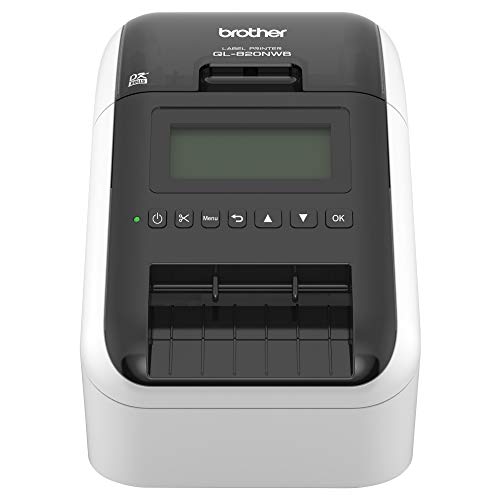
Brother QL-820NWB
A professional-grade label printer that supports both thermal and thermal transfer printing. It offers flexible connectivity and can print on a variety of label types.
Pros
- Fast and durable printing
- Supports many label types
- Flexible connectivity options
Cons
- More expensive
- Large footprint

MUNBYN Thermal Label Printer
An economical direct thermal printer that prints 4×6 shipping labels and barcodes. It is easy to set up and works with popular shipping platforms.
Pros
- Very affordable
- Easy setup
- Reliable performance
Cons
- USB only
- No battery option
Before you buy
How they compare
| # | Model | Print Technology | Best for | Score | Price |
|---|---|---|---|---|---|
| 1 | Brother P-Touch P750W | Thermal transfer | Versatile home and office labeling | 9.4 | Check price |
| 2 | Rollo Wireless Printer | Direct thermal | High-volume shipping labels | 9.2 | Check price |
| 3 | Phomemo PM-241 | Direct thermal | Budget-friendly mini label maker | 8.7 | Check price |
| 4 | DYMO LabelWriter 5XL | Direct thermal | Address and shipping labels | 9.1 | Check price |
| 5 | NIIMBOT B21 | Direct thermal | Creative and craft labeling | 8.5 | Check price |
| 6 | Brother QL-820NWB | Direct thermal / Thermal transfer | High-quality shipping and file labels | 9.3 | Check price |
| 7 | MUNBYN Thermal Label Printer | Direct thermal | Basic shipping and barcode labels | 8.8 | Check price |
Questions worth asking
What is the difference between direct thermal and thermal transfer label printers?
Direct thermal printers use heat to activate chemicals on the label, requiring no ink. Thermal transfer printers use a ribbon that melts onto the label, making prints more durable and smudge-proof. Direct thermal is cheaper but prints can fade when exposed to heat or sunlight.
Can I use label printers without a computer?
Yes, many modern label printers have Bluetooth and work with smartphone apps. You can design and print labels directly from your phone. Some also have built-in keyboards for standalone use, though they are less common now.
Do label printers require ink?
It depends on the technology. Direct thermal printers do not use ink or toner. Thermal transfer printers use ribbons, which are akin to ink. Inkjet and laser label printers do use ink or toner, but they are less common in dedicated label printers.
What label sizes can these printers handle?
It varies. Shipping label printers typically handle 4×6 inch labels. Tape-based label makers like Brother P-Touch print on tapes up to 24mm wide. Some printers can handle multiple sizes, but you need to check the specifications.
Are label printers compatible with Mac and Windows?
Most label printers come with drivers for both Windows and macOS. However, some budget models may only support Windows. Always check the product description or manufacturer website for compatibility details.
How do I connect a label printer to my phone?
If the printer has Bluetooth, you can pair it with your phone like any other Bluetooth device. Then use the manufacturer’s app to create and print labels. Some printers also support Wi-Fi, allowing you to print over your network.
Are generic labels compatible with name-brand printers?
Sometimes. Some printers accept generic labels, which can save money. However, using non-genuine labels may void the warranty or affect print quality. It is best to test a small batch first or check user reviews for recommendations.
How fast do label printers print?
Speed varies widely. Basic models print around 30mm per second, while high-volume shipping printers can print 150mm per second or more. For occasional use, speed is less critical, but for business shipping, faster is better.
Final word
For most users, the Brother P-Touch P750W offers the best balance of versatility and quality. If you primarily ship packages, the Rollo Wireless Printer is the clear choice for its speed and reliability. For budget-conscious crafters, the Phomemo PM-241 provides a fun and affordable entry point.
You might also need
Top-Tier PlayStation Racing Games Worth Every Penny
Top Voice Recorders for Travel: Capture Every Moment Clearly

Top Bulletin Boards for School: Durable Picks for Every Classroom
