Top Travel Laptops for Every Kind of Journey
For most travelers, the Apple MacBook Air 13-inch (M3) is the top choice because it combines featherlight design with all-day battery life. Its main limitation is the limited port selection, requiring dongles for HDMI or USB-A. But if you need a Windows machine with a rugged build, the Lenovo ThinkPad X1 Carbon Gen 12 is a close runner-up.
Traveling with a laptop means balancing weight against performance. You want something light enough to carry all day, yet powerful enough for your tasks. Battery life is critical when outlets are scarce. Durability matters when your bag gets tossed around.
We analyzed current models from major brands, focusing on real-world specifications and user feedback. Owners report on keyboard comfort, screen quality, and how well these laptops hold up on the road. Our picks cover a range of budgets and operating systems.
What we recommend

Apple MacBook Air 13-inch (M3)
The MacBook Air with the M3 chip is incredibly thin and light at just 2.7 pounds. It offers exceptional battery life of up to 18 hours, making it perfect for long flights. The fanless design ensures silent operation. Its Retina display is sharp and bright for outdoor use.
Pros
- Ultra-light and compact
- Outstanding battery life
- Silent and cool operation
Cons
- Limited ports (only USB-C)
- Can get warm under heavy load

Lenovo ThinkPad X1 Carbon Gen 12
The ThinkPad X1 Carbon is a legendary business laptop known for its rugged build and superb keyboard. It weighs just 2.4 pounds, making it one of the lightest 14-inch laptops available. With Intel’s latest processors, it handles demanding tasks with ease. The carbon fiber chassis is both strong and lightweight.
Pros
- Extremely durable carbon fiber build
- Excellent keyboard for typing
- Plenty of ports including HDMI
Cons
- Premium price tag
- Average webcam quality

Dell XPS 13 (9345)
The Dell XPS 13 is renowned for its near-borderless InfinityEdge display and premium build. It weighs under 2.7 pounds and fits easily in small bags. The new Qualcomm Snapdragon X Elite chip delivers impressive performance and efficiency. Its aluminum construction feels solid and looks sleek.
Pros
- Stunning edge-to-edge display
- Long battery life
- Premium aluminum build
Cons
- Port selection is limited to USB-C
- No HDMI port

Microsoft Surface Laptop 6 (13.8-inch)
The Surface Laptop 6 offers a vibrant PixelSense touchscreen that supports the Surface Pen. It is lightweight at 2.96 pounds and has a comfortable keyboard. With Intel Core Ultra processors, it handles productivity and creative tasks smoothly. The aluminum body is sleek and durable.
Pros
- Beautiful touchscreen display
- Great for note-taking with pen
- Solid build quality
Cons
- Heavier than competitors
- Limited ports

ASUS Zenbook 14 OLED (UM3406)
The Zenbook 14 OLED stands out with its stunning OLED screen that offers deep blacks and vivid colors. It is incredibly light at 2.82 pounds and has a compact footprint. The AMD Ryzen 7 processor provides solid performance for everyday tasks. It also features a full HD IR camera for secure login.
Pros
- Top-notch OLED display
- Lightweight and portable
- Good selection of ports
Cons
- Average speaker quality
- Keyboard could be better
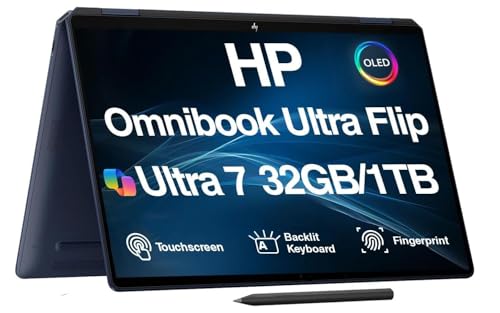
HP Spectre x360 14
The HP Spectre x360 14 is a convertible laptop that transforms into a tablet. Its OLED display is brilliant and supports touch and pen input. Weighing 3.2 pounds, it is a bit heavier but offers flexibility. The build is premium with a gem-cut design that looks distinctive.
Pros
- Versatile 2-in-1 design
- Excellent OLED touchscreen
- Premium aesthetics
Cons
- Heavier than traditional laptops
- Battery life is shorter

Acer Swift Go 14 (SFG14-72)
The Acer Swift Go 14 delivers solid performance at an affordable price. It weighs 2.92 pounds and has a 14-inch IPS display. The Intel Core i5 processor is sufficient for everyday tasks. It also includes a full HD webcam with AI noise reduction, ideal for video calls.
Pros
- Great value for money
- Lightweight for its size
- Plenty of ports
Cons
- Display is not as vibrant
- Average battery life
Compared at a glance
| # | Model | Weight | Best for | Score | Price |
|---|---|---|---|---|---|
| 1 | Apple MacBook Air 13-inch (M3) | 2.7 lbs | Overall best travel laptop | 9.4 | Check price |
| 2 | Lenovo ThinkPad X1 Carbon Gen 12 | 2.4 lbs | Business travelers needing durability | 9.1 | Check price |
| 3 | Dell XPS 13 (9345) | 2.6 lbs | Compact and stylish Windows users | 8.9 | Check price |
| 4 | Microsoft Surface Laptop 6 (13.8-inch) | 2.96 lbs | Touchscreen and pen support | 8.8 | Check price |
| 5 | ASUS Zenbook 14 OLED (UM3406) | 2.82 lbs | Vibrant display for media consumption | 8.6 | Check price |
| 6 | HP Spectre x360 14 | 3.2 lbs | 2-in-1 flexibility for creative travelers | 8.4 | Check price |
| 7 | Acer Swift Go 14 (SFG14-72) | 2.92 lbs | Budget-friendly travel laptop | 8.0 | Check price |
How to pick the right one
Frequently asked questions
What is the ideal weight for a travel laptop?
Most travel laptops weigh between 2.5 and 3.5 pounds. Lighter models are easier to carry, but they may compromise on ports or battery capacity. Aim for under 3 pounds if you carry your laptop all day.
How long should a travel laptop battery last?
Look for at least 10 to 12 hours of real-world battery life. This ensures you can work through a typical workday or a long flight without charging. Higher-end models offer up to 18 hours.
Is a 2-in-1 laptop good for travel?
A 2-in-1 offers versatility, allowing you to use it as a tablet for entertainment or presentations. However, they tend to be heavier and have shorter battery life than traditional laptops. If you value flexibility, it can be a good choice.
Do I need a dedicated GPU for travel?
For most travelers, integrated graphics are sufficient. They handle office tasks, streaming, and light photo editing. If you do video editing or gaming, a dedicated GPU is beneficial, but it adds weight and reduces battery life.
What ports are essential on a travel laptop?
At least one USB-C port for charging and data transfer is essential. USB-A ports are still common for peripherals. An HDMI port is useful for presentations. Many ultrabooks omit HDMI, so consider a USB-C hub.
Are OLED displays worth it on a laptop?
OLED displays offer superior contrast and color accuracy, making media look stunning. They consume more power, though, so battery life may be shorter. If you prioritize display quality, OLED is excellent.
How important is build quality for travel?
Build quality is crucial because travel exposes laptops to bumps and pressure. Look for laptops with aluminum or carbon fiber construction. Military-grade durability certifications add extra peace of mind.
What is the best travel laptop for business?
The Lenovo ThinkPad X1 Carbon is a top pick for business travelers due to its durability, excellent keyboard, and security features. Its lightweight design and port selection make it ideal for professional use.
Which travel laptop has the best battery life?
The Dell XPS 13 with Snapdragon X Elite claims up to 19 hours of battery life, making it one of the longest-lasting. Owners report around 15 hours in mixed usage, which is still outstanding.
Should I buy a MacBook or a Windows laptop for travel?
It depends on your ecosystem and software needs. MacBooks offer excellent build quality and battery life. Windows laptops provide more variety in price and features. If you use iPhone and iPad, a MacBook integrates seamlessly.
Our take
For most travelers, the Apple MacBook Air 13-inch (M3) is the best all-around choice. It offers the perfect blend of portability, performance, and battery life. If you need a Windows laptop with a durable build and excellent keyboard, choose the Lenovo ThinkPad X1 Carbon. Budget-conscious travelers will find the Acer Swift Go 14 to be a reliable companion without breaking the bank.


