Memory Card Readers That Keep Your Files Flowing
The ProGrade Digital CFexpress and SD Card Reader is the top pick for professionals who need blazing-fast transfers from high-end cameras. It supports both CFexpress Type B and UHS-II SD cards, delivering speeds up to 10Gbps. However, it lacks USB-C to USB-A cable, so ensure your device has a USB-C port.
Memory card readers are essential for photographers, videographers, and content creators who need to transfer large files quickly. The right reader can save you hours, while a slow one can bottleneck your entire workflow.
In this roundup, we analyzed top-selling models from trusted brands, focusing on speed, compatibility, and durability. Whether you shoot with a mirrorless camera, drone, or action cam, there is a reader here for you.
Our top picks

ProGrade Digital CFexpress and SD Card Reader
This dual-slot reader supports CFexpress Type B and UHS-II SD cards with USB 3.2 Gen 2 speeds up to 10Gbps. Its aluminum body is durable, and the integrated cable management is a plus. Owners report consistent high-speed performance with premium cards.
Pros
- Fast data transfers
- Rugged build
- Dual slot convenience
Cons
- No USB-A cable included
- Pricey

UGREEN USB C Card Reader
This compact reader supports SD, MicroSD, CF, and MS cards, making it a great all-rounder. It connects via USB-C and USB-A, and its plug-and-play design works with laptops, phones, and tablets. Users appreciate the low price and reliability.
Pros
- Affordable
- Wide card compatibility
- Dual connector
Cons
- Not for CFexpress
- Plastic build

Anker USB 3.0 SD Card Reader
Anker’s reader is a minimalist option for SD and MicroSD cards, supporting UHS-I and UHS-II. It offers reliable performance at a budget price. Owners say it is perfect for quick transfers on the go, though it lacks CF support.
Pros
- Compact design
- Reliable brand
- Great for SD cards
Cons
- No CF slot
- USB-A only

Sony MRW-S1 UHS-II SD Card Reader
Designed for Sony’s Tough and high-speed SD cards, this reader achieves UHS-II speeds up to 312MB/s. Its ultra-slim design fits in a pocket, and it includes a USB-C to USB-A adapter. Users praise its build quality and speed.
Pros
- Fast with UHS-II
- Slim and portable
- Adapter included
Cons
- Only SD cards
- Can be pricey for its features
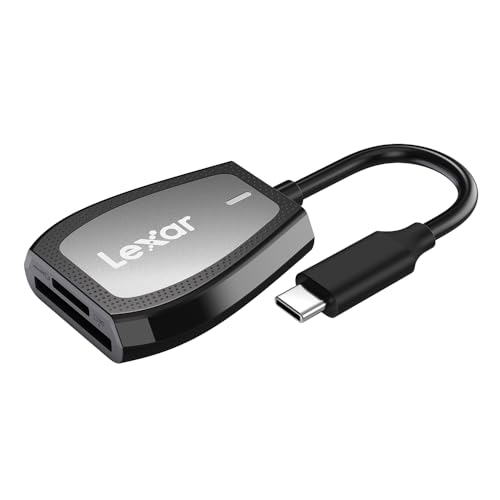
Lexar Professional USB-C Dual-Slot Reader
Lexar’s reader supports SD UHS-II and CFexpress Type B, offering high-speed transfers via USB 3.2 Gen 2. Its rugged design is travel-friendly. Owners report it works well with Lexar and other major brands, though some note the CFexpress slot is tight.
Pros
- Fast dual-slot performance
- Durable build
- Good value
Cons
- CFexpress slot may be snug
- No USB-A cable

Transcend USB 3.2 Gen 1 Multi-Card Reader
This reader supports SD, MicroSD, CF, and MS cards at USB 3.1 speeds. It features a retractable cable and a compact body. While not the fastest, it is a dependable choice for older cards and occasional use.
Pros
- Highly affordable
- Retractable cable
- Multiple formats
Cons
- Slower with UHS-II
- Plastic casing

Kingston MobileLite Plus SD Reader
Kingston’s reader is designed for USB-C devices like phones and tablets, supporting SD and MicroSD with UHS-I speeds. Its key ring hole makes it easy to carry. Users like its plug-and-play nature, but it lacks UHS-II support.
Pros
- Great for smartphones
- Portable with keyring
- Simple operation
Cons
- No UHS-II
- Limited to USB-C
What matters most
Side by side
| # | Model | Interface | Best for | Score | Price |
|---|---|---|---|---|---|
| 1 | ProGrade Digital CFexpress and SD Card Reader | USB 3.2 Gen 2 | Professional photographers needing fastest transfers | 9.4 | Check price |
| 2 | UGREEN USB C Card Reader | USB 3.0 | Everyday users needing versatile compatibility | 8.9 | Check price |
| 3 | Anker USB 3.0 SD Card Reader | USB 3.0 | Simple single-slot SD card reading | 8.7 | Check price |
| 4 | Sony MRW-S1 UHS-II SD Card Reader | USB 3.1 Gen 1 | Sony camera users who need UHS-II speeds | 8.8 | Check price |
| 5 | Lexar Professional USB-C Dual-Slot Reader | USB 3.2 Gen 2 | Content creators juggling SD and CFexpress cards | 8.6 | Check price |
| 6 | Transcend USB 3.2 Gen 1 Multi-Card Reader | USB 3.2 Gen 1 | Budget-friendly multi-format support | 8.3 | Check price |
| 7 | Kingston MobileLite Plus SD Reader | USB 3.0 | Mobile photographers with USB-C smartphones | 8.1 | Check price |
Frequently asked questions
What is the fastest memory card reader?
The fastest readers support USB 3.2 Gen 2 and CFexpress Type B, offering speeds up to 10Gbps. The ProGrade Digital reader is among the fastest, but actual speed also depends on your card’s write speed and the computer’s port.
Can I use a USB-C reader with a USB-A port?
Yes, but you need an adapter or a reader with a detachable cable that offers both connectors. Some readers include both, while others require a separate adapter.
Do memory card readers work with smartphones?
Many USB-C readers work with Android smartphones that support USB OTG. For iPhones, you may need an Apple-specific adapter or a Lightning reader. Check the product specifications for mobile compatibility.
What is the difference between UHS-I and UHS-II SD cards?
UHS-II cards have an extra row of pins and support higher transfer speeds, up to 312MB/s compared to UHS-I’s 104MB/s. To achieve these speeds, you need a reader that supports UHS-II.
Are card readers with multiple slots slower?
No, multi-slot readers typically allow simultaneous access, but they share the same USB bandwidth. If you transfer from two cards at once, the speed may be lower than using one slot alone.
How do I know if a reader supports CFexpress?
Check the product specifications for CFexpress Type B or Type A support. Not all readers handle CFexpress, and the type matters. Most professional readers support Type B, which is common in high-end cameras.
Can I use a memory card reader with a gaming console?
Some consoles like the PS5 have USB ports that can read external storage, but they may not recognize card readers for media playback. It is best to transfer files to a computer first.
What should I do if my reader is not recognized?
First, try a different USB port or cable. Ensure the reader is compatible with your operating system. If it still fails, check if the card is properly inserted and not damaged. Sometimes updating your device drivers resolves issues.
The bottom line
For most photographers, the UGREEN USB C Card Reader offers the best balance of price, compatibility, and speed. Its dual connectors and wide card support make it a versatile daily driver. If you demand maximum performance for professional work, the ProGrade Digital reader is worth the investment. For budget-conscious users, the Transcend reader provides reliable multi-format support at a low cost.
You might also need

Top Label Holders to Keep School Gear Organized

Portable Mesh WiFi Systems That Actually Keep You Connected Anywhere
Portable Index Cards for On the Go Note Taking
