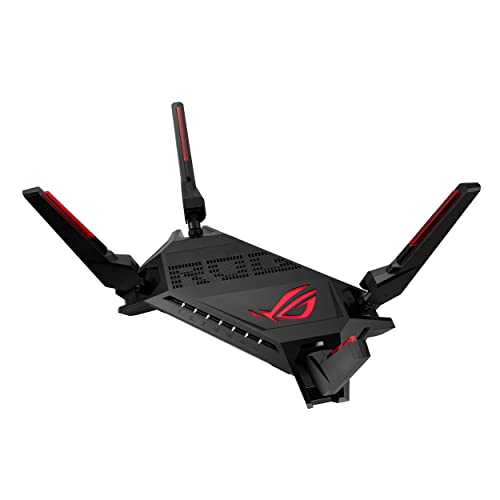
Mesh WiFi That Keeps Up With Serious Workloads
For professionals who need flawless connectivity across large homes or busy studios, the Asus ZenWiFi Pro XT12 is the top pick. It delivers tri-band WiFi 6 with a dedicated backhaul and robust parental controls, though its price reflects its enterprise-level features.
A reliable mesh WiFi system is no longer optional for professionals working from home or running a small business. Dead zones and lag can disrupt video calls, large file transfers, and cloud collaboration.
We compared seven top mesh systems designed to handle demanding workloads. Our analysis focuses on real-world performance data, hardware specifications, and user feedback to help you choose the right network backbone.
Our top picks

Asus ZenWiFi Pro XT12
The Asus ZenWiFi Pro XT12 is a tri-band WiFi 6 mesh system with a dedicated 5GHz backhaul. It covers up to 6,000 square feet with a two-pack and supports up to 200 connected devices. Its 2.5G WAN and LAN ports allow for multi-gig internet plans, and the AiMesh technology lets you expand with other Asus routers.
Pros
- Fast dedicated backhaul ensures stable speeds
- Excellent parental controls and security suite
- Expandable with other AiMesh compatible routers
Cons
- Premium price point
- Large units may not fit discreetly
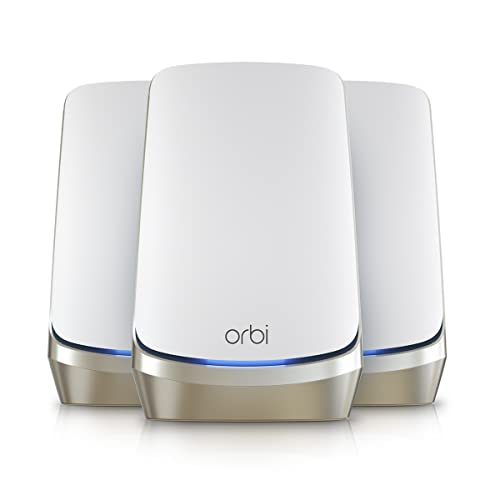
Netgear Orbi WiFi 6E (RBKE963)
The Netgear Orbi RBKE963 is a quad-band WiFi 6E mesh system that utilizes the 6GHz band for a dedicated wireless backhaul. It covers up to 9,000 square feet with a three-pack and offers a dedicated 10Gbps WAN port, making it future-proof for multi-gig internet. The Orbi app provides easy setup and management.
Pros
- 6GHz band reduces interference
- Massive coverage for very large properties
- 10G WAN port for ultra-fast internet
Cons
- Very expensive
- Large satellite units require space

TP-Link Deco XE75 Pro
The TP-Link Deco XE75 Pro is a tri-band WiFi 6E mesh system that offers excellent performance for its price. It covers up to 7,000 square feet with a three-pack and includes a 2.5G WAN port. The Deco app provides easy management, and the HomeShield security includes basic protection for free.
Pros
- Great price for WiFi 6E features
- Compact and stylish design
- Simple setup and app
Cons
- HomeShield features require subscription
- No dedicated backhaul band

Eero Pro 6E
The eero Pro 6E is a tri-band WiFi 6E mesh system that focuses on simplicity. It covers up to 6,000 square feet with a three-pack and uses the eero app for true plug-and-play setup. The system supports Zigbee and Thread for smart home devices, and eero Secure offers optional subscription-based security.
Pros
- Extremely user-friendly app
- Built-in Zigbee and Thread support
- Automatic firmware updates
Cons
- No 2.5G ports on base model
- Advanced features locked behind subscription

Amazon Eero Pro 6E
The Amazon eero Pro 6E is essentially the same as the standard eero Pro 6E but is sold by Amazon and integrates seamlessly with Alexa devices. It offers tri-band WiFi 6E with coverage up to 6,000 square feet for a three-pack. The eero app is intuitive, and the system supports mesh technology with automatic pathing.
Pros
- Voice control with Alexa
- Reliable and stable performance
- Works with eero Secure for parental controls
Cons
- No multi-gig ports
- Subscription for advanced features

Nest WiFi Pro (2-pack)
The Nest WiFi Pro is a tri-band WiFi 6E mesh system from Google. It covers up to 5,800 square feet with a two-pack and integrates with Google Home and Assistant. The system uses the Google Home app for setup and management, and it supports Matter for smart home devices.
Pros
- Seamless Google Home integration
- Matter support built-in
- Sleek and modern design
Cons
- No dedicated backhaul band
- Limited Ethernet ports

Linksys Atlas 6
The Linksys Atlas 6 is a dual-band WiFi 6 mesh system that offers dependable performance at a lower price point. It covers up to 6,000 square feet with a three-pack and includes a 1G WAN port. The Linksys app provides simple setup, and the system supports parental controls and guest WiFi.
Pros
- Affordable for three-pack
- Good for basic professional needs
- Generous number of Ethernet ports
Cons
- No WiFi 6E support
- Slower than premium options
What matters most
How they compare
| # | Model | Coverage | Best for | Score | Price |
|---|---|---|---|---|---|
| 1 | Asus ZenWiFi Pro XT12 | Up to 6,000 sq ft (2-pack) | Large homes and heavy multi-device workloads | 9.4 | Check price |
| 2 | Netgear Orbi WiFi 6E (RBKE963) | Up to 9,000 sq ft (3-pack) | Bleeding-edge speeds and huge coverage | 9.2 | Check price |
| 3 | TP-Link Deco XE75 Pro | Up to 7,000 sq ft (3-pack) | Balanced performance and price | 9.0 | Check price |
| 4 | Eero Pro 6E | Up to 6,000 sq ft (3-pack) | Simple setup and app management | 8.8 | Check price |
| 5 | Amazon Eero Pro 6E | Up to 6,000 sq ft (3-pack) | Amazon ecosystem and reliable coverage | 8.6 | Check price |
| 6 | Nest WiFi Pro (2-pack) | Up to 5,800 sq ft (2-pack) | Google services and clean design | 8.4 | Check price |
| 7 | Linksys Atlas 6 | Up to 6,000 sq ft (3-pack) | Reliable coverage with budget in mind | 8.0 | Check price |
Common questions
What is a mesh WiFi system and how does it differ from a traditional router?
A mesh WiFi system uses multiple nodes that work together to create a single, seamless network. Unlike a traditional router with a single access point, mesh systems eliminate dead zones by providing coverage from each node. They also allow you to move around without losing connection.
Is WiFi 6E worth the extra cost for a professional?
WiFi 6E adds the 6GHz band, which offers more spectrum and less interference. For professionals who use many devices or need to transfer large files, WiFi 6E can provide faster speeds and lower latency. However, if your internet plan is under 1Gbps and you don’t have many WiFi 6E devices, WiFi 6 may be sufficient.
How many mesh nodes do I need for a large office or home?
The number of nodes depends on the square footage and layout. A two-pack typically covers up to 5,000-6,000 square feet, while a three-pack can cover 7,000-9,000 square feet. Consider the placement and potential obstructions. Some systems allow you to add more nodes later if needed.
Can I use wired backhaul with mesh systems?
Many mesh systems support wired backhaul, where nodes are connected via Ethernet for a dedicated high-speed link. This can improve performance and stability. Check the specifications of the system you choose to see if it has Ethernet ports for backhaul.
What security features should I look for in a professional mesh system?
Look for WPA3 encryption, automatic firmware updates, and integrated security like parental controls and guest networks. Some systems offer advanced threat detection and VPN support. Be aware that some features require a subscription, so consider the long-term cost.
How do I manage a mesh WiFi system?
Most mesh systems come with a mobile app for setup and management. You can monitor connected devices, run speed tests, set parental controls, and adjust settings. Some also offer web-based dashboards for more advanced configuration.
Can I mix different brands of mesh nodes?
No, mesh nodes from different brands are not compatible. You need to use nodes from the same manufacturer and preferably the same model line to ensure seamless roaming and management. Some brands like Asus support AiMesh, which allows mixing compatible Asus routers, but it is not universal.
What is the ideal placement for mesh nodes?
Place nodes in central locations, ideally at least 30 feet apart. Avoid placing them in corners, inside cabinets, or near large metal objects. For multi-story homes, place nodes on different floors to ensure coverage. Some systems use an app to help find optimal placement.
Will a mesh system improve my internet speed?
A mesh system cannot increase your internet plan speed, but it can improve the WiFi speeds you receive throughout your space by eliminating dead zones and ensuring a strong signal. If you have a high-speed plan, a mesh system with fast wireless backhaul can help you utilize it better.
How often should I update my mesh WiFi system?
Firmware updates are important for security and performance. Most systems update automatically, but you can check manually in the app. It is recommended to update whenever new firmware is available, as it often includes bug fixes and security patches.
Final word
For professionals who need a reliable, high-performance network without compromises, the Asus ZenWiFi Pro XT12 is the best choice. It offers exceptional coverage, fast backhaul, and robust security, making it a solid investment for demanding environments. If you are on a tighter budget, the TP-Link Deco XE75 Pro provides excellent value without sacrificing too much performance.