Top Microcontrollers for Every Project Skill Level
The Arduino Uno Rev3 is our top pick for beginners and educators because it offers unmatched community support and a simple programming environment, with the main limitation being its limited processing power for advanced tasks.
Choosing the right microcontroller can make or break your project. With hundreds of options, it’s easy to get overwhelmed.
We compared the most popular boards on the market. Our focus is on real-world usability, performance, and community support.
The top picks, ranked

Arduino Uno Rev3
The Arduino Uno Rev3 is the classic entry point into electronics. It uses an ATmega328P chip and offers a forgiving environment with countless tutorials. Its 5V logic and standard pinout make it compatible with a vast range of shields and sensors. While its 16 MHz processor is modest, it’s more than enough for learning and simple automation. The board is through-hole, so it’s easy to replace components if needed. Owners report that it is robust and handles accidental short circuits well. The USB connection is straightforward, and the IDE runs on any computer. Its main drawback is limited memory and speed for complex tasks.
Pros
- Huge community and tutorials
- Stable and reliable for basic projects
- Works with many shields and sensors
Cons
- Limited processing power and memory
- No built-in WiFi or Bluetooth

Raspberry Pi Pico H
The Raspberry Pi Pico H is a low-cost board built around the RP2040 chip. It offers dual-core ARM Cortex-M0+ processors running at 133 MHz. The board has 26 GPIO pins and supports both MicroPython and C/C++. Its popularity has grown due to its price and performance. The Pico H version comes with pre-soldered headers, saving you time. It lacks wireless connectivity, but you can add modules. The board consumes very little power, making it ideal for battery-powered projects. Users appreciate the extensive documentation from Raspberry Pi. The main limitation is the lack of WiFi and Bluetooth by default.
Pros
- Very affordable
- Dual-core performance
- Great for MicroPython
Cons
- No built-in wireless
- Limited RAM compared to some rivals
ESP32 DevKitC V4
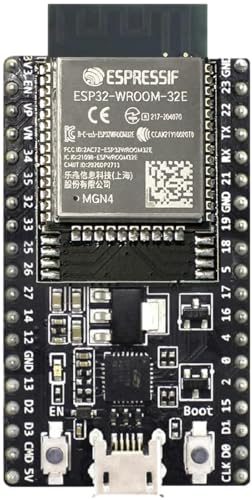
The ESP32 DevKitC V4 is a development board based on the ESP32-WROOM-32 module. It features dual-core Xtensa LX6 processors at 240 MHz and integrated WiFi and Bluetooth. This makes it a favorite for Internet of Things projects. The board has a rich set of peripherals, including ADCs, DACs, and multiple communication interfaces. It is compatible with the Arduino IDE and MicroPython. The board operates at 3.3V, so level shifting may be needed for some sensors. Owners report reliable wireless performance. The main limitation is its higher power consumption when wireless is active.
Pros
- Built-in WiFi and Bluetooth
- Powerful dual-core processor
- Wide ecosystem and support
Cons
- Higher power draw
- 3.3V logic can be a hassle

Teensy 4.1
The Teensy 4.1 is a powerhouse microcontroller from PJRC. It uses an ARM Cortex-M7 running at 600 MHz, making it one of the fastest boards available. It has a wealth of memory, including 8 MB of flash and 1 MB of RAM. This board excels in audio processing, graphics, and complex computations. It is compatible with the Arduino IDE but also supports other tools. The board includes a microSD socket and USB host capability. It operates at 3.3V and has many pins. Owners praise its speed and reliability. The main drawback is its higher cost and less beginner-friendly nature.
Pros
- Extremely fast
- Large memory capacity
- Great for audio and DSP
Cons
- Pricier than other boards
- Requires more technical skill

STM32F407G-DISC1
The STM32F407G-DISC1 is a discovery board from STMicroelectronics. It features an STM32F407VGT6 microcontroller with an ARM Cortex-M4F core running at 168 MHz. The board includes an onboard ST-LINK debugger, making it easy to program and debug. It has a wide range of peripherals, including multiple UARTs, SPIs, and I2Cs. It is ideal for those wanting to move beyond hobbyist platforms. The board comes with example projects and supports various IDEs. Owners appreciate its professional quality and documentation. However, it is less beginner-friendly due to the learning curve.
Pros
- Professional-grade features
- Onboard debugger
- Rich peripheral set
Cons
- Steep learning curve
- No wireless connectivity

Adafruit Metro M4 Express
The Adafruit Metro M4 Express is a powerful board that maintains the classic Arduino form factor. It uses an ATSAMD51J19 microcontroller with an ARM Cortex-M4F core at 120 MHz. It has 512 KB of flash and 192 KB of RAM. The board includes a USB port and is compatible with Arduino and CircuitPython. It has a built-in NeoPixel and a reset button. The board is well-made and suited for advanced projects. It supports a wide range of shields. Owners report excellent build quality and performance. The main limitation is its higher price compared to other Arduino-compatible boards.
Pros
- Fast for Arduino-compatible
- Supports CircuitPython and Arduino
- Compatible with many shields
Cons
- More expensive than Uno
- Not as many tutorials as Uno
Seeed Studio XIAO RP2040
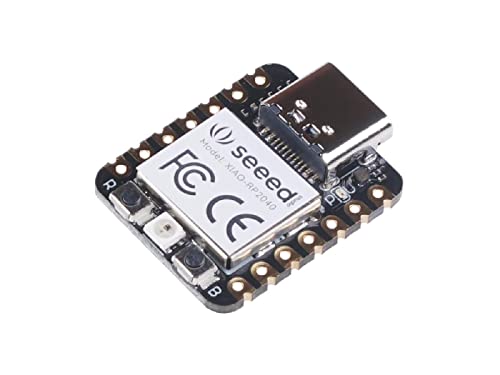
The Seeed Studio XIAO RP2040 is a tiny board, measuring just 20 x 17.5 mm. It uses the same RP2040 chip as the Raspberry Pi Pico, offering dual-core performance at 133 MHz. It has 2 MB of flash and 264 KB of RAM. The board features a USB-C connector and a battery charging circuit. It is ideal for wearables and small IoT devices. It can be programmed with MicroPython or C/C++. The board exposes many GPIO pins via castellated pads. Owners love its small footprint and power. The main limitation is the small number of pins for complex projects.
Pros
- Very small size
- Battery charging support
- USB-C connectivity
Cons
- Limited GPIO pins
- Solder pads may be tricky for beginners
Side by side
| # | Model | Microcontroller | Best for | Score | Price |
|---|---|---|---|---|---|
| 1 | Arduino Uno Rev3 | ATmega328P | Beginners and education | 9.4 | Check price |
| 2 | Raspberry Pi Pico H | RP2040 | Projects needing low cost and flexibility | 9.1 | Check price |
| 3 | ESP32 DevKitC V4 | ESP32-WROOM-32 | IoT and wireless projects | 9.3 | Check price |
| 4 | Teensy 4.1 | i.MX RT1062 | High-performance audio and real-time applications | 9.2 | Check price |
| 5 | STM32F407G-DISC1 | STM32F407VGT6 | Learning professional ARM development | 8.8 | Check price |
| 6 | Adafruit Metro M4 Express | ATSAMD51J19 | Projects requiring high speed with Arduino compatibility | 8.9 | Check price |
| 7 | Seeed Studio XIAO RP2040 | RP2040 | Wearables and compact projects | 8.6 | Check price |
What to look for
Frequently asked questions
What is the best microcontroller for beginners?
The Arduino Uno Rev3 is widely recommended for beginners due to its forgiving nature, extensive tutorials, and robust community. Its 5V logic makes it easier to interface with common sensors.
Can I use Python to program microcontrollers?
Yes, many boards support MicroPython or CircuitPython. The Raspberry Pi Pico and Seeed XIAO RP2040 are excellent choices for Python enthusiasts. They offer a simple syntax and interactive experience.
What is the difference between a microcontroller and a microprocessor?
A microcontroller is a complete computer on a chip with CPU, memory, and peripherals, designed for specific control tasks. A microprocessor is just the CPU and requires external components to function. Microcontrollers are ideal for embedded applications.
How much RAM do I need for my project?
It depends on your application. Basic projects may need only a few kilobytes. Advanced tasks like audio processing or graphics may require hundreds of kilobytes or even megabytes. Consider the Teensy 4.1 if you need large memory.
Do all microcontrollers have WiFi?
No, only some boards include built-in wireless. The ESP32 is famous for its integrated WiFi and Bluetooth. Others, like the Arduino Uno, require an external shield or module for connectivity.
What is the fastest microcontroller on this list?
The Teensy 4.1 with its 600 MHz ARM Cortex-M7 is the fastest. It is suitable for demanding applications like real-time audio processing and high-speed data acquisition.
Can I use Arduino shields with other boards?
Some boards, like the Adafruit Metro M4 Express, are designed to be pin-compatible with Arduino shields. Others may have different pinouts, so check compatibility before purchasing.
Are these boards suitable for commercial products?
Yes, many of these boards are used in commercial products. However, for mass production, you might consider using the bare microcontroller chip to reduce cost and size. Boards are great for prototyping.
What is the best microcontroller for IoT projects?
The ESP32 DevKitC V4 is a top choice for IoT because of its built-in WiFi and Bluetooth, low cost, and support for popular protocols like MQTT. It offers a good balance of performance and connectivity.
How do I choose between 3.3V and 5V logic?
Check the voltage requirements of your sensors and modules. Many modern sensors operate at 3.3V. If you need to interface with 5V components, you may need level shifters. The Arduino Uno uses 5V, while most newer boards are 3.3V.
The bottom line
For most hobbyists and educators, the Arduino Uno Rev3 remains the best choice due to its unmatched ease of use and learning resources. If you are building IoT projects, the ESP32 DevKitC V4 offers the best value with built-in wireless. For high-performance needs, the Teensy 4.1 is the way to go, despite its premium price.


