Top Mobile Game Controllers for Serious Gamers
The Backbone One is the top pick for most gamers. It offers a console-like feel, low latency, and a polished app. Its main limitation is that it only fits phones up to a certain size and is not compatible with all cases.
Mobile gaming has evolved far beyond touch controls. A dedicated controller can give you precision, comfort, and an edge in competitive titles.
We compared popular models based on specifications, user feedback, and compatibility. Our picks cover various budgets and gaming preferences.
The top picks, ranked

Backbone One (Lightning or USB-C)
The Backbone One is a sleek, telescopic controller that connects directly to your phone’s port, eliminating Bluetooth lag. It features low-latency controls, a headphone jack, and a companion app for launching games and streaming. Users report a comfortable grip and responsive buttons, making it ideal for long sessions.
Pros
- Zero latency wired connection
- Excellent build quality with comfortable ergonomics
- Companion app adds social features and game discovery
Cons
- May not fit phones with thick cases
- No Bluetooth mode for other devices

Razer Kishi V2
The Razer Kishi V2 is a direct USB-C connection controller that offers low latency and a familiar console layout. It has clickable analog thumbsticks, a D-pad, and programmable buttons. The bridge design stretches to fit most phones, and it includes a pass-through charging port. Users praise its solid build and responsive inputs.
Pros
- Low latency wired connection
- Comfortable grip for long gaming sessions
- Works with Xbox Game Pass and other cloud services
Cons
- Not compatible with iPhones without a special adapter
- Some users find the thumbsticks a bit stiff

GameSir X2 Pro
The GameSir X2 Pro is a USB-C controller that offers hall-effect sensing thumbsticks to eliminate drift. It has a compact design with a built-in USB-C connector and a USB-C port for charging while playing. It works with Android and iOS (with a Lightning version available). Users like the responsive buttons and the fact that it feels solid for the price.
Pros
- Hall-effect sticks prevent drift
- Affordable price point
- Compatible with many Android devices and iPhone with Lightning version
Cons
- No Bluetooth option
- Build quality is not as premium as higher-end models
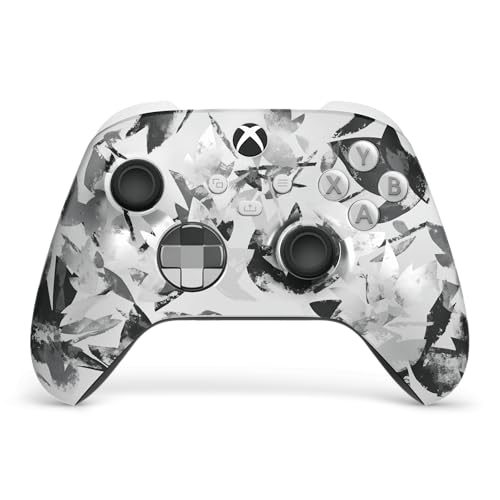
Xbox Wireless Controller (Mobile Gaming Edition)
Microsoft’s official Xbox controller designed for mobile gaming includes a phone clamp and Bluetooth connectivity. It has the familiar Xbox layout and works with Android, iOS, and PC. It is ideal for cloud gaming with Xbox Game Pass Ultimate. Users appreciate the comfort and reliability, though it requires two AA batteries or a rechargeable pack.
Pros
- Seamless integration with Xbox Game Pass
- High-quality tactile buttons and triggers
- Versatile: works with console and PC as well
Cons
- Batteries not included
- Phone clamp may not fit larger phones with cases

PowerA Moga XP7-X
The PowerA Moga XP7-X is a Bluetooth controller with a built-in phone clip and a 3000mAh battery that can charge your phone while you play. It offers a comfortable grip and supports both Android and iOS. It also features a dedicated app for button mapping. Users like the battery life and the ability to play for hours without worrying about phone battery.
Pros
- Can charge your phone during gameplay
- Comfortable design for long sessions
- Works with cloud gaming services and native games
Cons
- Bluetooth connection may add slight latency
- Bulky compared to telescopic controllers

8BitDo Pro 2
The 8BitDo Pro 2 is a versatile Bluetooth controller that works with Android, iOS, PC, and Nintendo Switch. It features a classic gamepad layout with grips, turbo buttons, and a rear paddle. It includes a phone clip (sold separately) and supports motion controls. Users praise its build quality and compatibility, making it a great choice for emulation and modern games.
Pros
- Works with many devices and platforms
- Classic design with modern features
- Excellent for retro gaming and cloud gaming
Cons
- Phone clip is not included and sold separately
- No direct USB-C connection to phone for low latency

Nacon MG-X
The Nacon MG-X is a telescopic Bluetooth controller specifically designed for Android devices. It has a compact design that stretches to fit phones up to 6.8 inches. It connects via Bluetooth and has a low-latency mode. It includes a USB-C charging port for the controller itself. Users like its portability and the fact that it doesn’t require a separate clip.
Pros
- Compact and portable design
- No need for a separate phone clip
- Comfortable for most hand sizes
Cons
- Only Android compatible
- No headphone jack
How they compare
| # | Model | Connection | Best for | Score | Price |
|---|---|---|---|---|---|
| 1 | Backbone One (Lightning or USB-C) | Wired (Lightning or USB-C) | Best overall for iPhone and Android users | 9.4 | Check price |
| 2 | Razer Kishi V2 | USB-C wired | Best for Android gamers who want a console-like experience | 9.2 | Check price |
| 3 | GameSir X2 Pro | USB-C wired | Best budget-friendly with hall-effect sticks | 8.9 | Check price |
| 4 | Xbox Wireless Controller (Mobile Gaming Edition) | Bluetooth or USB-C wired | Best for Xbox Game Pass enthusiasts | 8.8 | Check price |
| 5 | PowerA Moga XP7-X | Bluetooth | Best for gaming on the go with a built-in battery | 8.5 | Check price |
| 6 | 8BitDo Pro 2 | Bluetooth or USB-C wired | Best for retro gamers and multi-platform use | 8.3 | Check price |
| 7 | Nacon MG-X | Bluetooth | Best for Android users who prefer a clip-less design | 8.0 | Check price |
How to pick the right one
Common questions
Will a mobile game controller work with all games?
Not all games support external controllers. Games designed for touch input may not recognize them. However, many popular titles like Call of Duty Mobile, PUBG Mobile, and Fortnite have controller support. Check the game’s settings or documentation for compatibility.
Can I use a console controller with my phone?
Yes, many console controllers like the Xbox Wireless Controller or PlayStation DualSense can connect to your phone via Bluetooth. They work well with cloud gaming services and games that support controller input. You may need a clip to attach the phone.
What is the difference between USB-C and Lightning controllers?
USB-C controllers are for Android devices and newer iPhones (iPhone 15 and later). Lightning controllers are for older iPhones with a Lightning port. Choose the one that matches your phone’s charging port. Some controllers come in both versions.
Do I need a controller with a headphone jack?
If you want to use wired headphones while gaming, a headphone jack on the controller is convenient. Otherwise, you can use wireless earbuds or connect headphones to your phone directly. Some controllers include a 3.5mm jack for this purpose.
Can I charge my phone while using a controller?
Some wired controllers have a pass-through charging port, allowing you to plug in a cable and charge your phone while playing. Bluetooth controllers with a built-in battery may also have a USB port to charge your phone, but it will drain the controller’s battery faster.
Are mobile controllers good for cloud gaming?
Yes, controllers enhance cloud gaming by providing physical buttons and analog sticks. Services like Xbox Game Pass and GeForce Now support many controllers. A low-latency wired or Bluetooth 5.0 connection is recommended for the best experience.
Will a controller work with my iPhone?
Most modern controllers support iOS via Bluetooth or a Lightning connection. However, some Android-specific controllers may not work with iPhones. Check the product specifications to ensure iOS compatibility. Controllers like the Backbone One have separate versions for iPhone and Android.
How do I know if a controller fits my phone?
Check the product description for the maximum phone width or screen size. Measure your phone’s width and compare it to the controller’s specifications. Most telescopic controllers can adjust to fit a range of sizes, but there are limits.
The bottom line
For most gamers, the Backbone One is the definitive choice due to its wired reliability and polished ecosystem. If you are an Android user and prefer a more traditional controller, the Razer Kishi V2 is a strong alternative. For those on a budget, the GameSir X2 Pro offers excellent value without compromising on performance. Avoid Bluetooth-only controllers if you are competitive and demand the lowest latency.


