Top Modems for Fast Internet in 2026
For most people, the NETGEAR Nighthawk CM2000 is the best modem because it supports multi-gig internet plans and has a 2.5 Gbps port for future-proofing. It is ideal for gigabit and multi-gig subscribers who want maximum speed. Its main limitation is the higher price and that it requires a separate router.
Upgrading your modem can dramatically improve your internet speed and stability, especially if you are renting an outdated unit from your ISP. A good modem pays for itself over time and gives you full control over your network.
We analyzed the most popular and reliable modems on the market, covering different DOCSIS standards and speed tiers. Whether you have cable, fiber, or DSL, there is a modem that fits your needs and budget.
Before you buy
Our top picks

NETGEAR Nighthawk CM2000
The NETGEAR Nighthawk CM2000 is a high-performance cable modem that supports DOCSIS 3.1 and multi-gig speeds up to 2.5 Gbps. It is designed for internet plans exceeding 1 Gbps and future-proofing your home network. With a 2.5 Gbps Ethernet port, it ensures you get the most out of your connection. Owners report excellent stability and speed consistency, making it a top choice for heavy internet users.
Pros
- Blazing fast for gigabit plans
- Future-proof with 2.5 Gbps port
- Compatible with major US ISPs
Cons
- Expensive
- No built-in router
Motorola MB8611
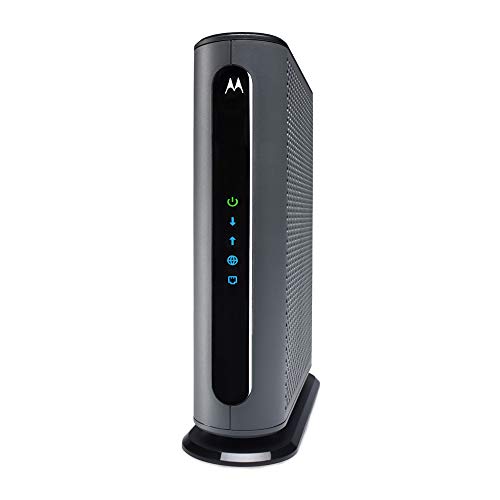
The Motorola MB8611 is a DOCSIS 3.1 modem that supports gigabit speeds with a 2.5 Gbps Ethernet port. It is a popular choice for users with cable internet plans up to 1 Gbps. The modem is known for its reliable performance and easy setup. Users appreciate its compact design and compatibility with major providers like Xfinity and Spectrum.
Pros
- Excellent performance for gigabit
- Reliable and stable
- Compact and easy to set up
Cons
- No Wi-Fi built-in
- Slightly pricey

ARRIS Surfboard S33
The ARRIS Surfboard S33 is a DOCSIS 3.1 modem that delivers multi-gig speeds up to 2.5 Gbps. It is ideal for internet plans between 1 and 2 Gbps. The modem features a 2.5 Gbps Ethernet port and is compatible with all major cable providers. It is a versatile and affordable option for high-speed internet users.
Pros
- Supports multi-gig plans
- Great value for features
- Works with major ISPs
Cons
- No Wi-Fi
- Setup may require ISP activation

NETGEAR CM1000
The NETGEAR CM1000 is a DOCSIS 3.1 modem that supports speeds up to 1 Gbps. It is a solid choice for those with internet plans under 1 Gbps who want to save money while still getting reliable performance. The modem is compatible with major cable providers and is known for its easy installation and consistent connectivity.
Pros
- Affordable DOCSIS 3.1 option
- Reliable performance
- Simple setup
Cons
- Only 1 Gbps port
- No multi-gig support
Motorola MB7621
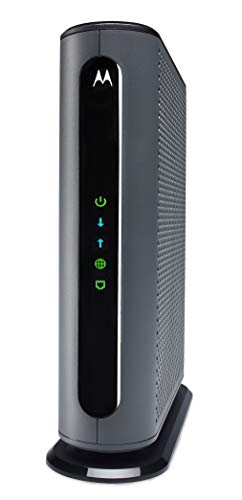
The Motorola MB7621 is a DOCSIS 3.0 modem that supports speeds up to 600 Mbps. It is an ideal choice for households with internet plans between 200 and 600 Mbps. This modem is widely compatible and offers a great balance of price and performance. Users report high satisfaction with its stability and easy setup.
Pros
- Very affordable
- Reliable and proven
- Works with most cable ISPs
Cons
- Not for gigabit plans
- Older DOCSIS 3.0 technology

TP-Link TC-7610
The TP-Link TC-7610 is a DOCSIS 3.0 modem that supports speeds up to 300 Mbps. It is a budget-friendly option for users with slower internet plans. The modem is compatible with major cable providers and offers a simple plug-and-play setup. It is a practical choice for basic internet browsing and streaming.
Pros
- Very low cost
- Easy to install
- Stable for moderate use
Cons
- Limited speed capability
- Not future-proof

NETGEAR DM200
The NETGEAR DM200 is a modem for DSL and VDSL internet connections. It supports speeds up to 100 Mbps depending on your provider. This modem is ideal for those who cannot get cable or fiber internet and need a reliable DSL modem. It is compatible with many DSL providers and is known for its stable connection.
Pros
- Perfect for DSL service
- Reliable connection
- Wide ISP support
Cons
- Not for cable internet
- Lower speed than cable
The lineup, side by side
| # | Model | DOCSIS | Best for | Score | Price |
|---|---|---|---|---|---|
| 1 | NETGEAR Nighthawk CM2000 | 3.1 | Multi-gig cable plans | 9.4 | Check price |
| 2 | Motorola MB8611 | 3.1 | Gigabit cable plans | 9.2 | Check price |
| 3 | ARRIS Surfboard S33 | 3.1 | High-speed cable plans | 9.0 | Check price |
| 4 | NETGEAR CM1000 | 3.1 | Sub-gigabit cable plans | 8.7 | Check price |
| 5 | Motorola MB7621 | 3.0 | Plans up to 600 Mbps | 8.5 | Check price |
| 6 | TP-Link TC-7610 | 3.0 | Plans up to 300 Mbps | 8.2 | Check price |
| 7 | NETGEAR DM200 | DSL/VDSL | DSL and VDSL connections | 8.0 | Check price |
Questions worth asking
Do I need a new modem to get faster internet?
If your modem is outdated and doesn’t support the speed tier you pay for, upgrading can help. For example, if you have a DOCSIS 3.0 modem and subscribe to gigabit speeds, you won’t reach those speeds. A new DOCSIS 3.1 modem can unlock your full plan speed.
How do I know if a modem is compatible with my ISP?
Check your ISP’s website for an approved modem list. Most ISPs provide a list of certified modems that work with their network. You can also contact customer support to confirm compatibility before purchasing.
What is the difference between DOCSIS 3.0 and 3.1?
DOCSIS 3.1 is the newer standard that supports faster speeds, lower latency, and better bandwidth. It is essential for gigabit and multi-gig internet plans. DOCSIS 3.0 is older and typically supports speeds up to 1 Gbps, but in practice, it’s often limited to lower speeds.
Can I use my own modem with Xfinity?
Yes, Xfinity allows customers to use their own modems, but you must select a model from their approved list. You will need to activate it by calling or using the Xfinity app. Using your own modem eliminates the monthly rental fee.
Should I buy a modem router combo or separate devices?
Separate devices are generally recommended for better performance and flexibility. You can upgrade each independently. Combos are convenient but often have weaker Wi-Fi and less customization. If you have a large home or specific networking needs, separate is better.
How long do modems last?
Most modems last between 3 to 5 years, but they can last longer if they remain compatible with your ISP and technology standards. As internet speeds increase, older modems may become bottlenecks. Replacing them when needed ensures optimal performance.
What does a 2.5 Gbps Ethernet port mean?
A 2.5 Gbps Ethernet port allows data transfer at speeds up to 2.5 gigabits per second. This is faster than the standard 1 Gbps port and is necessary to take advantage of internet plans that exceed 1 Gbps. It also future-proofs your connection for upcoming speed upgrades.
Can I use a cable modem for DSL internet?
No, cable modems are specifically designed for cable internet networks. DSL internet uses phone lines and requires a DSL modem. They are not interchangeable. Ensure you purchase the correct type for your connection.
Do I need a separate router if I buy a modem?
Yes, a standalone modem does not have Wi-Fi or routing capabilities. You will need a separate router to create a wireless network and manage multiple devices. Alternatively, you can connect a single device directly via Ethernet, but that is not practical for most homes.
What is the best modem for gigabit internet?
For gigabit internet, a DOCSIS 3.1 modem with a 2.5 Gbps Ethernet port is recommended. Models like the NETGEAR CM2000, Motorola MB8611, and ARRIS S33 are top choices. They ensure you get the full speed of your plan and are compatible with major ISPs.
The verdict
If you want the best overall performance and are willing to invest in future-proofing, choose the NETGEAR Nighthawk CM2000. It handles multi-gig speeds with ease and is compatible with all major cable providers. For most households with plans up to 600 Mbps, the Motorola MB7621 offers excellent value and reliability without breaking the bank. Avoid buying a modem that is overkill for your current plan unless you plan to upgrade soon, as the extra cost may not yield immediate benefits.