Top Monitor Stands for a Tidy Home Office Setup
The HUANUO Single Monitor Mount stands out as the top overall pick for most home offices, offering a wide range of motion and sturdy gas spring adjustment at a reasonable price. Its main advantage is ergonomic flexibility, letting you tilt, swivel, and rotate your screen to find the perfect viewing angle. A limitation is that it requires a desk clamp or grommet mount, which might not suit every desk.
A proper monitor stand can transform your home office. It raises your screen to eye level, reducing neck strain and improving posture. It also frees up valuable desk space underneath.
Whether you need a simple riser for a laptop or a heavy-duty arm for multiple monitors, there is a solution for you. We have selected seven stands that cater to various needs and budgets.
Before you buy
What we recommend

HUANUO Single Monitor Mount
This gas spring arm supports monitors from 17 to 32 inches and up to 19.8 pounds. It offers full articulation with tilt, swivel, and rotation, allowing you to position your screen exactly where you need it. The included cable management clips keep your desk tidy. Users appreciate its sturdy construction and smooth adjustment.
Pros
- Smooth gas spring adjustment
- Wide range of motion
- Fits most desks
Cons
- Requires desk clamp or grommet
- Cable management could be better

Ergotron LX Desk Monitor Arm
The Ergotron LX is known for its exceptional build quality and smooth motion. It supports monitors up to 34 inches and 25 pounds, making it ideal for larger screens. The arm features a patented constant force technology for effortless height adjustment. It comes with a 10-year warranty, reflecting its durability.
Pros
- Exceptional build quality
- Smooth and precise movements
- 10-year warranty
Cons
- Expensive
- Requires significant desk space
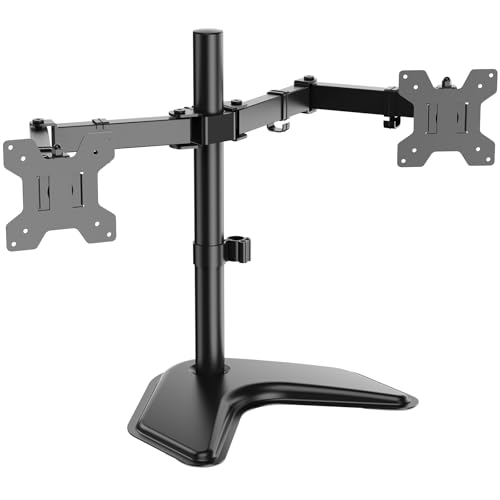
WALI Dual Monitor Stand
This dual monitor stand supports two screens up to 27 inches each, with a combined weight capacity of 22 pounds per arm. It offers independent adjustment for each monitor, allowing you to set up a seamless multi-display workspace. The stand includes built-in cable management and is compatible with VESA patterns.
Pros
- Supports two monitors independently
- Sturdy construction
- Easy cable management
Cons
- Arms may wobble on thin desks
- Limited height adjustment range

Mount-It! Adjustable Monitor Stand Riser
This riser is a simple and affordable solution. It raises your monitor by a fixed height of 4 inches, which is enough for many users. The metal frame is sturdy and can hold up to 55 pounds. It includes a shelf for your keyboard or other items when not in use.
Pros
- Very affordable
- Sturdy metal construction
- Adds storage space
Cons
- No height adjustment
- Not suitable for larger setups

VIVO Single Monitor Desk Mount
The VIVO mount offers gas spring assistance for easy height changes at a budget price. It supports monitors from 13 to 30 inches and up to 17.6 pounds. The arm provides tilt, swivel, and rotation. Users note that it is a great value for the price.
Pros
- Low cost
- Gas spring for easy adjustment
- Compact design
Cons
- Plastic parts in the base
- Not for heavy monitors

Amazon Basics Single Monitor Stand
The Amazon Basics riser is a minimalist desk accessory. It raises your monitor by 5.5 inches and supports up to 60 pounds. The surface is made of a non-slip material to keep your monitor stable. It is a no-frills option that does its job well.
Pros
- Very affordable
- Stable and non-slip
- Clean look
Cons
- No adjustability
- Not for ultrawide monitors

Mount-It! Wall Mount Monitor Arm
This wall mount arm frees up your entire desk surface. It supports monitors up to 27 inches and 15 pounds. The arm can extend up to 16 inches from the wall and swivels 180 degrees. It is a good choice for those with limited desk space.
Pros
- Frees desk space completely
- Adjustable arm
- Sturdy wall plate
Cons
- Requires drilling into wall
- Less flexible than desk mount
The lineup, side by side
| # | Model | Screen Size | Best for | Score | Price |
|---|---|---|---|---|---|
| 1 | HUANUO Single Monitor Mount | 17 to 32 inches | Best Overall | 9.4 | Check price |
| 2 | Ergotron LX Desk Monitor Arm | Up to 34 inches | Premium Pick | 9.2 | Check price |
| 3 | WALI Dual Monitor Stand | Up to 27 inches per monitor | Best Dual Monitor | 9.0 | Check price |
| 4 | Mount-It! Adjustable Monitor Stand Riser | 4 inches | Simple Riser | 8.7 | Check price |
| 5 | VIVO Single Monitor Desk Mount | 13 to 30 inches | Budget Arm | 8.5 | Check price |
| 6 | Amazon Basics Single Monitor Stand | 5.5 inches | Minimalist Riser | 8.3 | Check price |
| 7 | Mount-It! Wall Mount Monitor Arm | Up to 27 inches | Wall Mount | 8.1 | Check price |
Frequently asked questions
What is the benefit of using a monitor stand?
A monitor stand raises your screen to eye level, reducing neck and back strain. It also frees up desk space and can improve your posture and productivity.
How do I know if my monitor is VESA compatible?
Check the back of your monitor for four screw holes arranged in a square. Common sizes are 75×75 or 100×100 millimeters. If you have holes, you can use a mount that supports that pattern.
Can I use a monitor stand with a laptop?
Yes, some stands come with a laptop tray, or you can use a laptop stand. Alternatively, you can place your laptop on a riser and use an external keyboard and mouse.
How much weight can a desk clamp mount hold?
It varies by model. Most clamps support between 15 and 25 pounds per arm. Always check the weight capacity to ensure it can handle your monitor’s weight.
Do monitor arms fit all desks?
Most arms use a C-clamp that fits desks with a thickness up to about 3 inches. Some also offer a grommet mount option for desks with a hole. Always measure your desk to confirm compatibility.
Can I adjust the height of my monitor stand?
Arms with gas springs allow height adjustment. Fixed risers have a set height. If you need flexibility, choose an arm with gas spring assistance.
Will a monitor stand wobble?
A quality stand should be stable. Look for stands with sturdy construction and wide bases. Reviews can indicate if a particular model is prone to wobbling.
How do I install a desk clamp mount?
You attach the clamp to the back edge of your desk and tighten it. Then you attach the VESA plate to your monitor and slide it onto the arm. Most come with instructions and necessary tools.
Can I use a monitor stand with an ultrawide monitor?
Some stands support ultrawide monitors up to 34 inches or more. Check the weight capacity and VESA compatibility. Heavier ultrawides may require a heavy-duty arm.
What is the difference between a riser and an arm?
A riser is a fixed-height platform that sits on your desk. An arm attaches to your desk and allows movement, adjustment, and often better ergonomics. Arms are more versatile but may be more expensive.
Our pick
For most home offices, the HUANUO Single Monitor Mount is the best choice because it combines affordability, adjustability, and solid construction. If you have a larger budget and want top-tier quality, the Ergotron LX is worth the investment. For dual monitors, go with the WALI Dual Monitor Stand. For a simple, low-cost solution, the Mount-It! riser does the job.


