Top Mouse Bungees to Tame Your Cable for Good
The Razer Mouse Bungee V3 stands out for its weighted base and flexible arm, ideal for competitive gamers who need zero cable drag. Its main advantage is rock-solid stability, but it lacks RGB lighting.
A mouse bungee lifts your mouse cable off the desk, reducing drag and snags. This simple tool can make a surprising difference in aiming precision and comfort.
We looked at seven current models, from budget picks to premium options. Each has strengths, so consider your desk space and preferred mouse cable type.
What we recommend

Razer Mouse Bungee V3
The Razer Mouse Bungee V3 has a heavy, non-slip base that keeps it planted during frantic flicks. Its adjustable arm holds cables securely with a rubber grip, and it supports both braided and paracord cables.
Pros
- Very stable due to weight
- Holds thick braided cables well
- Easy to adjust on the fly
Cons
- No RGB lighting
- Takes up desk space

Zowie Camade II
The Zowie Camade II is a favorite in esports for its simple, functional design. It has a sturdy base and a flexible arm that stays where you put it. The cable holder is wide enough for thicker cables.
Pros
- Excellent build quality
- Flexible arm holds position
- Compact footprint
Cons
- No height adjustment
- Can be pricey
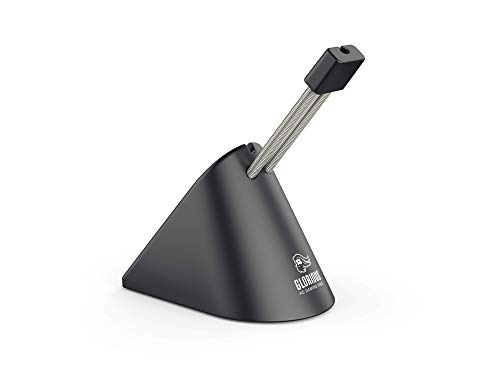
Glorious PC Gaming Race Mouse Bungee
Glorious offers an affordable bungee that doesn’t feel cheap. It has a weighted base with a rubberized coating and a sturdy metal arm. The cable clip is spring-loaded for a firm grip.
Pros
- Very affordable
- Weighted base prevents tipping
- Simple and effective
Cons
- Plastic feels less premium
- Arm may loosen over time

Cooler Master MasterAccessory Bungee
Cooler Master’s bungee adds customizable RGB lighting to your setup. It has a solid base and a flexible arm with a wide cable groove. The lighting is controlled via a button, no software needed.
Pros
- Adds RGB flair
- Wide groove fits large cables
- Simple lighting controls
Cons
- Base is not as heavy
- Cable may pop out during extreme movements

SteelSeries Spectrum Mouse Bungee
SteelSeries offers a bungee that matches their aesthetic. It has a low-profile design with a weighted base and a flexible arm. The cable holder uses a rubber grip that works with most cables.
Pros
- Sleek design
- Stable base
- Affordable price
Cons
- No height adjustment
- Rubber grip may wear over time
Razer Mouse Bungee V2
The Razer Mouse Bungee V2 is still available and offers a similar design to the V3 but with a lighter base. It has a plastic construction and a simple clip. It works well for lighter cables.
Pros
- Cheaper than V3
- Small footprint
- Does the job
Cons
- Light base can tip
- Clip may not hold thick cables
Deltahub Carpio Bungee
The Deltahub Carpio is a wrist rest and bungee combo, attaching to the front of your desk. It provides a place to rest your palm while keeping the cable elevated. It’s made of aluminum and silicone.
Pros
- Saves desk space
- Combines wrist rest and bungee
- Sturdy clamp
Cons
- Requires a flat desk edge
- May not suit all grip styles
Compared at a glance
| # | Model | Base Material | Best for | Score | Price |
|---|---|---|---|---|---|
| 1 | Razer Mouse Bungee V3 | Rubberized ABS plastic with weighted core | Competitive gamers | 9.4 | Check price |
| 2 | Zowie Camade II | Steel plate with rubber feet | Esports enthusiasts | 9.2 | Check price |
| 3 | Glorious PC Gaming Race Mouse Bungee | Rubberized plastic with metal weight | Value seekers | 8.8 | Check price |
| 4 | Cooler Master MasterAccessory Bungee | Plastic with rubber bottom | RGB lovers | 8.5 | Check price |
| 5 | SteelSeries Spectrum Mouse Bungee | Plastic with metal weight | SteelSeries users | 8.3 | Check price |
| 6 | Razer Mouse Bungee V2 | Plastic with rubber feet | Budget Razer fans | 8.0 | Check price |
| 7 | Deltahub Carpio Bungee | Aluminum and silicone | Minimalist setups | 8.1 | Check price |
How to choose
Frequently asked questions
Do mouse bungees work with wireless mice?
No, they are only for wired mice. Wireless mice don’t have a cable to manage.
Can a mouse bungee improve my aim?
Yes, by eliminating cable drag, you can move your mouse more smoothly and consistently, which can improve your aim.
Will a mouse bungee damage my mouse cable?
Most are designed with soft grips that won’t damage cables. Avoid bungees with sharp edges or overly tight clips.
How do I choose between a heavy and light bungee?
Heavy bungees stay in place during intense gaming, while lighter ones are easier to move. If you have a large desk and make fast movements, choose a heavier base.
Can I use a mouse bungee with a laptop?
Yes, as long as you have a wired mouse and a flat surface to place the bungee.
Are there any wireless mouse bungees?
No, the term ‘wireless mouse bungee’ is a contradiction. However, some bungees can hold a charging cable for a wireless mouse while it charges.
How do I attach the cable to the bungee?
Open the clip or groove, place the cable inside, and close it. Ensure the cable is not pinched too tightly.
Do I need a mouse bungee if my mouse has a paracord cable?
Paracord cables are light and flexible, but they can still benefit from a bungee to keep them off the desk and avoid snags.
The verdict
For most gamers, the Razer Mouse Bungee V3 is the top choice because it offers the best stability and reliability. If you’re on a budget, the Glorious bungee is a solid pick. If you want RGB, the Cooler Master adds flair. Ultimately, any of these will improve your setup, but the Razer V3 stands out as the most dependable.


