Choosing a NAS Enclosure That Grows With Your Storage Needs
Synology’s DS923+ balances four bays with expandable RAM for most homes and small offices. QNAP’s TS-464 keeps M.2 cache separate from its four main drive bays. Need cheap mirrored backup only? The Synology DS223j covers two bays at the lowest cost here.
Three enclosures cover most situations here. Synology’s DS923+ balances bay count, CPU power and RAM headroom for households and small offices. The QNAP TS-464 trades some RAM ceiling for built-in 2.5GbE speed, and the Synology DS223j strips things down to affordable mirrored backup only.
Storage capacity says little on its own, since almost any enclosure accepts large drives. CPU class and network speed decide whether the box can also transcode video or run backup software without stalling. We compared bay count, RAM ceiling and connectivity, then checked owner reports on noise, app support and drive compatibility.
Our top picks

Synology DS923+ 4-Bay NAS
A quad-core AMD Ryzen R1600 processor keeps multiple users from stalling each other during transfers. RAM expands from 4GB up to 32GB for heavier virtualization or surveillance workloads. Two M.2 NVMe slots hold cache drives that speed up frequently accessed files, and DSM software ties backup, sync and surveillance into one dashboard.
Pros
- Quad-core Ryzen handles several users at once
- RAM expands to 32GB for heavier workloads
- DSM combines backup, sync and surveillance in one app
Cons
- Priced well above basic 2-bay enclosures
- 2.5GbE speed needs a separate add-in card

QNAP TS-464 4-Bay NAS
Built-in dual 2.5GbE ports move large files noticeably faster than standard gigabit, with no extra hardware needed. Two M.2 slots handle cache duty so all four bays stay free for spinning drives. QTS software runs Docker containers and Plex for home server projects without extra add-ons.
Pros
- Dual 2.5GbE ships standard, no add-in card needed
- M.2 cache slots leave all four bays open
- Runs Docker and Plex well for home projects
Cons
- RAM tops out lower than the DS923+
- QTS has a steeper learning curve for new owners

Synology DS223j 2-Bay NAS
Two bays cover mirrored backup for a household without paying for capacity most people never use. A quad-core Realtek chip keeps power draw low, which matters for a box left running around the clock. DSM’s mobile app makes remote file access straightforward for non-technical owners.
Pros
- Low entry cost into DSM software
- Quiet, low-power design for always-on use
- Mobile app simplifies remote file access
Cons
- Fixed 1GB RAM limits multitasking
- No hardware transcoding for video playback

Synology DS1522+ 5-Bay NAS
Five bays, plus support for a matching expansion unit, push total capacity to ten drives without swapping hardware. A quad-core AMD chip and dual M.2 slots keep performance steady as the array grows. Synology Hybrid RAID mixes drive sizes across bays without wasting capacity.
Pros
- Expansion unit doubles capacity down the road
- SHR mixes drive sizes without losing space
- Strong CPU keeps pace as bays fill up
Cons
- Larger footprint than 2 or 4-bay units
- 1GbE ports feel slow for this price tier

QNAP TS-873A 8-Bay NAS
Eight bays support larger RAID arrays for a small team sharing one file server. A Ryzen embedded processor runs concurrent backups and virtual machines without choking. Dual 2.5GbE ports and an open PCIe slot leave room for future network upgrades.
Pros
- Eight bays suit small office RAID needs
- Handles virtual machines alongside file sharing
- PCIe slot leaves room for network upgrades
Cons
- Fans run loud under sustained load
- Overkill for single-household use

Synology DS223 2-Bay NAS
A guided setup wizard walks new owners through drive formatting and their first backup job. Two mirrored bays protect photos and documents against a single drive failure. DSM’s package center adds apps gradually as an owner’s needs grow.
Pros
- Guided wizard suits first-time NAS owners
- Mirrored bays guard against drive failure
- Package center grows alongside new skills
Cons
- Single 1GbE port caps transfer speed
- No hardware transcoding for media playback
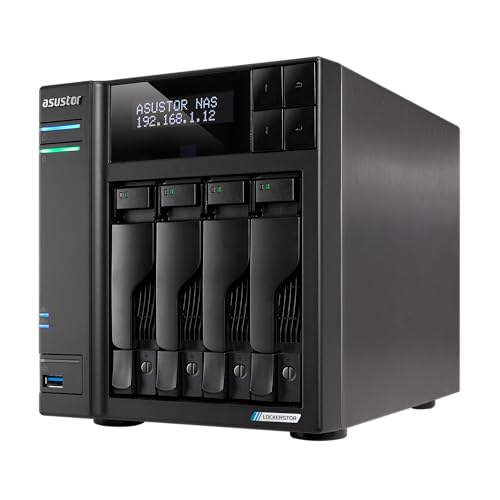
Asustor Lockerstor 4 AS6704T
Built-in 2.5GbE and hardware transcoding keep Plex playback smooth across multiple devices at once. Four bays cover a home media library without needing an expansion unit. ADM software bundles a surveillance station for camera storage too.
Pros
- Hardware transcoding suits Plex media libraries
- Dual 2.5GbE speeds large media transfers
- Surveillance station included for camera storage
Cons
- Smaller app ecosystem than Synology or QNAP
- Fewer future expansion options for extra bays
What to look for
How many bays does a NAS enclosure actually need? Two bays handle mirrored backup for a household, protecting files if one drive fails. Four or more bays open up RAID options that balance speed and redundancy while leaving room to grow. Small offices sharing one server benefit from eight bays or an expansion unit. Buying for the data expected three years out beats sizing for today alone.
Why do CPU and RAM decide daily usability? A weak processor bottlenecks transfers the moment more than one person connects. RAM headroom matters most for virtual machines, surveillance recording or running several apps together. Quad-core chips from AMD or Intel handle that multitasking far better than older dual-core designs. Checking the RAM ceiling matters more than what ships in the box.
Does 2.5GbE networking make a real difference? Standard gigabit ports cap real-world transfers around 110 megabytes per second, which feels slow with large video files. Built-in 2.5GbE roughly doubles that speed without needing a specialized network switch. Households streaming 4K media or backing up large photo libraries notice the gain right away. A router or switch still needs to support the faster speed before it helps at all.
DSM vs QTS vs ADM: which NAS software fits best? Synology’s DSM offers the most polished interface and the widest documentation for new owners. QNAP’s QTS leans toward power users who want Docker containers and virtual machines. Asustor’s ADM sits between the two, with a smaller but capable app store. Software ecosystem often outweighs raw hardware specs over the long run.
The lineup, side by side
| # | Model | Bays | Best for | Score | Price |
|---|---|---|---|---|---|
| 1 | Synology DS923+ 4-Bay NAS | 4, expandable to 9 with add-on unit | Best overall | 9.3 | Check price |
| 2 | QNAP TS-464 4-Bay NAS | 4 | Best value | 9.0 | Check price |
| 3 | Synology DS223j 2-Bay NAS | 2 | Best budget | 8.6 | Check price |
| 4 | Synology DS1522+ 5-Bay NAS | 5, expandable to 10 | Best for growing storage | 8.9 | Check price |
| 5 | QNAP TS-873A 8-Bay NAS | 8 | Best for small office | 8.7 | Check price |
| 6 | Synology DS223 2-Bay NAS | 2 | Best for beginners | 8.4 | Check price |
| 7 | Asustor Lockerstor 4 AS6704T | 4 | Best for media transcoding | 8.3 | Check price |
Common questions
How many bays do I need for a NAS enclosure?
Two bays suit basic mirrored backup for a household. Four or more bays support RAID setups that balance speed and redundancy while leaving room for growth.
Is a NAS enclosure better than an external hard drive?
For shared access, automated backup and remote retrieval, yes. External drives are simpler but connect to only one computer and skip RAID protection entirely.
Which NAS enclosure works best for Plex?
Models with hardware transcoding, such as the Asustor Lockerstor 4 AS6704T, stream smoothly to several devices at once. Units without it still work but strain the CPU during playback.
Do I need 2.5GbE networking on a NAS?
It roughly doubles transfer speed over standard gigabit, which helps with large video files or frequent backups. A router or switch needs to support it too before the gain shows up.
Can I mix different hard drive sizes in one NAS?
Synology’s SHR and similar flexible RAID systems allow mixed drive sizes while keeping redundancy. Standard RAID setups usually need matching drive capacities for best results.
NAS enclosure vs cloud storage, which is worth it?
A NAS costs money once and gives full control over files with no recurring subscription. Cloud storage needs less setup but bills monthly and depends on internet speed.
How much RAM does a NAS enclosure need?
Basic file storage runs fine on 2GB. Virtual machines, surveillance recording or several apps together benefit from 8GB or more, so check the expansion ceiling first.
Is a NAS enclosure worth it for a small office?
Enclosures with eight bays and stronger CPUs, like the QNAP TS-873A, support shared file access and backup for several employees, often beating a shared cloud drive on speed.
What is the best NAS enclosure for beginners?
The Synology DS223 walks new owners through drive formatting and their first backup job with a guided setup wizard.
Our take
Most households and small offices do well starting with the Synology DS923+, which balances four bays, expandable RAM and dependable DSM software. The QNAP TS-464 saves money without losing much real-world speed. Anyone needing only basic mirrored backup gets that job done cheapest with the Synology DS223j.