Nintendo Consoles with USB C: Top Picks Compared
The Nintendo Switch (OLED Model) is the top pick for most people because it combines a vibrant screen, improved kickstand, and USB C fast charging. Its main limitation is the higher price compared to the standard Switch. For budget buyers, the standard Switch offers the same core hybrid experience at a lower cost, though its screen is less impressive.
Nintendo’s latest consoles all use USB C for charging, making them compatible with modern phone chargers and power banks. This is a big convenience for travelers and families. However, not all USB C ports are created equal in terms of charging speed and data transfer.
In this roundup, we compare every current Nintendo system that features USB C. We break down what each model does best, from the budget-friendly Lite to the premium OLED. Our goal is to help you choose the right one without overpaying for features you won’t use.
How to choose
The best picks, ranked

Nintendo Switch (OLED Model) with White Joy-Con
The Switch OLED is the pinnacle of Nintendo’s hybrid design. Its 7 inch OLED screen delivers rich colors and deep blacks, making portable play a joy. The upgraded kickstand offers multiple viewing angles, and the dock includes a wired LAN port for stable online play. Owners report that the battery lasts about 4.5 to 9 hours depending on the game, and USB C charging is fast and reliable. This model is ideal if you play mostly in handheld mode and want the best visual experience.
Pros
- Vibrant OLED screen
- Adjustable kickstand
- Wired LAN in dock
Cons
- More expensive than standard Switch
- No 4K in docked mode

Nintendo Switch (Standard) with Neon Red and Blue Joy-Con
The standard Switch remains a solid choice for those who want the full hybrid experience without the OLED premium. It has a 6.2 inch LCD screen that is perfectly adequate for most games. The battery life is similar to the OLED, ranging from 4.5 to 9 hours. Many owners appreciate that this model is often bundled with games or accessories. It charges via USB C and works with the same docks as the OLED, though the dock lacks a LAN port. If you plan to play on TV most of the time, this is a smart buy.
Pros
- Lower price
- Same performance as OLED
- Wide availability
Cons
- LCD screen less vibrant
- No LAN port in dock
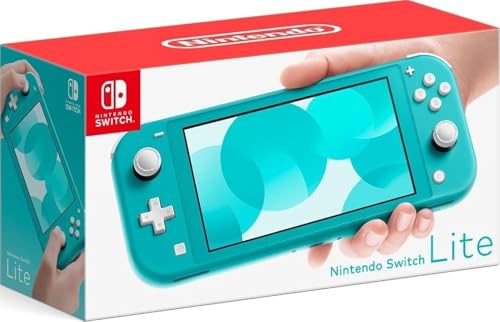
Nintendo Switch Lite (Turquoise)
The Switch Lite is a dedicated handheld that cannot connect to a TV. It features a compact 5.5 inch touchscreen and built in controls, making it lighter and more portable than other models. It uses USB C for charging, and its battery lasts 3 to 7 hours, which is shorter than the full Switch. However, it is the most affordable way to play Nintendo’s library. Owners report that it feels sturdy and is perfect for kids or commuters. Just remember that some games require detachable Joy-Con, so you may need separate controllers.
Pros
- Lightest and most portable
- Lower price
- Great for handheld-only players
Cons
- No TV output
- Shorter battery life
Nintendo Switch (OLED Model) with White Joy-Con and Switch Sports
This bundle includes the OLED Switch and a full download code for Switch Sports, a fun collection of motion-controlled games. It is the same great hardware as the top pick, with the added value of a popular game. For families, this is a cost-effective way to get both a console and a game that everyone can enjoy. The OLED screen enhances the vibrant graphics of sports games. The bundle is often sold at a similar price to the standalone OLED, making it a smart deal if you plan to buy Switch Sports anyway.
Pros
- Includes Switch Sports
- Same OLED quality
- Great value for families
Cons
- Game is digital, not physical
- May not appeal to all

Nintendo Switch with Mario Kart 8 Deluxe Bundle
This bundle pairs the standard Switch with a download code for Mario Kart 8 Deluxe, one of the best-selling Switch games. It offers the same reliable hardware as the standard model, with the convenience of a game included. Mario Kart is a fantastic multiplayer title that works well both on TV and in handheld mode. This bundle is ideal for those who want a proven game without extra cost. The console charges via USB C, and the battery life remains solid. If you are new to Nintendo, this is a welcoming start.
Pros
- Includes Mario Kart 8 Deluxe
- Trusted hardware
- Great for multiplayer
Cons
- No OLED screen
- Digital game not physical

Nintendo Switch Lite (Yellow)
The yellow Switch Lite is a vibrant choice for travelers who want a compact console. It is the smallest and lightest of all models, easily fitting into a bag. The battery lasts 3 to 7 hours, which is less than the full Switch, but the portability compensates. USB C charging means you can use your phone charger to top up. Owners report that the D-pad is excellent for retro games and platformers. This model is perfect for those who never play on a TV and prioritize portability above all else.
Pros
- Compact and light
- Vibrant color options
- Excellent D-pad
Cons
- No TV mode
- Shorter battery life

Nintendo Switch (OLED Model) with Splatoon 3 Edition
The Splatoon 3 edition OLED Switch features unique neon pink and green Joy-Con with a special design on the dock and back of the console. It is the same high-performance hardware as the standard OLED, with the same great screen and battery. This special edition is a collector’s item for fans of the series. The design is eye-catching and often sells out quickly. If you love Splatoon or want a console that stands out, this is a fantastic choice. It charges via USB C and includes all the benefits of the OLED model.
Pros
- Unique Splatoon design
- OLED screen
- Collectible value
Cons
- No game included
- Premium price
Compared at a glance
| # | Model | Screen | Best for | Score | Price |
|---|---|---|---|---|---|
| 1 | Nintendo Switch (OLED Model) with White Joy-Con | 7 inch OLED 1280×720 | Best overall for vibrant handheld gaming | 9.4 | Check price |
| 2 | Nintendo Switch (Standard) with Neon Red and Blue Joy-Con | 6.2 inch LCD 1280×720 | Best value for hybrid play | 9.1 | Check price |
| 3 | Nintendo Switch Lite (Turquoise) | 5.5 inch LCD 1280×720 | Best budget for handheld only | 8.7 | Check price |
| 4 | Nintendo Switch (OLED Model) with White Joy-Con and Switch Sports | 7 inch OLED 1280×720 | Best for families who love party games | 9.0 | Check price |
| 5 | Nintendo Switch with Mario Kart 8 Deluxe Bundle | 6.2 inch LCD 1280×720 | Best for racing fans | 8.9 | Check price |
| 6 | Nintendo Switch Lite (Yellow) | 5.5 inch LCD 1280×720 | Best for travel and on the go | 8.5 | Check price |
| 7 | Nintendo Switch (OLED Model) with Splatoon 3 Edition | 7 inch OLED 1280×720 | Best for Splatoon fans | 9.2 | Check price |
Frequently asked questions
Do all Nintendo Switch consoles use USB C charging?
Yes, every current Nintendo Switch model, including the Lite, standard, and OLED, uses USB C for charging. This means they are compatible with many modern chargers and power banks.
Can I use a phone charger to charge my Switch?
In most cases, yes. The Switch supports USB C PD, so a phone charger that provides at least 15W should work, but charging may be slower than the official adapter. For best results, use the included charger.
Which Nintendo console has the best battery life?
The standard Switch and OLED model have similar battery life, ranging from 4.5 to 9 hours depending on the game. The Switch Lite has a shorter battery life, from 3 to 7 hours.
Can the Nintendo Switch Lite connect to a TV?
No, the Switch Lite is a handheld only console. It does not have video output, so it cannot connect to a TV. If you want to play on a TV, choose the standard or OLED model.
Is the OLED model worth the extra money?
If you play mostly in handheld mode, the OLED screen is a significant upgrade with better colors and contrast. If you play mainly on TV, the standard model offers the same performance for less.
Are all Joy-Con controllers compatible across Switch models?
Yes, all Joy-Con controllers work with any Switch model. You can also use the Pro Controller with any model. However, the Switch Lite has built in controls and cannot attach Joy-Con, but it can connect wirelessly.
How much internal storage do I need?
The standard Switch and Lite have 32 GB, while the OLED has 64 GB. Games can take up several GB, so a microSD card is recommended for digital downloads. All models support microSD cards up to 2 TB.
Can I use a power bank to charge my Switch on the go?
Yes, you can use a power bank with USB C PD output. Many power banks can charge the Switch while playing, which is great for travel. Look for one that provides at least 18W for faster charging.
The verdict
For most people, the Nintendo Switch (OLED Model) is the best choice because it offers the best handheld screen and improved design. Its higher price is justified if you play in handheld mode frequently. If you are on a budget or primarily play on TV, the standard Switch delivers the same experience for less. Only buy the Switch Lite if you never plan to use a TV and prioritize portability above all else.


